Module 3: Skill Assessment
Back to the main module notes: Module 3: Windows Event Logs & Finding Evil
Assessment Navigation
Key Takeaway
Jump to question
Related
Since working through real attack logs in the skill assessment, this is where the module material actually clicked for me. Same detection scenario approach from the main notes, but now applied question by question against .evtx files.
Key Takeaway
Finding evil in Windows logs is not about memorizing every Event ID. It is about knowing how to inspect the event structure, understand the fields, correlate related activity, and build a timeline that explains what happened.
Sysmon, ETW, SilkETW, and Get-WinEvent all provide visibility, but visibility only becomes useful when the analyst can ask precise questions. AI can help me write and refine those questions faster, but the judgment still comes from understanding the logs myself.
Assessment Notes
For large .evtx files I kept the same workflow: sort with XML, dump fields, query with PowerShell. I turned that into reusable scripts in my HTB-CDSA repo (module3-finding-evil/). Start with _shared/Invoke-EvtxRecon.ps1 for first-pass recon, then run the matching 2-detect.ps1 for each assessment question below.
This assessment used older attack logs and asked me to answer specific detection questions.
Question 1: DLL Hijacking
Question: Which process executed the DLL hijacking attack?
Log path: C:\Logs\DLLHijack
Answer format: .exe
DLL Hijack Investigation via Get-WinEvent
File: DLLHijack.evtx
Date: 2022-04-27
Actor: DESKTOP-R4PEEIF\waldo
Investigation Methodology
Step 1 - Set the file path
Point to the actual .evtx file, not the folder.
$evtx = "C:\Logs\DLLHijack\DLLHijack.evtx"
Mistake to avoid: $evtx = "C:\Logs\DLLHijack" points to the folder and will fail.
Step 2 - Inspect XML structure
Before filtering anything, see what fields exist in this log.
You cannot filter what you cannot see.
$e = Get-WinEvent -Path $evtx -MaxEvents 1 -ErrorAction SilentlyContinue

([xml]$e.ToXml()).Event.EventData.Data | Select-Object Name, '#text'
Step 3 - Enumerate Event IDs
Map the terrain before hunting. Do not assume which events were collected.
Get-WinEvent -Path $evtx -ErrorAction SilentlyContinue |

    Group-Object Id | Sort-Object Count -Descending |

    Select-Object Name, Count
Result in this file:
| Event ID | Count | Meaning |
|---|---|---|
| 10 | 1560 | Process Access |
| 12 | 1345 | Registry Create/Delete |
| 7 | 1196 | Image Loaded (DLL) |
| 13 | 1028 | Registry Value Set |
| 1 | 27 | Process Create |
Target: Event ID 7 (ImageLoad) - this is where DLL hijacking shows up.
Step 4 - Extract Event ID 7 and filter for unsigned DLLs
Store results in $hits, then display. Storing silently shows nothing - always output explicitly.
$hits = Get-WinEvent -Path $evtx -FilterXPath "*[System[EventID=7]]" -ErrorAction SilentlyContinue |

ForEach-Object {

    $d = ([xml]$_.ToXml()).Event.EventData.Data

    [pscustomobject]@{

        TimeCreated      = $_.TimeCreated

        ProcessGuid      = ($d | Where-Object { $_.Name -eq 'ProcessGuid'      }).'#text'

        Image            = ($d | Where-Object { $_.Name -eq 'Image'            }).'#text'

        ImageLoaded      = ($d | Where-Object { $_.Name -eq 'ImageLoaded'      }).'#text'

        OriginalFileName = ($d | Where-Object { $_.Name -eq 'OriginalFileName' }).'#text'

        Signed           = ($d | Where-Object { $_.Name -eq 'Signed'           }).'#text'

        Signature        = ($d | Where-Object { $_.Name -eq 'Signature'        }).'#text'

        SignatureStatus  = ($d | Where-Object { $_.Name -eq 'SignatureStatus'   }).'#text'

    }

}

$hits | Where-Object { $_.Signed -eq 'false' } | Sort-Object TimeCreated | Format-List
Result - two suspicious loads:
TimeCreated      : 4/27/2022 6:39:11 PM

Image            : C:\ProgramData\Dism.exe

ImageLoaded      : C:\ProgramData\DismCore.dll

OriginalFileName : ORIGINALFILENAMEGOESHERE

Signed           : false

SignatureStatus  : Unavailable

TimeCreated      : 4/27/2022 6:39:30 PM

Image            : C:\Windows\System32\rundll32.exe

ImageLoaded      : C:\ProgramData\DismCore.dll

OriginalFileName : ORIGINALFILENAMEGOESHERE

Signed           : false

SignatureStatus  : Unavailable
Indicators identified:
| Indicator | Why suspicious |
|---|---|
Signed = false |
Legitimate system DLLs are always Microsoft-signed |
C:\ProgramData\Dism.exe |
Real Dism.exe lives in C:\Windows\System32\ |
C:\ProgramData\DismCore.dll |
Real DismCore.dll lives in C:\Windows\System32\Dism\ |
OriginalFileName = ORIGINALFILENAMEGOESHERE |
Fake placeholder - custom-compiled payload |
SignatureStatus = Unavailable |
No signature block in the PE file at all |
| 19 second gap between loads | Human operator manually running two commands |
Reading the fields:
-
Image= the process that loaded the DLL -
ImageLoaded= the DLL that got loaded -
ProcessGuid= unique identifier used to pivot to other events
Step 5 - Pivot ProcessGuid to Event ID 1 (who ran Dism.exe)
Event ID 7 tells you what loaded. Event ID 1 tells you who ran it and from where.
Use ProcessGuid from Step 4 to find the process creation event.
$suspectGuid = '{67e39d39-f03f-6269-9b01-000000000300}'

Get-WinEvent -Path $evtx -FilterXPath "*[System[EventID=1]]" -ErrorAction SilentlyContinue |

ForEach-Object {

    $d = ([xml]$_.ToXml()).Event.EventData.Data

    $pg = ($d | Where-Object { $_.Name -eq 'ProcessGuid' }).'#text'

    if ($pg -eq $suspectGuid) {

        [pscustomobject]@{

            TimeCreated    = $_.TimeCreated

            ProcessId      = ($d | Where-Object { $_.Name -eq 'ProcessId'          }).'#text'

            Image          = ($d | Where-Object { $_.Name -eq 'Image'              }).'#text'

            CommandLine    = ($d | Where-Object { $_.Name -eq 'CommandLine'        }).'#text'

            ParentImage    = ($d | Where-Object { $_.Name -eq 'ParentImage'        }).'#text'

            ParentCmdLine  = ($d | Where-Object { $_.Name -eq 'ParentCommandLine'  }).'#text'

            User           = ($d | Where-Object { $_.Name -eq 'User'               }).'#text'

            IntegrityLevel = ($d | Where-Object { $_.Name -eq 'IntegrityLevel'     }).'#text'

        }

    }

} | Format-List
Result:
TimeCreated    : 4/27/2022 6:39:11 PM

Image          : C:\ProgramData\Dism.exe

CommandLine    : Dism

ParentImage    : C:\Windows\System32\cmd.exe

ParentCmdLine  : "C:\Windows\system32\cmd.exe"

User           : DESKTOP-R4PEEIF\waldo

IntegrityLevel : Medium
Process tree:
waldo

  └─ cmd.exe

       └─ C:\ProgramData\Dism.exe   (typed "Dism" - PATH resolved to rogue binary)

            └─ loaded C:\ProgramData\DismCore.dll
Step 6 - Pivot ProcessGuid to Event ID 1 (who ran rundll32.exe)
Same pivot for the second suspicious load using rundll32’s ProcessGuid.
$rundll32Guid = '{67e39d39-f052-6269-a001-000000000300}'

Get-WinEvent -Path $evtx -FilterXPath "*[System[EventID=1]]" -ErrorAction SilentlyContinue |

ForEach-Object {

    $d = ([xml]$_.ToXml()).Event.EventData.Data

    $pg = ($d | Where-Object { $_.Name -eq 'ProcessGuid' }).'#text'

    if ($pg -eq $rundll32Guid) {

        [pscustomobject]@{

            TimeCreated    = $_.TimeCreated

            ProcessId      = ($d | Where-Object { $_.Name -eq 'ProcessId'          }).'#text'

            Image          = ($d | Where-Object { $_.Name -eq 'Image'              }).'#text'

            CommandLine    = ($d | Where-Object { $_.Name -eq 'CommandLine'        }).'#text'

            ParentImage    = ($d | Where-Object { $_.Name -eq 'ParentImage'        }).'#text'

            ParentCmdLine  = ($d | Where-Object { $_.Name -eq 'ParentCommandLine'  }).'#text'

            User           = ($d | Where-Object { $_.Name -eq 'User'               }).'#text'

            IntegrityLevel = ($d | Where-Object { $_.Name -eq 'IntegrityLevel'     }).'#text'

        }

    }

} | Format-List
Result:
TimeCreated    : 4/27/2022 6:39:30 PM

Image          : C:\Windows\System32\rundll32.exe

CommandLine    : rundll32.exe DismCore.dll,main

ParentImage    : C:\Windows\System32\cmd.exe

ParentCmdLine  : "C:\Windows\system32\cmd.exe"

User           : DESKTOP-R4PEEIF\waldo

IntegrityLevel : Medium
Note: rundll32.exe DismCore.dll,main - attacker directly called the main export of the malicious DLL. The DLL was designed to be executed this way. This is LOLBin abuse (Living Off the Land Binary).
Step 7 - Check for child processes spawned by Dism.exe
Search Event ID 1 where ParentProcessGuid matches - to find anything Dism.exe launched.
Get-WinEvent -Path $evtx -FilterXPath "*[System[EventID=1]]" -ErrorAction SilentlyContinue |

ForEach-Object {

    $d = ([xml]$_.ToXml()).Event.EventData.Data

    $parentGuid = ($d | Where-Object { $_.Name -eq 'ParentProcessGuid' }).'#text'

    if ($parentGuid -eq '{67e39d39-f03f-6269-9b01-000000000300}') {

        [pscustomobject]@{

            TimeCreated = $_.TimeCreated

            ProcessId   = ($d | Where-Object { $_.Name -eq 'ProcessId'   }).'#text'

            Image       = ($d | Where-Object { $_.Name -eq 'Image'       }).'#text'

            CommandLine = ($d | Where-Object { $_.Name -eq 'CommandLine' }).'#text'

        }

    }

} | Format-List
Result: No results - Dism.exe spawned no child processes. The payload ran entirely inside Dism.exe’s memory space. This is expected DLL hijack behavior - code executes within the hijacked process, not as a new process.
Step 8 - Check impact (network, files, registry)
Network connections (Event ID 3):
Get-WinEvent -Path $evtx -FilterXPath "*[System[EventID=3]]" -ErrorAction SilentlyContinue |

ForEach-Object {

    $d = ([xml]$_.ToXml()).Event.EventData.Data

    $pg = ($d | Where-Object { $_.Name -eq 'ProcessGuid' }).'#text'

    if ($pg -eq '{67e39d39-f03f-6269-9b01-000000000300}') {

        [pscustomobject]@{

            TimeCreated  = $_.TimeCreated

            DestIP       = ($d | Where-Object { $_.Name -eq 'DestinationIp'       }).'#text'

            DestPort     = ($d | Where-Object { $_.Name -eq 'DestinationPort'     }).'#text'

            DestHostname = ($d | Where-Object { $_.Name -eq 'DestinationHostname' }).'#text'

        }

    }

} | Format-List
File creation (Event ID 11):
Get-WinEvent -Path $evtx -FilterXPath "*[System[EventID=11]]" -ErrorAction SilentlyContinue |

ForEach-Object {

    $d = ([xml]$_.ToXml()).Event.EventData.Data

    $pg = ($d | Where-Object { $_.Name -eq 'ProcessGuid' }).'#text'

    if ($pg -eq '{67e39d39-f03f-6269-9b01-000000000300}') {

        [pscustomobject]@{

            TimeCreated    = $_.TimeCreated

            TargetFilename = ($d | Where-Object { $_.Name -eq 'TargetFilename' }).'#text'

        }

    }

} | Format-List
Registry writes (Event ID 13):
Get-WinEvent -Path $evtx -FilterXPath "*[System[EventID=13]]" -ErrorAction SilentlyContinue |

ForEach-Object {

    $d = ([xml]$_.ToXml()).Event.EventData.Data

    $pg = ($d | Where-Object { $_.Name -eq 'ProcessGuid' }).'#text'

    if ($pg -eq '{67e39d39-f03f-6269-9b01-000000000300}') {

        [pscustomobject]@{

            TimeCreated  = $_.TimeCreated

            TargetObject = ($d | Where-Object { $_.Name -eq 'TargetObject' }).'#text'

            Details      = ($d | Where-Object { $_.Name -eq 'Details'      }).'#text'

        }

    }

} | Format-List
Results:
-
Network: No connections
-
Files: No drops
-
Registry: Only BAM key write (
HKLM\System\CurrentControlSet\Services\bam\State\UserSettings\...) - this is Windows automatically recording execution history, not malware persistence
Pivot Logic Summary
| Query type | Field matched | Answers |
|---|---|---|
ProcessGuid = suspectGuid on Event 1 |
Who spawned this process | Parent -> child relationship |
ParentProcessGuid = suspectGuid on Event 1 |
What this process spawned | Child processes |
ProcessGuid = suspectGuid on Event 3/11/13 |
What this process did | Network, files, registry |
Final Attack Chain
DESKTOP-R4PEEIF\waldo

  └─ C:\Windows\System32\cmd.exe

       ├─ [18:39:11] typed "Dism"

       │     └─ C:\ProgramData\Dism.exe          <- rogue binary (not System32)

       │          └─ side-loaded C:\ProgramData\DismCore.dll

       │               └─ ran inside Dism.exe memory (no child process)

       │

       └─ [18:39:30] typed "rundll32.exe DismCore.dll,main"

             └─ C:\Windows\System32\rundll32.exe  <- LOLBin

                  └─ directly called main export of DismCore.dll
DLL Hijack Indicators Cheat Sheet
| Indicator | Why it matters |
|---|---|
Signed = false |
No Microsoft certificate |
| DLL loaded from wrong path | DLL search order abuse |
OriginalFileName is placeholder or mismatched |
Custom-compiled payload |
SignatureStatus = Unavailable |
No signature block in PE file |
System binary in user-writable path (C:\ProgramData\) |
No admin rights needed to plant it |
| rundll32 + DLL + export name | LOLBin execution of payload |
| Human-spaced timestamps | Manual operator, not automation |
| No child processes from hijacked process | Payload ran in-memory inside hijacked process |
Questions 2 and 3: Unmanaged PowerShell / CLR Injection
These two questions are connected because the first asks for the process that executed unmanaged PowerShell code, and the second asks for the process that injected into it.
| Question | What I Need to Find | Log Path | Answer Format |
|---|---|---|---|
| Q2 | Process that executed unmanaged PowerShell code | C:\Logs\PowershellExec |
.exe |
| Q3 | Process that injected into the unmanaged PowerShell process | C:\Logs\PowershellExec |
.exe |
Unmanaged PowerShell / CLR Injection Investigation via Get-WinEvent
File: PowershellExec.evtx
Date: 2022-04-27
Actor: DESKTOP-R4PEEIF\waldo
Answer: Calculator.exe
Background - What is Unmanaged PowerShell?
Normal PowerShell execution uses powershell.exe which is a managed .NET application.
Unmanaged PowerShell is when an attacker runs PowerShell code inside another process - without ever launching powershell.exe.
The .NET runtime must be initialized inside the host process to do this. That initialization leaves a fingerprint in Event ID 7 (ImageLoad).
IOCs - What to Look For
| DLL | Role | IOC when loaded by unexpected process |
|---|---|---|
clr.dll |
.NET Common Language Runtime | Any non-.NET native process loading this is running .NET code |
clrjit.dll |
JIT compiler | Same - only present when .NET is executing |
System.Management.Automation.dll |
PowerShell engine | Non-powershell.exe process loading this = PowerShell running inside it |
Key rule: clr.dll + clrjit.dll loading in a process = C# / .NET bytecode executing inside that process.
Key signal: Large time gap between process spawn and CLR load = injection, not normal startup.
Investigation Methodology
Step 1 - Set path and enumerate Event IDs
$evtx = "C:\Logs\PowershellExec\PowershellExec.evtx"

Get-WinEvent -Path $evtx -ErrorAction SilentlyContinue |

    Group-Object -Property Id -NoElement |

    Sort-Object Count -Descending
Result:
| Event ID | Count | Meaning |
|---|---|---|
| 12 | 23201 | Registry Create/Delete |
| 10 | 11360 | Process Access |
| 7 | 3694 | Image Loaded - target |
| 13 | 2925 | Registry Value Set |
| 1 | 65 | Process Create |
Target: Event ID 7 (ImageLoad) - CLR DLL loads show up here.
Step 2 - Extract all Event ID 7 into $hits
$hits = Get-WinEvent -Path $evtx -FilterXPath "*[System[EventID=7]]" -ErrorAction SilentlyContinue |

ForEach-Object {

    $d = ([xml]$_.ToXml()).Event.EventData.Data

    [pscustomobject]@{

        TimeCreated = $_.TimeCreated

        ProcessGuid = ($d | Where-Object { $_.Name -eq 'ProcessGuid' }).'#text'

        Image       = ($d | Where-Object { $_.Name -eq 'Image'       }).'#text'

        ImageLoaded = ($d | Where-Object { $_.Name -eq 'ImageLoaded' }).'#text'

        Signed      = ($d | Where-Object { $_.Name -eq 'Signed'      }).'#text'

    }

}
Step 3 - Find all processes that loaded CLR DLLs
“Don’t exclude any process by name - even powershell.exe is included.”
$hits | Where-Object {

    $_.ImageLoaded -match 'clr\.dll$|clrjit\.dll$'

} | Group-Object Image | Select-Object Name, Count | Sort-Object Count -Descending
Result:
| Process | Count |
|---|---|
powershell.exe |
2 |
Calculator.exe |
2 |
Both loaded clr.dll and clrjit.dll. Now determine which one is legitimate.
Step 4 - Timeline gap analysis
“Legitimate .NET apps load CLR within seconds of starting. Large gap = injection.”
Pivot each CLR-loading process to Event ID 1 to get spawn time, then compare against CLR load time:
# Get spawn time for Calculator.exe

$calcGuid = '{67e39d39-f4cc-6269-3203-000000000300}'

Get-WinEvent -Path $evtx -FilterXPath "*[System[EventID=1]]" -ErrorAction SilentlyContinue |

ForEach-Object {

    $d = ([xml]$_.ToXml()).Event.EventData.Data

    $pg = ($d | Where-Object { $_.Name -eq 'ProcessGuid' }).'#text'

    if ($pg -eq $calcGuid) {

        [pscustomobject]@{

            TimeCreated    = $_.TimeCreated

            Image          = ($d | Where-Object { $_.Name -eq 'Image'             }).'#text'

            CommandLine    = ($d | Where-Object { $_.Name -eq 'CommandLine'       }).'#text'

            ParentImage    = ($d | Where-Object { $_.Name -eq 'ParentImage'       }).'#text'

            ParentCmdLine  = ($d | Where-Object { $_.Name -eq 'ParentCommandLine' }).'#text'

            User           = ($d | Where-Object { $_.Name -eq 'User'              }).'#text'

            IntegrityLevel = ($d | Where-Object { $_.Name -eq 'IntegrityLevel'    }).'#text'

        }

    }

} | Format-List
Timeline comparison:
| Process | Spawned | CLR Loaded | Gap | Verdict |
|---|---|---|---|---|
powershell.exe |
6:58:44 PM | 6:58:45 PM | 0.8s | Normal - .NET app startup |
Calculator.exe |
6:58:36 PM | 6:59:42 PM | 66s | Injection - CLR loaded long after startup |
Calculator.exe is the injection target - it is a UWP/WinRT app with no legitimate reason to load the legacy .NET Framework 4.x CLR (C:\Windows\Microsoft.NET\Framework64\v4.0.30319\clr.dll).
Step 5 - Confirm injector via Event ID 8 (CreateRemoteThread)
“Who created a thread inside Calculator.exe at exactly the moment CLR loaded?”
Get-WinEvent -Path $evtx -FilterXPath "*[System[EventID=8]]" -ErrorAction SilentlyContinue |

ForEach-Object {

    $d = ([xml]$_.ToXml()).Event.EventData.Data

    [pscustomobject]@{

        TimeCreated   = $_.TimeCreated

        SourceImage   = ($d | Where-Object { $_.Name -eq 'SourceImage'   }).'#text'

        TargetImage   = ($d | Where-Object { $_.Name -eq 'TargetImage'   }).'#text'

        StartAddress  = ($d | Where-Object { $_.Name -eq 'StartAddress'  }).'#text'

        StartModule   = ($d | Where-Object { $_.Name -eq 'StartModule'   }).'#text'

        StartFunction = ($d | Where-Object { $_.Name -eq 'StartFunction' }).'#text'

    }

} | Format-List
Result:
TimeCreated   : 4/27/2022 6:59:42 PM

SourceImage   : C:\Windows\System32\rundll32.exe

TargetImage   : C:\Program Files\WindowsApps\...\Calculator.exe

StartAddress  : 0x0000025398BD0000

StartModule   : -

StartFunction : -
Timestamp match: 6:59:42 PM = exact same second CLR loaded in Calculator.exe.
StartModule/StartFunction = - = thread started at raw memory address = shellcode injection.
Full Attack Chain
waldo

  └─ powershell.exe (interactive session)

       └─ whoami.exe  <- recon

rundll32.exe

  └─ [6:59:42 PM] CreateRemoteThread -> Calculator.exe   <- shellcode injected

                       └─ clr.dll loaded                 <- .NET runtime initialized

                       └─ clrjit.dll loaded              <- JIT compiler started

                            └─ PowerShell code executes inside Calculator.exe
Pivot Logic Summary
| Query | Event ID | Answers |
|---|---|---|
Filter clr.dll + clrjit.dll loads |
7 | Which processes loaded CLR |
| Compare spawn time vs CLR load time | 1 + 7 | Which process had CLR injected (large gap) |
| TargetImage = injection target | 8 | Who injected via CreateRemoteThread |
CLR Injection IOC Cheat Sheet
| Indicator | Why it matters |
|---|---|
clr.dll + clrjit.dll in non-.NET process |
.NET bytecode executing where it shouldn’t |
| Large time gap (>30s) between spawn and CLR load | CLR was injected, not loaded at startup |
| UWP/native process loading legacy .NET Framework CLR | Wrong runtime for that process type |
StartModule: - in Event ID 8 |
Thread started from raw memory = shellcode |
StartFunction: - in Event ID 8 |
No named export = reflective/shellcode injection |
| Event ID 8 timestamp matches CLR load timestamp | Injection moment confirmed |
Question 3 after we identified which was responsible we do basic query
tep 1 - Confirm the injection target** Calculator.exe had a 66 second gap between spawn and CLR load - that’s the injection target.
Step 2 - Check Event ID 8 (CreateRemoteThread) for that target “Who created a thread inside Calculator.exe?”
Get-WinEvent -Path $evtx -FilterXPath "*[System[EventID=8]]" -ErrorAction SilentlyContinue |
ForEach-Object {
    $d = ([xml]$_.ToXml()).Event.EventData.Data
    [pscustomobject]@{
        TimeCreated   = $_.TimeCreated
        SourceImage   = ($d | Where-Object { $_.Name -eq 'SourceImage'   }).'#text'
        TargetImage   = ($d | Where-Object { $_.Name -eq 'TargetImage'   }).'#text'
        StartAddress  = ($d | Where-Object { $_.Name -eq 'StartAddress'  }).'#text'
        StartModule   = ($d | Where-Object { $_.Name -eq 'StartModule'   }).'#text'
        StartFunction = ($d | Where-Object { $_.Name -eq 'StartFunction' }).'#text'
    }
} | Format-List
Step 3 - Correlate timestamp “Does the Event ID 8 timestamp match when CLR loaded?”
6:59:42 PM - rundll32.exe creates remote thread in Calculator.exe
6:59:42 PM - Calculator.exe loads clr.dll + clrjit.dll
Questions 4 and 5: LSASS Dump and Follow-On Login
These two questions are connected because the first identifies the LSASS dump process, and the second checks whether suspicious login activity followed.
| Question | What I Need to Find | Log Path | Answer Format |
|---|---|---|---|
| Q4 | Process that performed the LSASS dump | C:\Logs\Dump |
.exe |
| Q5 | Whether an ill-intended login occurred after the dump | C:\Logs\Dump |
Yes / No |
LSASS Dump Investigation via Get-WinEvent
File: LsassDump.evtx
Date: 2022-04-27
Actor: DESKTOP-R4PEEIF\waldo
Answer: ProcessHacker.exe
Investigation Methodology
Step 1 - Set path and inspect XML structure
$evtx = "C:\Logs\Dump\LsassDump.evtx"

$e = Get-WinEvent -FilterHashtable @{Path=$evtx; Id=10} -MaxEvents 1 -ErrorAction SilentlyContinue

([xml]$e.ToXml()).Event.EventData.Data | Select-Object Name, '#text'
Key fields in Event ID 10:
-
SourceImage- process that opened the handle -
TargetImage- process that was accessed -
GrantedAccess- what access rights were requested -
CallTrace- DLL call stack
Step 2 - Enumerate GrantedAccess values against lsass
“Understand what access masks exist before filtering.”
Get-WinEvent -FilterHashtable @{Path=$evtx; Id=10} -ErrorAction SilentlyContinue |

ForEach-Object {

    $d = ([xml]$_.ToXml()).Event.EventData.Data

    $tgt = ($d | Where-Object { $_.Name -eq 'TargetImage' }).'#text'

    if ($tgt -match 'lsass') {

        ($d | Where-Object { $_.Name -eq 'GrantedAccess' }).'#text'

    }

} | Group-Object | Sort-Object Count -Descending
Result:
| GrantedAccess | Count | Verdict |
|---|---|---|
0x1000 |
13 | Normal - PROCESS_QUERY_LIMITED_INFORMATION |
0x1400 |
3 | Elevated - worth checking |
0x1fffff |
2 | PROCESS_ALL_ACCESS - dump IOC |
Step 3 - Hunt for 0x1fffff access on lsass
“Full access to lsass memory = credential dump.”
Get-WinEvent -FilterHashtable @{Path=$evtx; Id=10} -ErrorAction SilentlyContinue |

ForEach-Object {

    $d = ([xml]$_.ToXml()).Event.EventData.Data

    $tgt    = ($d | Where-Object { $_.Name -eq 'TargetImage'     }).'#text'

    $access = ($d | Where-Object { $_.Name -eq 'GrantedAccess'   }).'#text'

    if ($tgt -match 'lsass' -and $access -eq '0x1fffff') {

        [pscustomobject]@{

            TimeCreated   = $_.TimeCreated

            SourceImage   = ($d | Where-Object { $_.Name -eq 'SourceImage'     }).'#text'

            SourcePID     = ($d | Where-Object { $_.Name -eq 'SourceProcessId' }).'#text'

            TargetImage   = $tgt

            GrantedAccess = $access

            CallTrace     = ($d | Where-Object { $_.Name -eq 'CallTrace'       }).'#text'

        }

    }

} | Format-List
Result:
SourceImage   : C:\Users\waldo\Downloads\processhacker-3.0.4801-bin\64bit\ProcessHacker.exe

TargetImage   : C:\Windows\system32\lsass.exe

GrantedAccess : 0x1fffff
IOCs Confirmed
| IOC | Value |
|---|---|
GrantedAccess 0x1fffff |
PROCESS_ALL_ACCESS - only needed to dump memory |
| SourceImage path | C:\Users\waldo\Downloads\ - not installed, dropped by attacker |
| SourceImage ≠ TargetImage | Untrusted process accessing lsass |
| UNKNOWN entries in CallTrace | Shellcode or reflectively loaded code |
LSASS Dump IOC Cheat Sheet
| GrantedAccess | Meaning |
|---|---|
0x1000 |
PROCESS_QUERY_LIMITED_INFORMATION - normal |
0x1400 |
PROCESS_QUERY_INFORMATION - elevated, check context |
0x1fffff |
PROCESS_ALL_ACCESS - dump IOC |
0x1010 |
VM_READ + QUERY_LIMITED - Mimikatz signature |
0x143a |
Common dumper access mask |
Suspicious pattern:
-
SourceImage from user-writable path +
0x1fffffon lsass = credential dump -
UNKNOWN modules in CallTrace = shellcode/reflective injection
For answer five again basic get-winevent
what would have been suspicious?
PS C:\Logs\Dump>
PS C:\Logs\Dump> $start = Get-Date '4/27/2022 7:08:56 PM'
PS C:\Logs\Dump>
PS C:\Logs\Dump> Get-WinEvent -FilterHashtable @{Path=$evtx; Id=1; StartTime=$start} -ErrorAction SilentlyContinue |
>> ForEach-Object {
>>     $d = ([xml]$_.ToXml()).Event.EventData.Data
>>     [pscustomobject]@{
>>         TimeCreated   = $_.TimeCreated
>>         Image         = ($d | Where-Object { $_.Name -eq 'Image'       }).'#text'
>>         CommandLine   = ($d | Where-Object { $_.Name -eq 'CommandLine' }).'#text'
>>         ParentImage   = ($d | Where-Object { $_.Name -eq 'ParentImage' }).'#text'
>>         User          = ($d | Where-Object { $_.Name -eq 'User'        }).'#text'
>>         LogonGuid     = ($d | Where-Object { $_.Name -eq 'LogonGuid'   }).'#text'
>>     }
>> } | Sort-Object TimeCreated | Format-Table -AutoSize
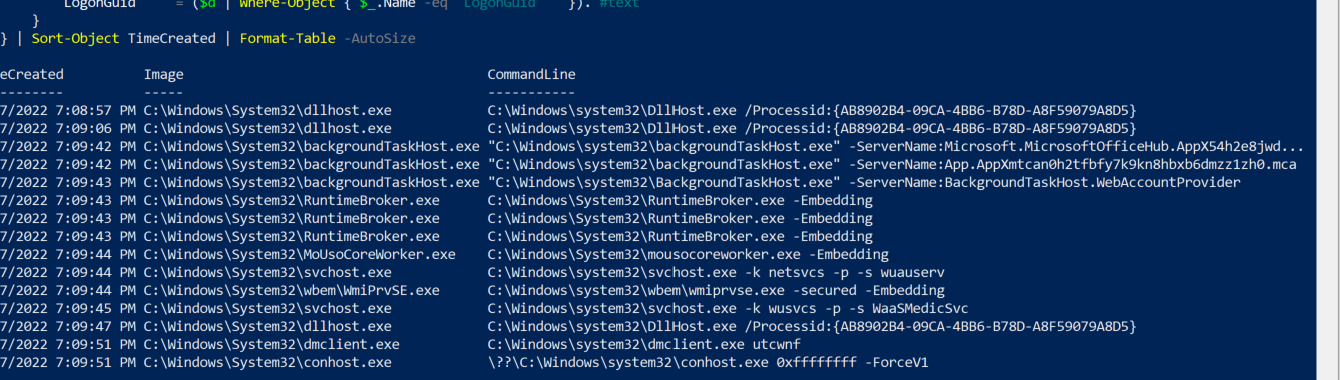
Event Viewer screenshot showing follow-on suspicious login after the LSASS dump timeline.
suspicious if
net.exe use \target\c$ /user:Administrator psexec.exe \target -u Administrator wmic.exe /node:target process call create runas.exe /user:Administrator cmd.exe
Question 6: Strange PPID
Question: Which process was used to temporarily execute code based on a strange parent-child relationship?
Log path: C:\Logs\StrangePPID
Answer format: .exe
Strange PPID Investigation via Get-WinEvent
File: StrangePPID.evtx
Date: 2022-04-27
Actor: DESKTOP-R4PEEIF\waldo
Answer: WerFault.exe
Investigation Methodology
Step 1 - Set path and enumerate Event IDs
$evtx = "C:\Logs\StrangePPID\StrangePPID.evtx"

Get-WinEvent -Path $evtx -ErrorAction SilentlyContinue |

    Group-Object -Property Id -NoElement |

    Sort-Object Count -Descending
Result:
| Event ID | Count | Meaning |
|---|---|---|
| 13 | 931 | Registry Value Set |
| 12 | 554 | Registry Create/Delete |
| 10 | 467 | Process Access |
| 7 | 186 | Image Loaded |
| 1 | 4 | Process Create - target |
| 8 | 1 | CreateRemoteThread - injection |
Target: Event ID 1 (only 4 events) - small set, dump all.
Step 2 - Dump all Event ID 1 process creations
“With only 4 events the anomaly stands out immediately.”
Get-WinEvent -FilterHashtable @{Path=$evtx; Id=1} -ErrorAction SilentlyContinue |

ForEach-Object {

    $d = ([xml]$_.ToXml()).Event.EventData.Data

    [pscustomobject]@{

        TimeCreated    = $_.TimeCreated

        Image          = ($d | Where-Object { $_.Name -eq 'Image'             }).'#text'

        CommandLine    = ($d | Where-Object { $_.Name -eq 'CommandLine'       }).'#text'

        ParentImage    = ($d | Where-Object { $_.Name -eq 'ParentImage'       }).'#text'

        ParentCmdLine  = ($d | Where-Object { $_.Name -eq 'ParentCommandLine' }).'#text'

        User           = ($d | Where-Object { $_.Name -eq 'User'              }).'#text'

        IntegrityLevel = ($d | Where-Object { $_.Name -eq 'IntegrityLevel'    }).'#text'

    }

} | Sort-Object TimeCreated | Format-List
Result:
7:17:25 PM  WerFault.exe       <- spawned by explorer.exe

7:18:06 PM  cmd.exe /c whoami  <- spawned by WerFault.exe  *** SUSPICIOUS ***

7:18:06 PM  conhost.exe        <- spawned by cmd.exe

7:18:06 PM  whoami.exe         <- spawned by cmd.exe
IOC: WerFault.exe spawning cmd.exe - Windows Error Reporting has zero legitimate reason to spawn a command shell.
Step 3 - Check Event ID 8 (CreateRemoteThread)
“Who injected into WerFault.exe to make it spawn cmd.exe?”
Get-WinEvent -FilterHashtable @{Path=$evtx; Id=8} -ErrorAction SilentlyContinue |

ForEach-Object {

    $d = ([xml]$_.ToXml()).Event.EventData.Data

    [pscustomobject]@{

        TimeCreated   = $_.TimeCreated

        SourceImage   = ($d | Where-Object { $_.Name -eq 'SourceImage'   }).'#text'

        TargetImage   = ($d | Where-Object { $_.Name -eq 'TargetImage'   }).'#text'

        StartAddress  = ($d | Where-Object { $_.Name -eq 'StartAddress'  }).'#text'

        StartModule   = ($d | Where-Object { $_.Name -eq 'StartModule'   }).'#text'

        StartFunction = ($d | Where-Object { $_.Name -eq 'StartFunction' }).'#text'

    }

} | Format-List
Result:
SourceImage   : C:\Windows\System32\rundll32.exe

TargetImage   : C:\Windows\System32\WerFault.exe

StartAddress  : 0x000002ED15F10000

StartModule   : -

StartFunction : -
IOC: StartModule: - and StartFunction: - = thread started at raw memory address = shellcode/reflective injection.
Full Attack Chain
rundll32.exe

  └─ [7:17:25 PM] CreateRemoteThread -> WerFault.exe   <- shellcode injected

                       └─ [7:18:06 PM] cmd.exe /c whoami  <- PPID spoofed child

                                └─ whoami.exe              <- recon command
IOCs Confirmed
| IOC | Evidence |
|---|---|
| WerFault.exe spawning cmd.exe | WerFault never legitimately spawns a shell |
| rundll32.exe -> WerFault.exe via Event ID 8 | Process injection confirmed |
StartModule/StartFunction = - |
Shellcode - no named module or function |
| Same rundll32 + shellcode pattern | Matches Calculator.exe injection from PowershellExec case |
PPID Spoofing IOC Cheat Sheet
| Signal | Why suspicious |
|---|---|
| WerFault.exe spawning cmd/powershell | Error reporter never launches shells |
| svchost/lsass/spoolsv spawning cmd | System services don’t spawn user shells |
| Large time gap between parent spawn and child spawn | Real parent-child is milliseconds |
| Parent process has no console/UI | Can’t legitimately spawn interactive tools |
| Event ID 8 on the spoofed parent before child spawns | Injection then PPID abuse |
Processes That Should NEVER Spawn cmd.exe / powershell.exe
WerFault.exe, svchost.exe, spoolsv.exe, lsass.exe

winlogon.exe, services.exe, smss.exe, csrss.exe

taskhost.exe, taskhostw.exe
References
[HTB Academy] Certified Defensive Security Analyst (CDSA) - Module 3: Windows Event Logs & Finding Evil Skill Assessment. https://academy.hackthebox.com/
[HTB-CDSA] Sysmon threat detection scripts and XML queries used during this assessment. https://github.com/kismatkunwar89/HTB-CDSA
[SBousseaden] Common Windows Normal Processes Parent/Child Relationships (process tree mind map). https://twitter.com/SBousseaden
[Microsoft] Get-WinEvent (PowerShell cmdlet documentation). https://learn.microsoft.com/en-us/powershell/module/microsoft.powershell.diagnostics/get-winevent
[Sysmon] Sysinternals Sysmon (official documentation). https://learn.microsoft.com/en-us/sysinternals/downloads/sysmon