Module 12: YARA & Sigma For SOC Analysts

These are my notes for Module 12. It splits cleanly in two: YARA for files and memory, and Sigma for logs and SIEMs. The first half covers YARA, reading strings, generating rules with yarGen, writing them by hand for a few real APT samples, then hunting with those rules on disk, inside live processes, in ETW telemetry, and in memory dumps. The second half covers Sigma, the rule format, the detection modifiers, translating rules with sigmac, and running them against event logs with Chainsaw and Splunk.
Note on the samples: every binary and memory image here (
svchost.exe,dharma_sample.exe,legit.exe,DirectX.dll,shell.exe,Seatbelt.exe,compromised_system.raw) comes from the HTB Academy module resources and is handled inside an isolated analysis VM. Do not run malware outside a lab.
Back to Module 11: Module 11: Introduction to Malware Analysis
Module 12 Navigation
On this page
Fundamentals
YARA and Sigma are two of the most useful things a SOC analyst can pick up, because they both give you a standard way to describe a threat and then go find it. YARA is specialised for file and memory analysis, Sigma is designed for log analysis and SIEM integration, and between them they cover most of where detection actually happens.
A few things they give you:
- Custom threat detection. You can write rules for the specific patterns or behaviours in your own environment instead of waiting for a vendor signature.
- Malware analysis and classification. YARA matches signatures against known traits, so you can bucket samples by family.
- Efficient log management. Sigma rules filter and correlate data from many sources, cutting noise so you can prioritise.
- IOC identification. Both frameworks help you locate Indicators of Compromise, the artifacts left behind by a breach, which shrinks attacker dwell time.
- Collaboration. Because both use standard formats, rules travel well and get shared across the community, often through GitHub or The DFIR Report.
Two tools sit alongside them that show up throughout this module:
- Chainsaw: an open-source tool that applies Sigma rules directly to Windows Event Log files.
- Uncoder.io: a service that converts Sigma rules into optimised queries for specific SIEM and XDR platforms.
And a few repositories worth bookmarking:
- Yara-Rules/rules (malware)
- mikesxrs/Open-Source-YARA-rules
- SigmaHQ/sigma (rules)
- joesecurity/sigma-rules
- The-DFIR-Report/Yara-Rules and The-DFIR-Report/Sigma-Rules
What YARA Is
YARA is a pattern-matching tool and rule format for identifying and classifying files based on textual or binary patterns. It scans files byte by byte looking for the indicators you define, and it is used for malware detection, forensic investigations, and proactive threat hunting.
| Usage | Main purpose |
|---|---|
| Malware detection | Determine whether a file or memory region resembles known malware. |
| File classification | Identify what a file is: a document, a packed executable, a specific software version. |
| IOC detection | Search for known evidence such as malware strings, hashes, filenames, or embedded domains. |
| Incident response | Use rules after an incident to find affected systems and scope the damage. |
| Threat hunting | Search proactively, before an alert exists, for hidden or previously missed threats. |
| Custom rules | Build organisation-specific detections for unique applications, attackers, or environments. |
| Security-tool integration | Run YARA inside EDR, antivirus, sandboxes, and automated analysis pipelines. |
| Community rule sharing | Reuse and improve rules published by other researchers. |
The YARA Scan Engine
The core of the system is the scan engine, which uses specialised modules and algorithms to compare input data against a set of rules.
- Input data: the engine accepts local files, directories, memory images, and network traffic captures.
- Matching process: it iterates through each file, performing string matching, regular expressions, and binary matching.
- Output: when a pattern matches the defined conditions, it records the rule that triggered, the file path, and the offset, the exact location where the match occurred.
Structure of a YARA Rule
Rules are stored in .yara or .yar files. Identifiers are case-sensitive, cannot exceed 128 characters, and cannot start with a digit. A complete rule has a header and meta, a strings body, and a condition.
rule Ransomware_WannaCry {
    meta:
        author = "Madhukar Raina"
        version = "1.0"
        description = "Simple rule to detect strings from WannaCry ransomware"
        reference = "https://www.virustotal.com/gui/file/ed01ebfbc9eb5bbea545af4d01bf5f1071661840480439c6e5babe8e080e41aa/behavior"

    strings:
        $s1 = "msg/m_indonesian.wnry"
        $s2 = "msg/m_latvian.wnry"
        $s3 = "msg/m_lithuanian.wnry"

    condition:
        all of them
}
The meta section is context only and does not affect detection. The strings section defines the variables (strings, hex sequences, or regex) to look for. The condition is the logic that has to be satisfied for a match, here a simple all of them.
Advanced Detection Logic
You often want the rule to only fire on the right kind of file. The uint16(0) function reads the first two bytes, so you can confirm a file is a Windows executable before doing anything else. The value 0x5A4D is MZ and 0x4D5A is ZM.
condition:
    filesize < 100KB and (uint16(0) == 0x5A4D or uint16(0) == 0x4D5A)
This only triggers if the file is a small executable under 100KB. Combining a magic-byte check, a size bound, and string logic is the pattern you see in almost every good rule from here on.
Developing YARA Rules
The fastest way to start a rule is to look at what a sample actually contains. strings is where I always begin.
htb-student@remnux:~/Samples/YARASigma$ strings svchost.exe
!This program cannot be run in DOS mode.
UPX0
UPX1
UPX2
3.96
UPX!
8MZu
...
Advapi32.dll
GetUserNameA
KERNEL32.DLL
msvcrt.dll
ExitProcess
GetProcAddress
LoadLibraryA
VirtualProtect
exit
The first few strings already give it away. UPX0, UPX1, and UPX2 are the section names UPX creates when it packs a binary, so this is a packed executable, and that alone is enough for a rule.
rule UPX_packed_executable
{
    meta:
        description = "Detects UPX-packed executables"

    strings:
        $string_1 = "UPX0"
        $string_2 = "UPX1"
        $string_3 = "UPX2"

    condition:
        all of them
}
If the rule finds all three strings it raises an alert, hinting the file is packed with UPX.
Running strings on a second sample shows something more specific.
htb-student@remnux:~/Samples/YARASigma$ strings dharma_sample.exe
!This program cannot be run in DOS mode.
Rich
.text
`.rdata
@.data
...
GetProcAddress
LoadLibraryA
WaitForSingleObject
KERNEL32.dll
RSDS%~m
C:\crysis\Release\PDB\payload.pdb
...
That C:\crysis\Release\PDB\payload.pdb path is a leftover PDB debug string, and it is exactly the kind of unique artifact you want in a rule. Rather than hand-pick every string, you can let yarGen do the first pass.
Automating with yarGen
yarGen is an automatic YARA rule generator. It ships with a large database of goodware strings and opcodes so it can tell benign strings apart from the ones worth keeping. Setup is download the latest release, pip install -r requirements.txt, then python yarGen.py --update to pull the databases.
htb-student@remnux:~/yarGen-0.23.4$ python3 yarGen.py -m /home/htb-student/temp -o htb_sample.yar
------------------------------------------------------------------------
                   _____
    __ _____ _____/ ___/__ ___
   / // / _ `/ __/ (_ / -_) _ \
   \_, /\_,_/_/  \___/\__/_//_/
  /___/  Yara Rule Generator
         Florian Roth, July 2020, Version 0.23.3

  Note: Rules have to be post-processed
------------------------------------------------------------------------
[+] Using identifier 'temp'
[+] Processing PEStudio strings ...
[+] Reading goodware strings from database 'good-strings.db' ...
[+] Loading ./dbs/good-imphashes-part3.db ...
[+] Total: 4029 / Added 4029 entries
[+] Loading ./dbs/good-strings-part9.db ...
[+] Total: 788 / Added 788 entries
The flags are simple: -m points at the folder of suspicious files, -o is the output rule file. The rule it writes looks like this.
rule dharma_sample {
   meta:
      description = "temp - file dharma_sample.exe"
      author = "yarGen Rule Generator"
      reference = "https://github.com/Neo23x0/yarGen"
      date = "2026-07-16"
      hash1 = "bff6a1000a86f8edf3673d576786ec75b80bed0c458a8ca0bd52d12b74099071"
   strings:
      $x1 = "C:\\crysis\\Release\\PDB\\payload.pdb" fullword ascii
      $s2 = "sssssbsss" fullword ascii
      $s3 = "sssssbs" fullword ascii
      $s4 = "RSDS%~m" fullword ascii
      $s5 = "QtVN$0w" fullword ascii
      $s6 = "{RDqP^\\" fullword ascii
      $s7 = "lq'AW;" fullword ascii
      $s8 = "j={s`t" fullword ascii
      $s9 = "$4ir)J" fullword ascii
      $s10 = "G),_'P" fullword ascii
      /* ...more auto-generated strings... */
   condition:
      uint16(0) == 0x5a4d and filesize < 300KB and
      1 of ($x*) and 4 of them
}
It kept the PDB path as $x1 (the strong indicator) and a pile of $s strings, and the condition requires the magic bytes, a size bound, the strong string, and at least four total. Running it against the sample folder confirms it fires.
htb-student@remnux:~/yarGen-0.23.4$ yara htb_sample.yar /home/htb-student/Samples/YARASigma
dharma_sample /home/htb-student/Samples/YARASigma/microsoft.com
dharma_sample /home/htb-student/Samples/YARASigma/KB5027505.exe
dharma_sample /home/htb-student/Samples/YARASigma/check_updates.exe
dharma_sample /home/htb-student/Samples/YARASigma/pdf_reader.exe
dharma_sample /home/htb-student/Samples/YARASigma/dharma_sample.exe
yarGen is a great starting point, but the takeaway is that a human still needs to post-process the output. Trimming the weak auto-generated strings down to the ones that actually matter is what turns a noisy rule into a clean one.
Writing YARA Rules by Hand
Automated rules get you moving, but for real threats you want to understand the sample and pick the indicators yourself. Three examples, each with a different angle.
Example 1: ZoxPNG RAT (APT17)
Running strings on legit.exe surfaces a lot, but the interesting part is the network and behaviour strings buried in the middle.
htb-student@remnux:~/Samples/YARASigma$ strings legit.exe
...
http://%s/imgres?q=A380&hl=en-US&sa=X&biw=1440&bih=809&tbm=isus&tbnid=aLW4-J8Q1lmYBM:...
http://0.0.0.0/1
http://0.0.0.0/2
Mozilla/4.0 (compatible; MSIE 8.0; Windows NT 6.1; WOW64; Trident/4.0; SLCC2; .NETCLR 2.0.50727)
...
Content-Type: image/x-png
Cookie: SESSIONID=%s
[IISEND=0x%08X][Recv:] 0x%08X %s
IISCMD Error:%d
hWritePipe2 Error:%d
Not Support This Function!
...
Two pieces of context sharpen the rule. First, related samples are all under 200KB (per the hybrid-analysis reference and the Intezer writeup). Second, the import hash pins the family.
htb-student@remnux:~$ python3 imphash_calc.py /home/htb-student/Samples/YARASigma/legit.exe
414bbd566b700ea021cfae3ad8f4d9b9
Florian Roth’s rule for this family combines all three ideas: magic bytes, size, and then imphash OR strong strings OR enough total strings.
import "pe"

rule APT17_Malware_Oct17_Gen {
   meta:
      description = "Detects APT17 malware"
      author = "Florian Roth (Nextron Systems)"
      reference = "https://goo.gl/puVc9q"
      date = "2017-10-03"
      hash1 = "0375b4216334c85a4b29441a3d37e61d7797c2e1cb94b14cf6292449fb25c7b2"
      hash3 = "ee362a8161bd442073775363bf5fa1305abac2ce39b903d63df0d7121ba60550"
   strings:
      $x1 = "Mozilla/4.0 (compatible; MSIE 8.0; Windows NT 6.1; WOW64; Trident/4.0; SLCC2; .NETCLR 2.0.50727)" fullword ascii
      $x2 = "http://%s/imgres?q=A380&hl=en-US&sa=X&biw=1440&bih=809&tbm=isus&tbnid=aLW4-J8Q1lmYBM" ascii

      $s1 = "hWritePipe2 Error:%d" fullword ascii
      $s2 = "Not Support This Function!" fullword ascii
      $s3 = "Cookie: SESSIONID=%s" fullword ascii
      $s4 = "http://0.0.0.0/1" fullword ascii
      $s5 = "Content-Type: image/x-png" fullword ascii
      $s6 = "Accept-Language: en-US" fullword ascii
      $s7 = "IISCMD Error:%d" fullword ascii
      $s8 = "[IISEND=0x%08X][Recv:] 0x%08X %s" fullword ascii
   condition:
      ( uint16(0) == 0x5a4d and filesize < 200KB and (
            pe.imphash() == "414bbd566b700ea021cfae3ad8f4d9b9" or
            1 of ($x*) or
            6 of them
         )
      )
}
The logic reads cleanly: a small Windows executable that either has the known import hash, or one of the strong $x strings, or six strings in total. Testing it prints every string that matched.
htb-student@remnux:~$ yara -s /home/htb-student/Rules/yara/apt_apt17_mal_sep17_2.yar /home/htb-student/Samples/YARASigma/legit.exe
APT17_Malware_Oct17_Gen /home/htb-student/Samples/YARASigma/legit.exe
0x867c:$x1: Mozilla/4.0 (compatible; MSIE 8.0; Windows NT 6.1; WOW64; Trident/4.0; SLCC2; .NETCLR 2.0.50727)
0x8418:$x2: http://%s/imgres?q=A380&hl=en-US&sa=X&biw=1440&bih=809&tbm=isus&tbnid=aLW4-J8Q1lmYBM
0x88e0:$s1: hWritePipe2 Error:%d
0x8924:$s2: Not Support This Function!
0x884c:$s3: Cookie: SESSIONID=%s
0x857c:$s4: http://0.0.0.0/1
0x87a4:$s5: Content-Type: image/x-png
0x8808:$s6: Accept-Language: en-US
0x88cc:$s7: IISCMD Error:%d
0x88a8:$s8: [IISEND=0x%08X][Recv:] 0x%08X %s
Example 2: Neuron (Turla, .NET)
Neuron client and service are both written in .NET, so string analysis is less useful and .NET reversing is the better approach. The monodis tool disassembles the assembly and gives you the class and function names.
htb-student@remnux:~$ monodis --output=code /home/htb-student/Samples/YARASigma/Microsoft.Exchange.Service.exe
That writes a code file containing every class and function in the assembly.
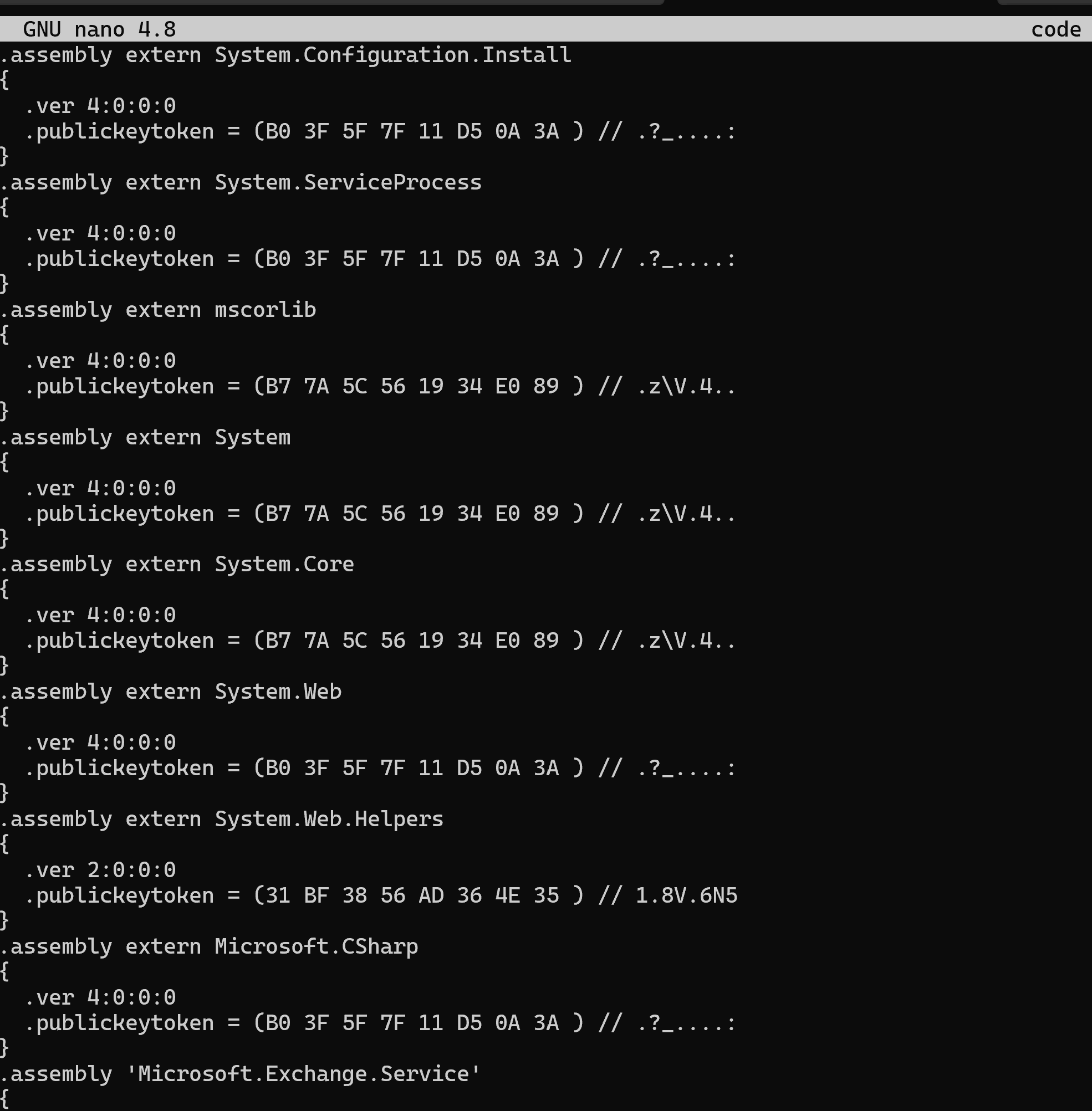
The module notes that a nicer way to do this is to load the assembly into a .NET debugger and editor like dnSpy. Either way, the NCSC UK rule keys off the class and function names plus the .NET BSJB magic.
rule neuron_functions_classes_and_vars {
   meta:
      description = "Rule for detection of Neuron based on .NET functions and class names"
      author = "NCSC UK"
      reference = "https://www.ncsc.gov.uk/alerts/turla-group-malware"
      hash = "d1d7a96fcadc137e80ad866c838502713db9cdfe59939342b8e3beacf9c7fe29"
   strings:
      $class1 = "StorageUtils" ascii
      $class2 = "WebServer" ascii
      $class3 = "StorageFile" ascii
      $class4 = "StorageScript" ascii
      $class5 = "ServerConfig" ascii
      $class6 = "CommandScript" ascii
      $class7 = "MSExchangeService" ascii
      $class8 = "W3WPDIAG" ascii
      $func1 = "AddConfigAsString" ascii
      $func2 = "DelConfigAsString" ascii
      $func3 = "GetConfigAsString" ascii
      $func4 = "EncryptScript" ascii
      $func5 = "ExecCMD" ascii
      $func6 = "KillOldThread" ascii
      $func7 = "FindSPath" ascii
      $dotnetMagic = "BSJB" ascii
   condition:
      (uint16(0) == 0x5A4D and uint16(uint32(0x3c)) == 0x4550) and $dotnetMagic and 6 of them
}
The condition is worth reading closely. uint16(0) == 0x5A4D confirms the MZ header, and uint16(uint32(0x3c)) == 0x4550 follows the pointer at offset 0x3c to the PE header and checks it says PE. The BSJB string confirms it is a .NET assembly, and then six of the class or function names have to be present. That is a much more precise rule than string-matching a native binary.
Example 3: Stonedrill (Shamoon 2.0)
Stonedrill hides its real payload in an encrypted resource, and encrypted or compressed data in a PE almost always means high entropy. A quick per-section entropy check makes it obvious.
htb-student@remnux:~$ python3 entropy_pe_section.py -f /home/htb-student/Samples/YARASigma/sham2.exe
.text
        virtual address: 0x1000
        entropy: 6.4093453613451885
.rdata
        virtual address: 0x27000
        entropy: 4.913675128870228
.data
        virtual address: 0x2e000
        entropy: 1.039771174750106
.rsrc
        virtual address: 0x3a000
        entropy: 7.976847940518103
The maximum possible entropy is 8.0, so .rsrc at 7.976847940518103 is a clear sign something is packed or encrypted there. Kaspersky’s rule turns exactly that observation into detection: find a file that enumerates files and resources, then check that one of its resources is large, has entropy over 7.8, and has resource id 101.
import "pe"
import "math"

rule susp_file_enumerator_with_encrypted_resource_101 {
   meta:
      copyright = "Kaspersky Lab"
      description = "Generic detection for samples that enumerate files with encrypted resource called 101"
      reference = "https://securelist.com/from-shamoon-to-stonedrill/77725/"
      version = "1.4"
   strings:
      $mz = "This program cannot be run in DOS mode."
      $a1 = "FindFirstFile" ascii wide nocase
      $a2 = "FindNextFile" ascii wide nocase
      $a3 = "FindResource" ascii wide nocase
      $a4 = "LoadResource" ascii wide nocase
   condition:
      uint16(0) == 0x5A4D and all of them and filesize < 700000
      and pe.number_of_sections > 4
      and pe.number_of_signatures == 0
      and pe.number_of_resources > 1 and pe.number_of_resources < 15
      and for any i in (0..pe.number_of_resources - 1): (
         (math.entropy(pe.resources[i].offset, pe.resources[i].length) > 7.8)
         and pe.resources[i].id == 101
         and pe.resources[i].length > 20000
         and pe.resources[i].language == 0
         and not ($mz in (pe.resources[i].offset..pe.resources[i].offset + pe.resources[i].length))
      )
}
This is the most advanced rule of the three. It leans on both the pe and math modules, and the for any i loop walks every resource to test entropy and size. It is a good reminder that YARA conditions can express real logic, not just string counts. The full details are in the Kaspersky report, and the YARA writing-rules docs cover the module functions.
Lab: Completing the DirectX.dll Rule
The lab gives a rule with a placeholder string and asks you to fill it in so it matches DirectX.dll. First, strings filtered to DLL references shows the suspicious imports.
htb-student@remnux:~$ strings /home/htb-student/Samples/YARASigma/DirectX.dll | grep dll
KERNEL32.dll
ADVAPI32.dll
MSVCRT.dll
kernel32.dll
\msvcrt.dll
\spool\prtprocs\w32x86\localspl.dll
\spool\prtprocs\x64\localspl.dll
\TSMSISrv.dll
The rule has $s4 = "\\X.dll" as a placeholder, and the three other strings (localspl.dll x2 and \msvcrt.dll) already appear in the output. The odd one out that completes the set is \TSMSISrv.dll, so X gets replaced with TSMSISrv.
rule APT17_Malware_Oct17_1 {
   meta:
      description = "Detects APT17 malware"
      author = "Florian Roth (Nextron Systems)"
      date = "2017-10-03"
   strings:
      $s1 = "\\spool\\prtprocs\\w32x86\\localspl.dll" ascii
      $s2 = "\\spool\\prtprocs\\x64\\localspl.dll" ascii
      $s3 = "\\msvcrt.dll" ascii
      $s4 = "\\TSMSISrv.dll" ascii
   condition:
      ( uint16(0) == 0x5a4d and filesize < 500KB and all of them )
}
With $s4 set, the rule matches every string.
htb-student@remnux:~$ yara -s /home/htb-student/Rules/yara/apt_apt17_mal_sep17_1.yar /home/htb-student/Samples/YARASigma/DirectX.dll
APT17_Malware_Oct17_1 /home/htb-student/Samples/YARASigma/DirectX.dll
0x29454:$s1: \spool\prtprocs\w32x86\localspl.dll
0x29478:$s2: \spool\prtprocs\x64\localspl.dll
0x2939c:$s3: \msvcrt.dll
0x294a8:$s4: \TSMSISrv.dll
Lab answer. The
$s4string is\TSMSISrv.dll(replaceXwithTSMSISrv.dll).
Hunting Evil with YARA (Windows, on Disk)
Writing rules is one half, hunting with them is the other. On Windows the first target is executables sitting on disk. I started in HxD, loaded the dharma sample, and used Ctrl+F to search for the C:\crysis\Release\PDB\payload.pdb path found earlier.
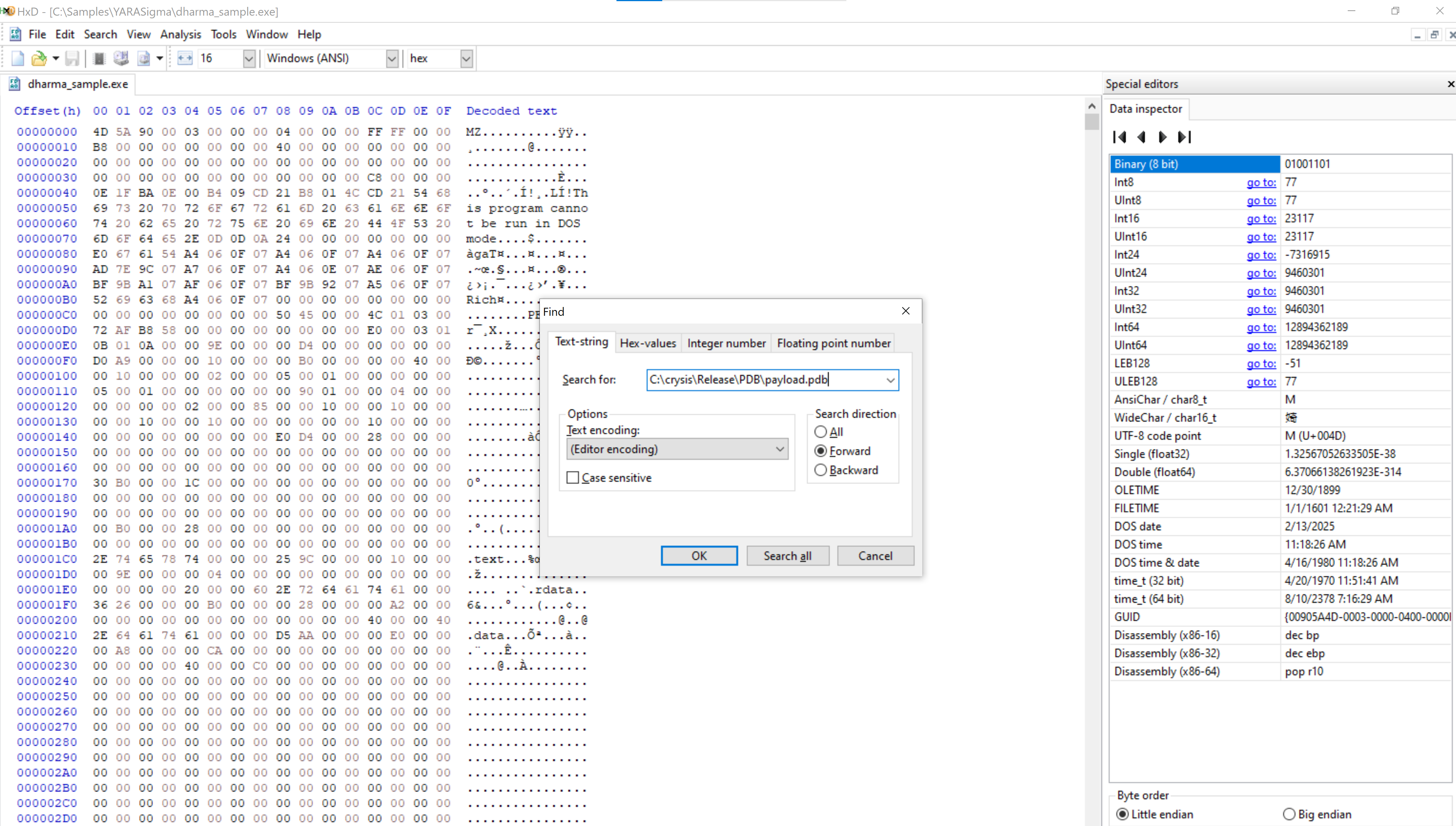
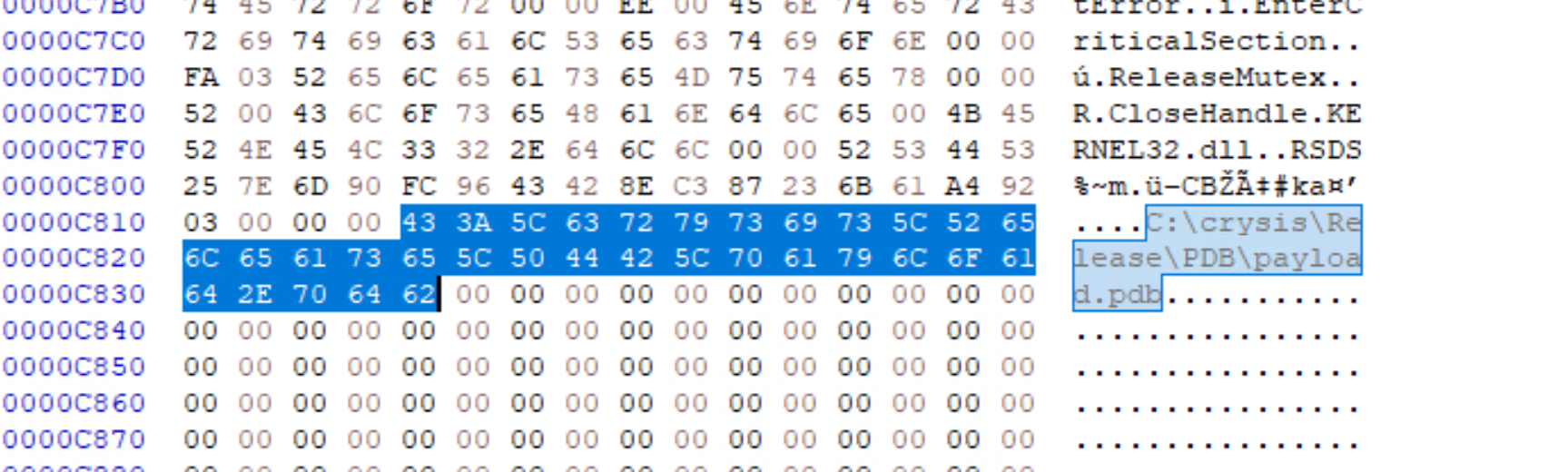
Another pattern that stood out was the seemingly unique sssssbsss string.
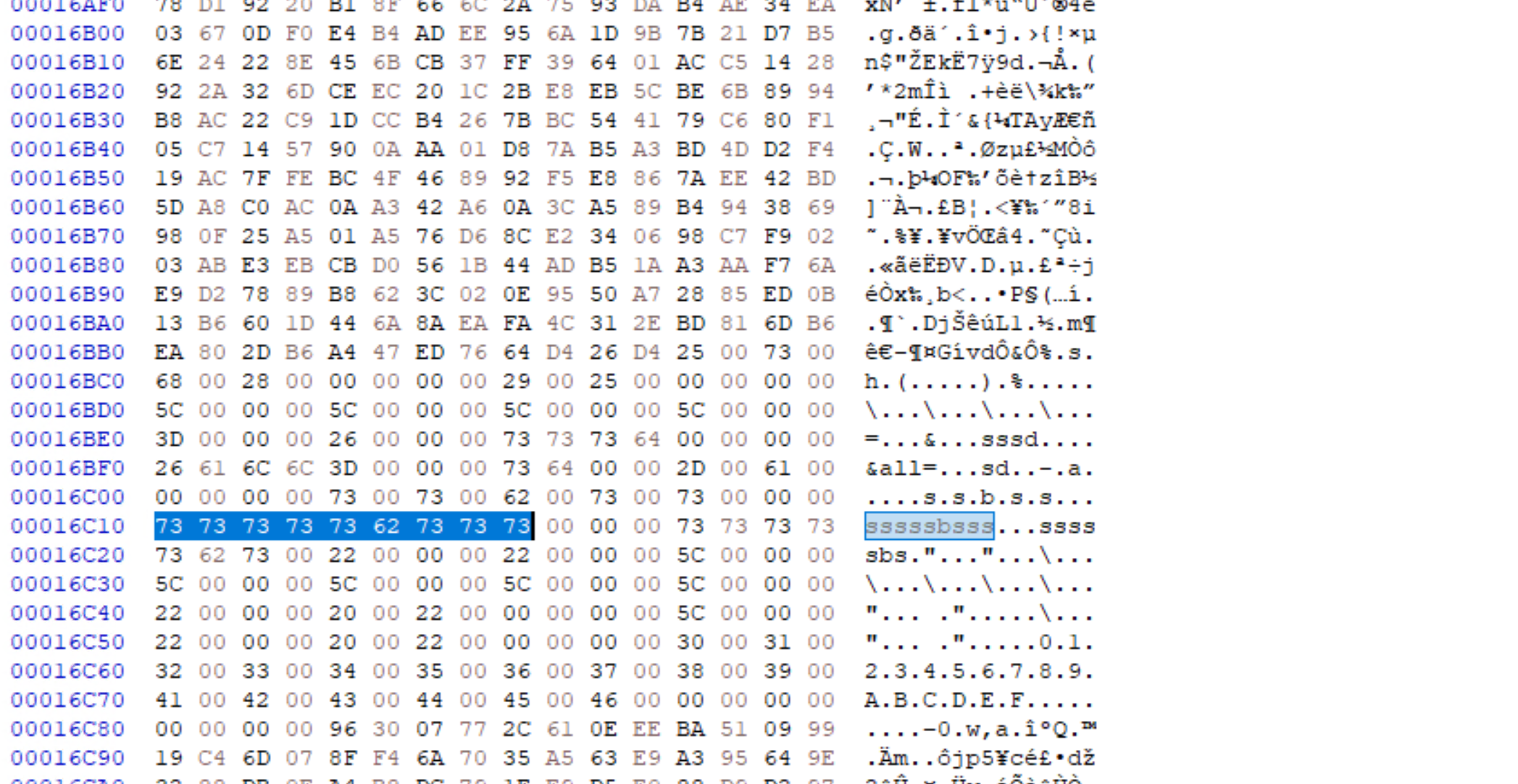
Working from the raw bytes rather than the ASCII string, the rule uses hex sequences directly.
rule ransomware_dharma {
   meta:
      author = "Madhukar Raina"
      version = "1.0"
      description = "Simple rule to detect strings from Dharma ransomware"
      reference = "https://www.virustotal.com/gui/file/bff6a1000a86f8edf3673d576786ec75b80bed0c458a8ca0bd52d12b74099071/behavior"
   strings:
      $string_pdb = { 433A5C6372797369735C52656C656173655C5044425C7061796C6F61642E706462 }
      $string_ssss = { 73 73 73 73 73 62 73 73 73 }
   condition:
      all of them
}
$string_pdb is the hex of C:\crysis\Release\PDB\payload.pdb, and $string_ssss is sssssbsss. Scanning the sample folder recursively with yara64.exe shows exactly which files carry both patterns.
C:\Users\htb-student>yara64.exe -s C:\Rules\yara\dharma_ransomware.yar C:\Samples\YARASigma\ -r 2>null
ransomware_dharma C:\Samples\YARASigma\\dharma_sample.exe
0xc814:$string_pdb: 43 3A 5C 63 72 79 73 69 73 5C 52 65 6C 65 61 73 65 5C 50 44 42 5C 70 61 79 6C 6F 61 64 2E 70 64 ...
0x16c10:$string_ssss: 73 73 73 73 73 62 73 73 73
ransomware_dharma C:\Samples\YARASigma\\check_updates.exe
ransomware_dharma C:\Samples\YARASigma\\KB5027505.exe
ransomware_dharma C:\Samples\YARASigma\\microsoft.com
ransomware_dharma C:\Samples\YARASigma\\pdf_reader.exe
The flags: -s shows the matched strings, -r recurses into subfolders, and 2>nul hides errors. The rule matched five files that all share the dharma fingerprint (pdf_reader.exe, microsoft.com, check_updates.exe, KB5027505.exe, and the original sample), so one confirmed sample found the other copies sitting in the same folder.
Hunting Inside Running Processes
Disk hunting misses anything that only exists in memory, so YARA can also scan the memory of live processes. The test target is Metasploit’s meterpreter reverse TCP shellcode, and the rule keys off the shellcode prologue, a couple of API checksums, and the ws2_ fragment of ws2_32.dll.
rule meterpreter_reverse_tcp_shellcode {
   meta:
      author = "FDD @ Cuckoo sandbox"
      description = "Rule for metasploit's meterpreter reverse tcp raw shellcode"
   strings:
      $s1 = { fce8 8?00 0000 60 }   // shellcode prologue in metasploit
      $s2 = { 648b ??30 }           // mov edx, fs:[???+0x30]
      $s3 = { 4c77 2607 }           // kernel32 checksum
      $s4 = "ws2_"                  // ws2_32.dll
      $s5 = { 2980 6b00 }           // WSAStartUp checksum
      $s6 = { ea0f dfe0 }           // WSASocket checksum
      $s7 = { 99a5 7461 }           // connect checksum
   condition:
      5 of them
}
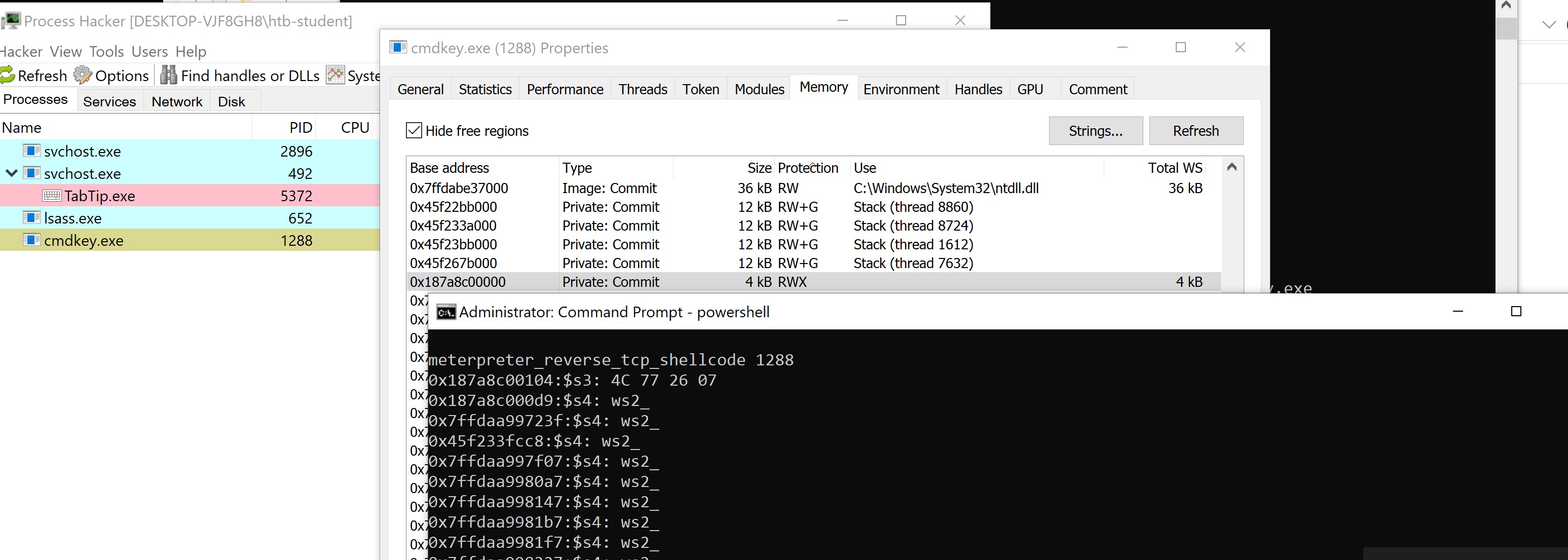
Running the sample injects shellcode into a child process. The parent spawns cmdkey.exe and writes shellcode into it before starting a remote thread.
PS C:\Samples\YARASigma> .\htb_sample_shell.exe

<-- Hack the box sample for yara signatures -->

[+] Parent process with PID 4548 is created : C:\Samples\YARASigma\htb_sample_shell.exe
[+] Child process with PID 7464 is created : C:\Windows\System32\cmdkey.exe
[+] Shellcode is written at address 0000018A9BAA0000 in remote process C:\Windows\System32\cmdkey.exe
[+] Remote thread to execute the shellcode is started with thread ID 5576

Press enter key to terminate...
Now scan every process by piping Get-Process into yara64.exe, running the rule against each PID’s memory.
PS C:\Windows\system32> Get-Process | ForEach-Object { "Scanning with Yara for meterpreter shellcode on PID "+$_.id; & "yara64.exe" "C:\Rules\yara\meterpreter_shellcode.yar" $_.id }
Scanning with Yara for meterpreter shellcode on PID 7464
meterpreter_reverse_tcp_shellcode 7464
Scanning with Yara for meterpreter shellcode on PID 416
error scanning 416: can not attach to process (try running as root)
...
Scanning with Yara for meterpreter shellcode on PID 4548
meterpreter_reverse_tcp_shellcode 4548
Two PIDs match: the injected child 7464 and the parent 4548. The errors on some PIDs are just access denials on protected processes. Zooming into the child with --print-strings shows the shellcode strings sitting in memory.
PS C:\Windows\system32> yara64.exe C:\Rules\yara\meterpreter_shellcode.yar 7464 --print-strings
meterpreter_reverse_tcp_shellcode 7464
0x18a9baa0104:$s3: 4C 77 26 07
0x18a9baa00d9:$s4: ws2_
0x7ffdaa99723f:$s4: ws2_
...
0x18a9baa0115:$s5: 29 80 6B 00
0x18a9baa0135:$s6: EA 0F DF E0
0x18a9baa014a:$s7: 99 A5 74 61
The matched offsets around 0x18a9baa0... line up with the address the loader reported writing to, which is a nice confirmation that the rule found the injected region and not a coincidence.
Hunting ETW Data with YARA
ETW (Event Tracing for Windows) records detailed activity from applications, drivers, and the kernel, and YARA can be pointed at that telemetry with a tool like SilkETW. The model has three parts: a controller that starts and stops tracing and enables providers, providers that generate the events, and consumers that receive and analyse them. Useful providers cover processes, files, networks, PowerShell, .NET, registry, DNS, SMB, WinRM, RDP, and security controls. ETW gives you the live telemetry, YARA finds the suspicious patterns inside it.
PowerShell ETW
This run traces the Microsoft-Windows-PowerShell provider and applies YARA rules to the events as they arrive.
PS C:\Tools\SilkETW\v8\SilkETW> .\SilkETW.exe -t user -pn Microsoft-Windows-PowerShell -ot file -p ./etw_ps_logs.json -l verbose -y C:\Rules\yara -yo Matches

███████╗██╗██╗   ██╗  ██╗███████╗████████╗██╗    ██╗
██╔════╝██║██║   ██║ ██╔╝██╔════╝╚══██╔══╝██║    ██║
███████╗██║██║   █████╔╝ █████╗     ██║   ██║ █╗ ██║
╚════██║██║██║   ██╔═██╗ ██╔══╝     ██║   ██║███╗██║
███████║██║█████╗██║  ██╗███████╗   ██║   ╚███╔███╔╝
╚══════╝╚═╝╚════╝╚═╝  ╚═╝╚══════╝   ╚═╝    ╚══╝╚══╝
                  [v0.8 - Ruben Boonen => @FuzzySec]

[+] Collector parameter validation success..
[>] Starting trace collector (Ctrl-c to stop)..
[?] Events captured: 0
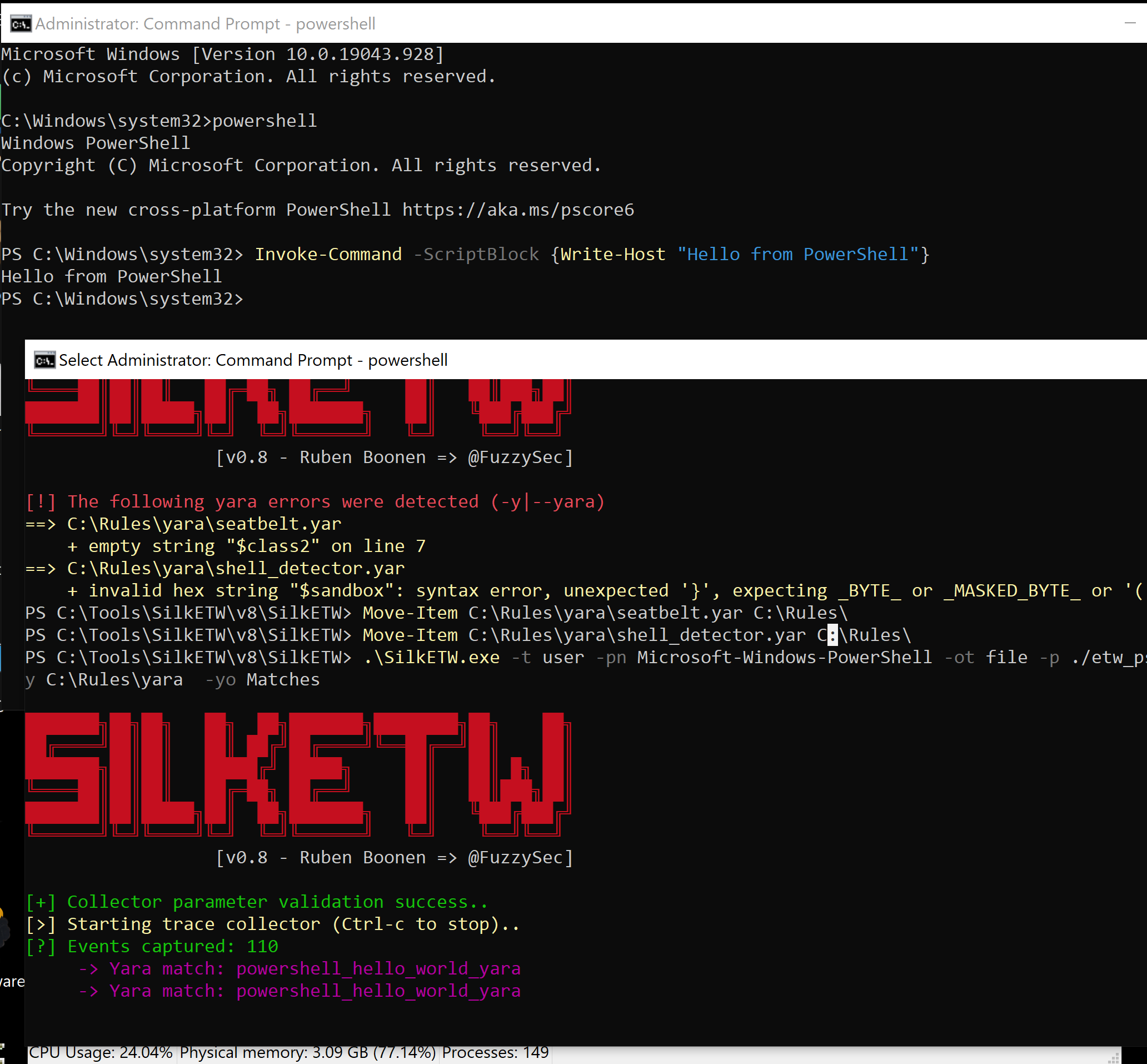
The flags break down as: -t user captures user-mode events, -pn picks the provider, -ot file and -p save to a JSON file, -l verbose gives detailed logging, -y loads YARA rules from a folder, and -yo Matches only shows YARA matches. The rule itself just looks for the pieces of a hello-world PowerShell line.
rule powershell_hello_world_yara {
    strings:
        $s0 = "Write-Host" ascii wide nocase
        $s1 = "Hello" ascii wide nocase
        $s2 = "from" ascii wide nocase
        $s3 = "PowerShell" ascii wide nocase
    condition:
        3 of ($s*)
}
Running the matching PowerShell triggers a hit in the ETW stream.
DNS-Client ETW
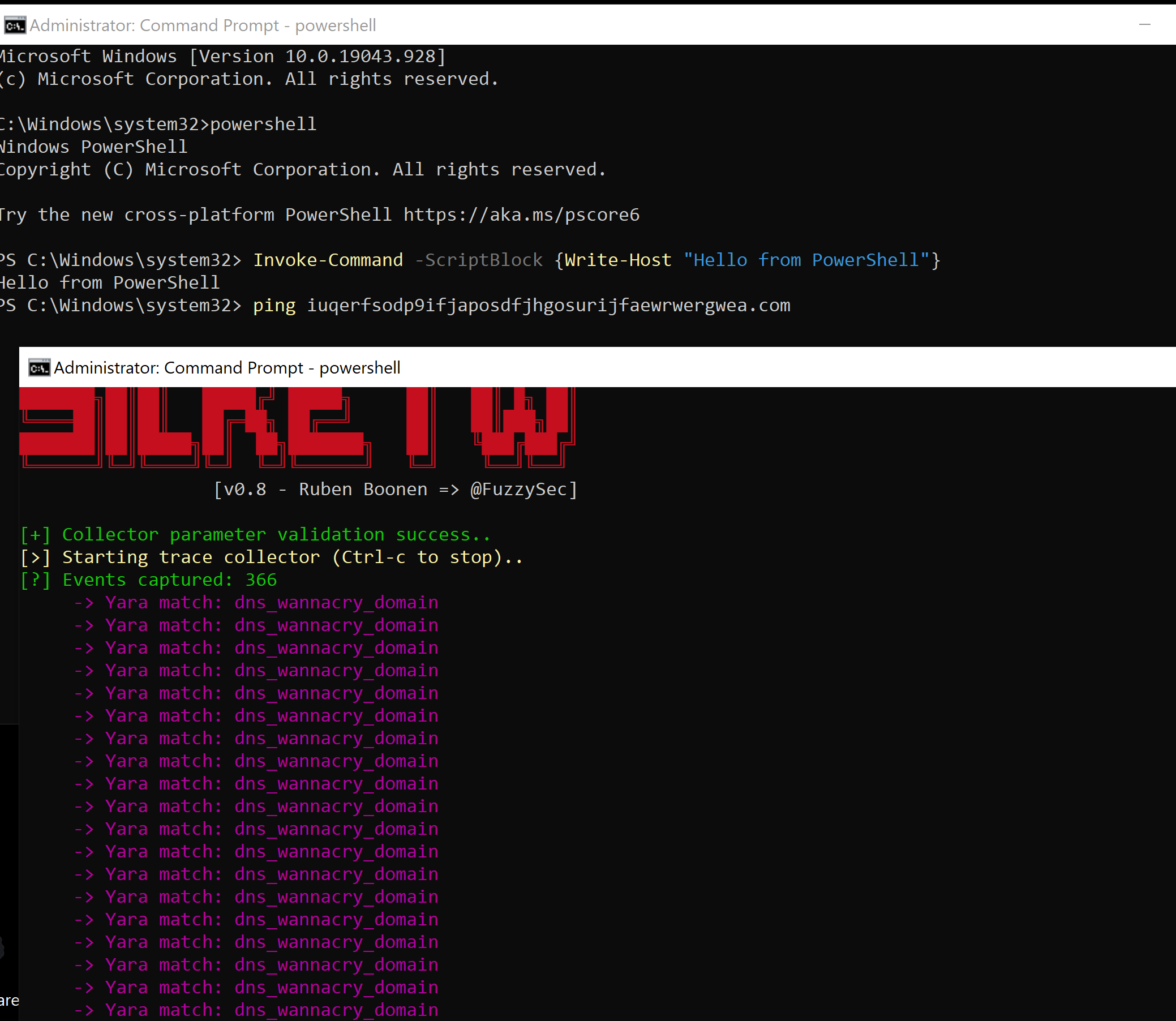
The same idea works for DNS. This time the provider is Microsoft-Windows-DNS-Client and the rule looks for the WannaCry kill-switch domain.
PS C:\Tools\SilkETW\v8\SilkETW> .\SilkETW.exe -t user -pn Microsoft-Windows-DNS-Client -ot file -p ./etw_dns_logs.json -l verbose -y C:\Rules\yara -yo Matches
[+] Collector parameter validation success..
[>] Starting trace collector (Ctrl-c to stop)..
[?] Events captured: 42
rule dns_wannacry_domain {
    strings:
        $s1 = "iuqerfsodp9ifjaposdfjhgosurijfaewrwergwea.com" ascii wide nocase
    condition:
        $s1
}
A simple ping to that domain generates a DNS-Client event, and the rule fires on it.
Lab: Filling in the $sandbox Bytes
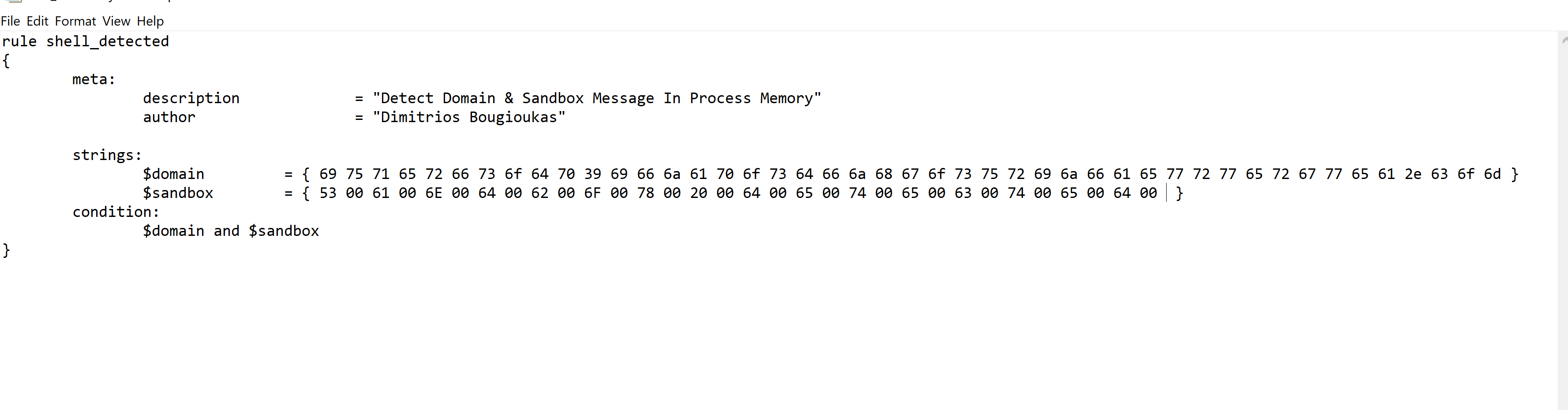
The lab gives a rule that scans process memory for a domain and a “Sandbox detected” message, but the $sandbox variable is empty. The task is to supply the right hex.
PS C:\Windows\system32> Get-Content C:\Rules\shell_detector.yar
rule shell_detected
{
        meta:
                description = "Detect Domain & Sandbox Message In Process Memory"
                author = "Dimitrios Bougioukas"

        strings:
                $domain  = { 69 75 71 65 72 66 73 6f 64 70 39 69 66 6a 61 70 6f 73 64 66 6a 68 67 6f 73 75 72 69 6a 66 61 65 77 72 77 65 72 67 77 65 61 2e 63 6f 6d }
                $sandbox = {  }
        condition:
                $domain and $sandbox
}
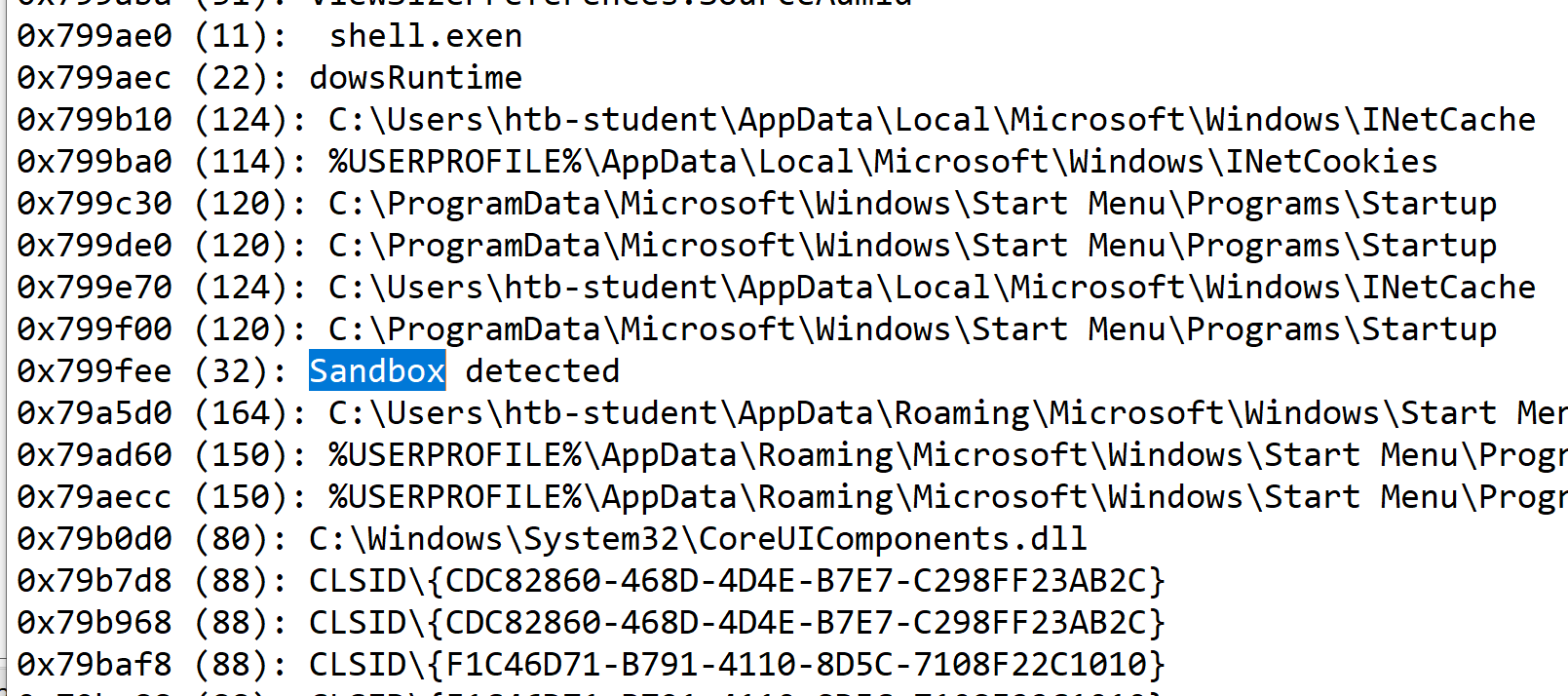
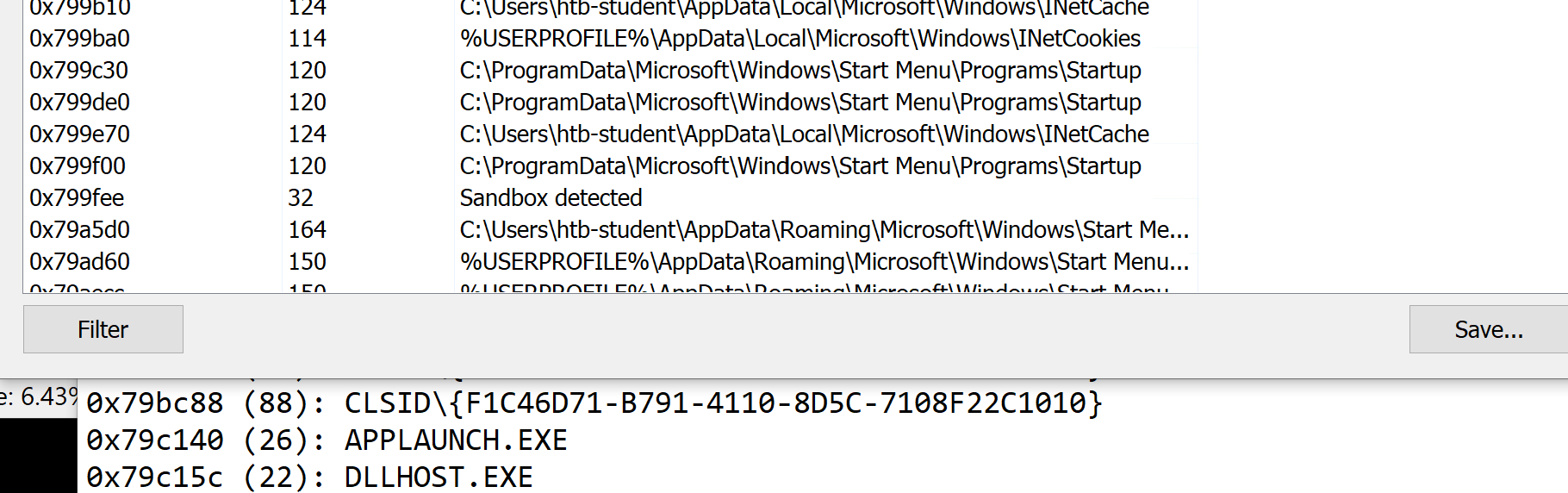
I ran shell.exe (it landed on PID 2080), then in Process Hacker dumped the process memory strings and searched for the “Sandbox detected” message box text.
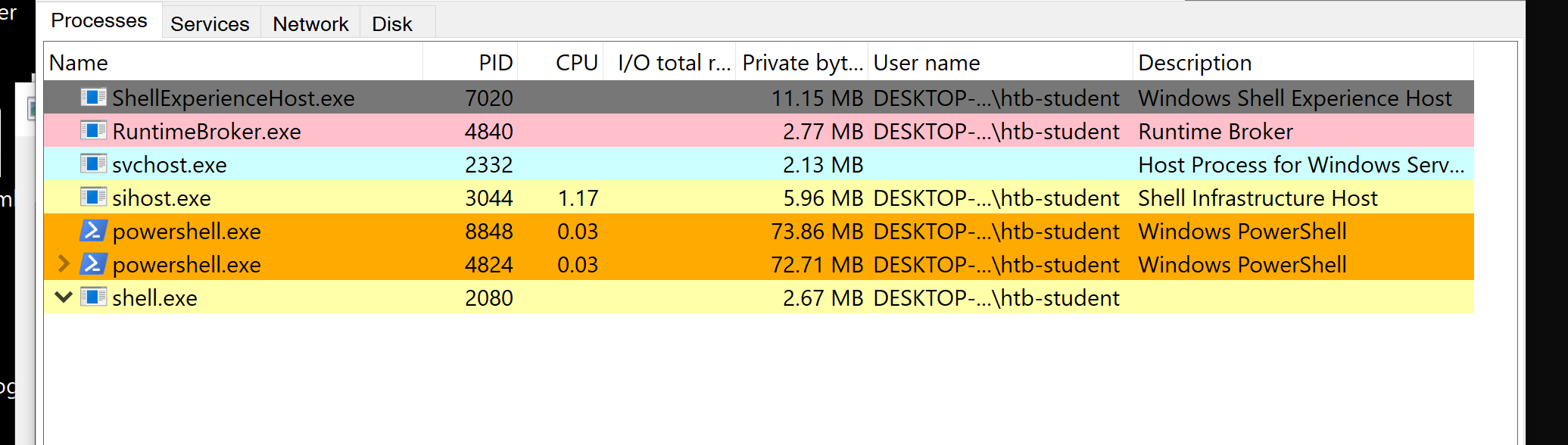
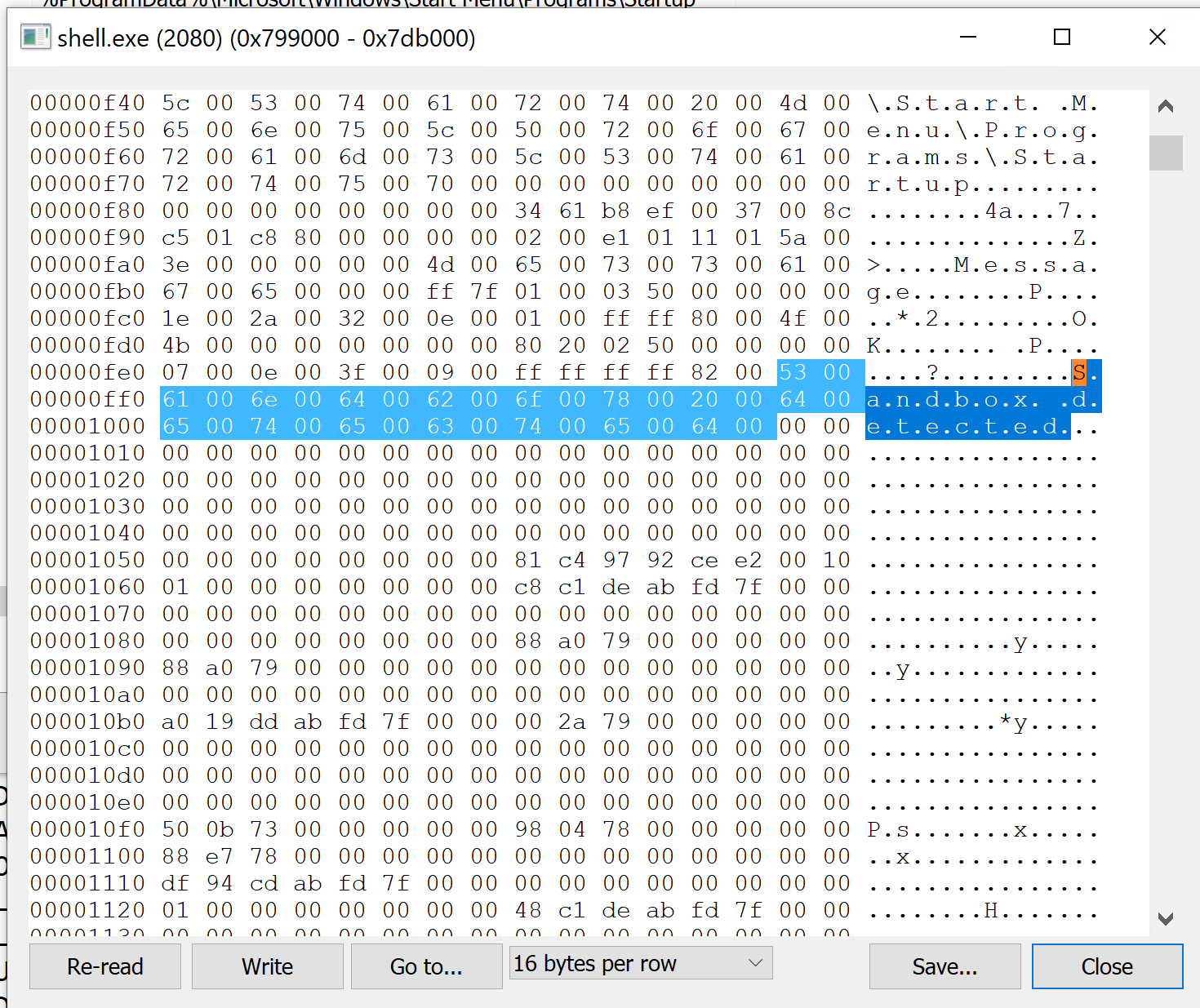
After updating the rule and testing it against the live process, the match came back as UTF-16LE (each character followed by a 00).
PS C:\Windows\system32> yara64.exe -s C:\Rules\shell_detector.yar 2080
shell_detected 2080
0x405339:$domain: 69 75 71 65 72 66 73 6F 64 70 39 69 66 6A 61 70 6F 73 64 66 6A 68 67 6F 73 75 72 69 6A 66 61 65 ...
0xe29810:$sandbox: 53 00 61 00 6E 00 64 00 62 00 6F 00 78 00 20 00 64 00 65 00 74 00 65 00 63 00 74 00 65 00 64 00
I first submitted the UTF-16LE bytes 530061006E00640062006F007800200064006500740065006300740065006400, which matched the live process but was not what HTB wanted. The grader expects the ASCII bytes stored inside shell.exe itself, without the 00 padding. Changing $sandbox to the plain ASCII of “Sandbox detected” and testing against the file on disk gave the accepted answer.
$sandbox = { 53 61 6E 64 62 6F 78 20 64 65 74 65 63 74 65 64 }
Lab answer.
53616e64626f78206465746563746564(the ASCII bytes ofSandbox detected, no spaces).
Hunting Evil with YARA (Linux, Memory Images)
In a SOC you often do not get the live machine, you get a memory capture handed to you. YARA scans memory images directly, which mirrors disk-based scanning almost exactly. The workflow is: create or reuse YARA rules, optionally compile them with yarac into a .yrc for performance, capture a memory image (DumpIt, MemDump, Belkasoft RAM Capturer, Magnet RAM Capture, FTK Imager, or LiME on Linux), then scan.
Running YARA straight against the raw image works.
htb-student@remnux:~$ yara --print-strings /home/htb-student/Rules/yara/wannacry_artifacts_memory.yar /home/htb-student/MemoryDumps/compromised_system.raw
Ransomware_WannaCry /home/htb-student/MemoryDumps/compromised_system.raw
0x4e140:$wannacry_payload_str1: tasksche.exe
0xdb564d8:$wannacry_payload_str1: tasksche.exe
...
0x13bac3d7:$wannacry_payload_str2: www.iuqerfsodp9ifjaposdfjhgosurijfaewrwergwea.com
0x450b048:$wannacry_payload_str3: mssecsvc.exe
0x13945408:$wannacry_payload_str4: diskpart.exe
For richer memory forensics you integrate with a framework, and Volatility ships a yarascan plugin.
Single-Pattern Scanning with Volatility
If you only need one indicator, -U takes a string directly on the command line. From earlier analysis we know WannaCry reaches for the hard-coded URI www.iuqerfsodp9ifjaposdfjhgosurijfaewrwergwea.com.
htb-student@remnux:~$ vol.py -f /home/htb-student/MemoryDumps/compromised_system.raw yarascan -U "www.iuqerfsodp9ifjaposdfjhgosurijfaewrwergwea.com" > output3.txt
Volatility Foundation Volatility Framework 2.6.1

htb-student@remnux:~$ grep -a -m 1 -B 1 -A 16 "Owner: Process svchost.exe Pid 1576" output3.txt
Rule: r1
Owner: Process svchost.exe Pid 1576
0x004313d7  77 77 77 2e 69 75 71 65 72 66 73 6f 64 70 39 69   www.iuqerfsodp9i
0x004313e7  66 6a 61 70 6f 73 64 66 6a 68 67 6f 73 75 72 69   fjaposdfjhgosuri
0x004313f7  6a 66 61 65 77 72 77 65 72 67 77 65 61 2e 63 6f   jfaewrwergwea.co
0x00431407  6d 00 00 00 00 00 00 00 00 01 00 00 00 00 00 00   m...............
Whole-Rule Scanning with Volatility
For a full rule (or many rules), -y takes a .yar file. The memory rule for WannaCry looks for its process names and the kill-switch domain.
htb-student@remnux:~$ cat /home/htb-student/Rules/yara/wannacry_artifacts_memory.yar
rule Ransomware_WannaCry {
    meta:
        author = "Madhukar Raina"
        version = "1.1"
        description = "Simple rule to detect strings from WannaCry ransomware"
    strings:
        $wannacry_payload_str1 = "tasksche.exe" fullword ascii
        $wannacry_payload_str2 = "www.iuqerfsodp9ifjaposdfjhgosurijfaewrwergwea.com" ascii
        $wannacry_payload_str3 = "mssecsvc.exe" fullword ascii
        $wannacry_payload_str4 = "diskpart.exe" fullword ascii
        $wannacry_payload_str5 = "lhdfrgui.exe" fullword ascii
    condition:
        3 of them
}
htb-student@remnux:~$ vol.py -f /home/htb-student/MemoryDumps/compromised_system.raw yarascan -y /home/htb-student/Rules/yara/wannacry_artifacts_memory.yar
Volatility Foundation Volatility Framework 2.6.1
Rule: Ransomware_WannaCry
Owner: Process svchost.exe Pid 1576
0x0043136c  74 61 73 6b 73 63 68 65 2e 65 78 65 00 00 00 00   tasksche.exe....
0x0043137c  52 00 00 00 43 6c 6f 73 65 48 61 6e 64 6c 65 00   R...CloseHandle.
...
0x01cfde54  54 61 73 6b 53 74 61 72 74 00 00 00 74 2e 77 6e   TaskStart...t.wn
0x01cfde64  72 79 00 00 69 63 61 63 6c 73 20 2e 20 2f 67 72   ry..icacls.../gr
0x01cfde74  61 6e 74 20 45 76 65 72 79 6f 6e 65 3a 46 20 2f   ant.Everyone:F./
The short version: -U inlines a single YARA string, -y points at a whole rule file. Which one you reach for depends on whether you are chasing one IOC or a full family.
Lab: Which Process Deleted the Shadows
The lab points at a VMware writeup on shadow volume deletion and asks which process deleted the shadows in the memory image. WannaCry wipes recovery options with a chain of built-in tools: vssadmin.exe delete shadows /all /quiet, then wbadmin delete catalog -quiet, wbadmin delete systemstatebackup, and bcdedit to disable automatic recovery. Searching memory for the delete shadows string and pulling out the owning process answers it.
htb-student@remnux:~$ vol.py -f /home/htb-student/MemoryDumps/compromised_system.raw yarascan -U "delete shadows" > shadows.txt
Volatility Foundation Volatility Framework 2.6.1

htb-student@remnux:~$ grep -E "Rule:|Owner:" shadows.txt
Rule: r1
Owner: Process @WanaDecryptor@ Pid 3200
Rule: r1
Owner: Process @WanaDecryptor@ Pid 3100

htb-student@remnux:~$ grep -a -m 1 -B 1 -A 16 "Owner: Process @WanaDecryptor@ Pid 3200" shadows.txt
Rule: r1
Owner: Process @WanaDecryptor@ Pid 3200
0x00420fe4  64 65 6c 65 74 65 20 73 68 61 64 6f 77 73 20 2f   delete.shadows./
0x00420ff4  61 6c 6c 20 2f 71 75 69 65 74 20 26 20 77 6d 69   all./quiet.&.wmi
0x00421004  63 20 73 68 61 64 6f 77 63 6f 70 79 20 64 65 6c   c.shadowcopy.del
0x00421014  65 74 65 20 26 20 62 63 64 65 64 69 74 20 2f 73   ete.&.bcdedit./s
The command string lives in the memory of @WanaDecryptor@, so that is the process responsible.
Lab answer.
@WanaDecryptor@
Hunting Evil with YARA (Web)
The last stop is Unpac.Me, a malware unpacking service that also lets you run YARA rules across their database of submissions. I tried following the course guidance here, but the same rule did not return results online, probably down to the dataset and how their search is performed. I made a note to look into it more and moved on rather than get stuck.
Sigma and Sigma Rules
That is YARA covered. Sigma is the other half of the module, and it is the generic format for describing detection rules for log analysis in SIEMs. It lets analysts write and share rules for specific malicious patterns, and because a Sigma rule is just YAML, it is portable across many SIEM and log-analysis systems without rewriting the query for each platform.
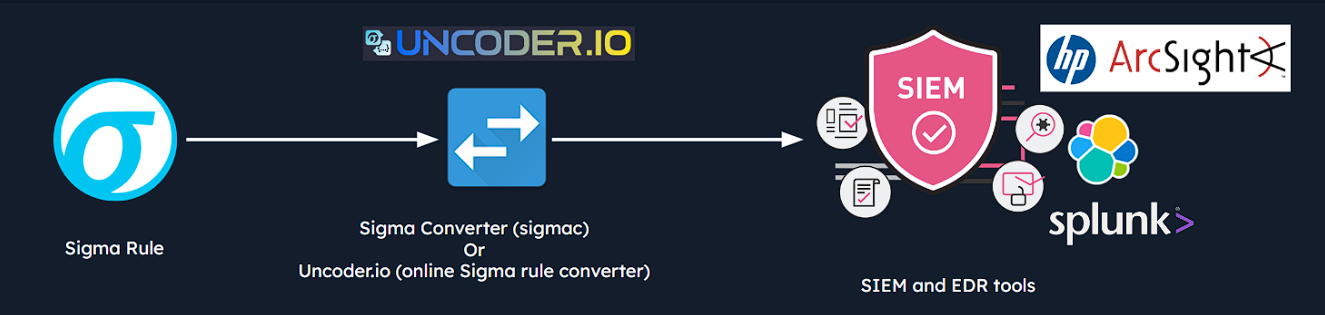
Sigma helps with incident response, threat hunting, and community rule sharing, and it works as a universal log-analytics language so you do not rewrite the same logic across every platform. The piece that makes this work is a converter. sigmac was the original, transforming Sigma rules into queries for a range of SIEMs, though pySigma is now the go-to because sigmac is considered obsolete.
Sigma Rule Format
A Sigma rule has metadata, a log source, and a detection block.
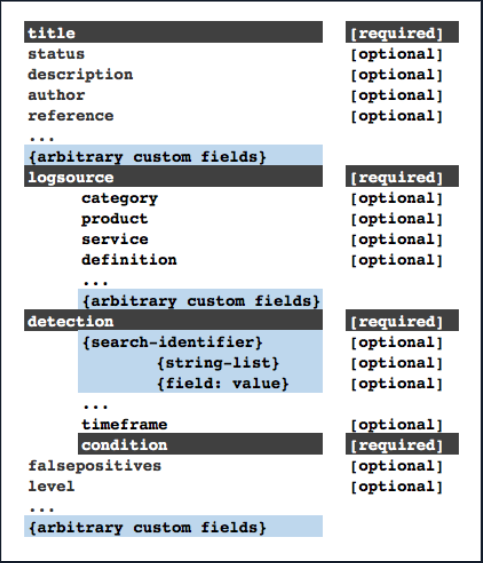
Here is a complete example detecting the LethalHTA technique, where mshta.exe is spawned by svchost.exe.
title: Potential LethalHTA Technique Execution
id: ed5d72a6-f8f4-479d-ba79-02f6a80d7471
status: test
description: Detects potential LethalHTA technique where "mshta.exe" is spawned by an "svchost.exe" process
references:
    - https://codewhitesec.blogspot.com/2018/07/lethalhta.html
author: Markus Neis
date: 2018/06/07
tags:
    - attack.defense_evasion
    - attack.t1218.005
logsource:
    category: process_creation
    product: windows
detection:
    selection:
        ParentImage|endswith: '\svchost.exe'
        Image|endswith: '\mshta.exe'
    condition: selection
falsepositives:
    - Unknown
level: high
The pieces:
- Rule metadata: a
title(max 256 characters), a uniqueid(UUID v4), and astatus(stable, test, experimental, deprecated, or unsupported). - Contextual fields: the
descriptionexplains the activity,referenceslink the research, andauthoranddatetrack the origin. - Logsource: this tells the converter which data to scan, using
category(process_creation, firewall),product(windows, apache), andservice(applocker, sshd) to narrow scope. The logsource guides list the valid combinations. - Detection: the search identifiers and the
conditionthat ties them together.
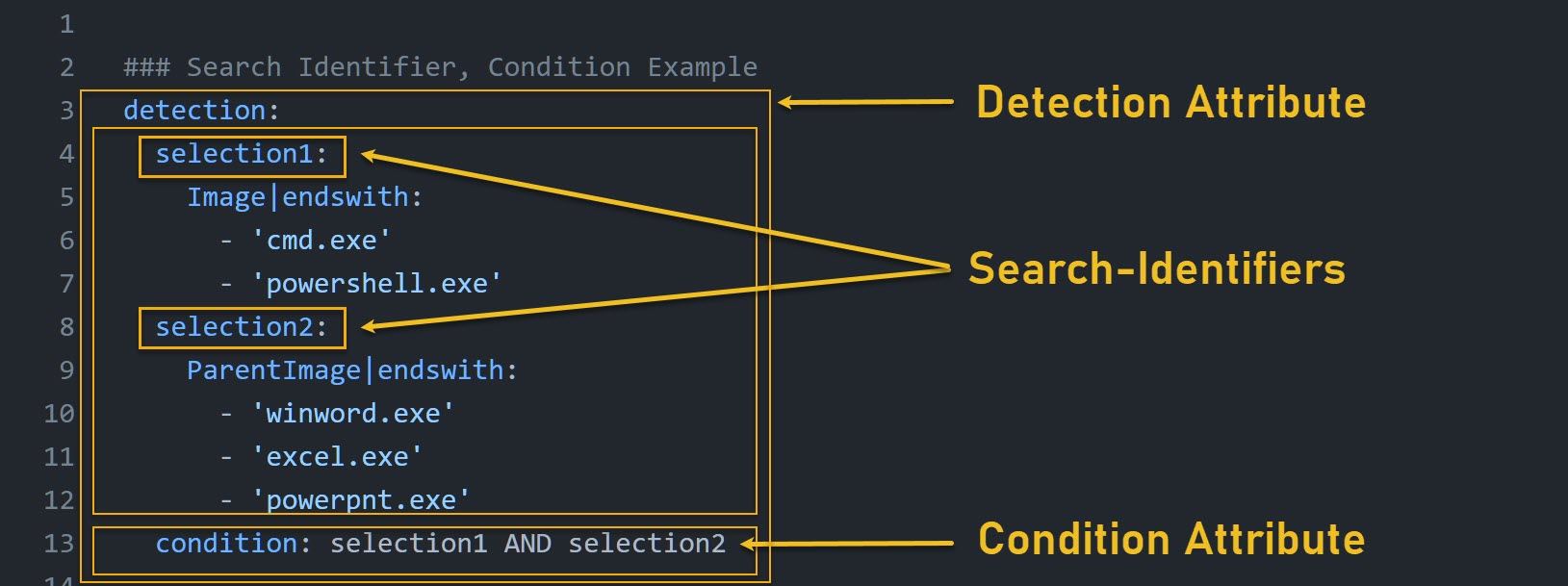
Detection Modifiers
Modifiers change how Sigma matches a field value. These are the ones that show up constantly.
| Modifier | Meaning |
|---|---|
contains |
Value can appear anywhere in the field. |
all |
Every listed value must exist. |
startswith |
Field must begin with the value. |
endswith |
Field must end with the value. |
re |
Value is a regular expression. |
For example, requiring both powershell and -enc on the command line:
CommandLine|contains|all:
  - 'powershell'
  - '-enc'
Beyond modifiers, the way you nest values controls the AND/OR logic, and this is the part that trips people up. Values inside a list are joined with OR:
selection:
  Image|endswith:
    - '\cmd.exe'
    - '\powershell.exe'
That matches cmd.exe OR powershell.exe. Strings without a field name search the whole log message, also joined with OR:
keywords:
  - evilservice
  - svchost.exe -n evil
A list of maps gives each map as a separate option, joined with OR:
selection:
  - Image|endswith: '\example.exe'
  - Description|contains: 'Test executable'
Fields inside the same map are joined with AND:
selection:
  EventLog: Security
  EventID: 4769
  TicketOptions: '0x40810000'
  TicketEncryption: '0x17'
And when a single field inside a map holds a list, those values go back to OR:
selection:
  EventLog: Security
  EventID:
    - 517
    - 1102
That means EventLog = Security AND (EventID = 517 OR EventID = 1102).
Finally the condition ties the selections together.
| Condition | Meaning |
|---|---|
selection1 or selection2 |
Either selection can match. |
selection1 and selection2 |
Both must match. |
all of them |
All search identifiers must match. |
1 of them |
At least one identifier must match. |
all of selection* |
All identifiers beginning with selection. |
1 of filter_* |
At least one identifier beginning with filter_. |
selection and not filter |
Match selection but exclude filter. |
( ) |
Controls order of evaluation. |
So condition: selection1 and (selection2 or selection3) means selection1 must match AND either selection2 or selection3.
The Rules of Thumb (Easy to Remember)
- Values in a list: OR
- Fields in one map: AND
- Maps inside a list: OR
contains|all: all listed values must appearcondition: connects the detection sections together
The best resources are the official Rule Creation Guide and the sigma-specification, which cover both best practices and common pitfalls.
Writing Sigma Rules
To write a rule you need an event to detect, so I generated one by dumping LSASS with mimikatz.
mimikatz # privilege::debug
Privilege '20' OK

mimikatz # sekurlsa::logonpasswords

Authentication Id : 0 ; 994987 (00000000:000f2eab)
Session           : RemoteInteractive from 2
User Name         : htb-student
Domain            : DESKTOP-VJF8GH8
Logon Time        : 7/18/2026 7:16:53 AM
Checking the Windows event logs afterwards, the interesting field is GrantedAccess.
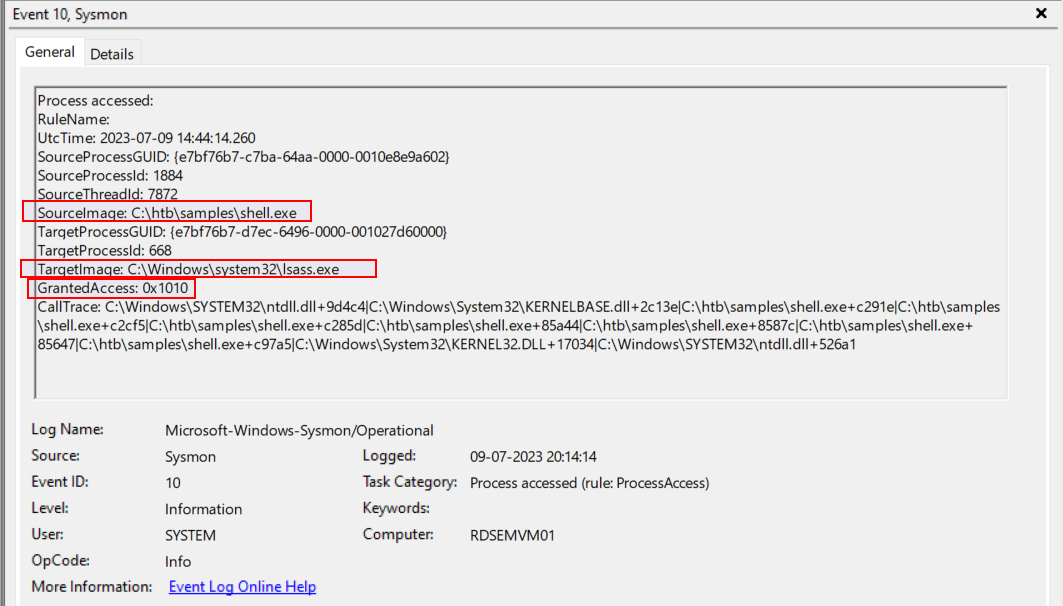
0x1010 matters because it combines PROCESS_VM_READ (0x0010) and PROCESS_QUERY_LIMITED_INFORMATION (0x1000), meaning the process asked to read LSASS memory and query basic information about it. That combination is frequently seen in credential-dumping. (0x0410 is the most common flag for reading LSASS memory, while 0x1010 implies both reading and querying, per the Microsoft access-rights docs.)
Detecting LSASS Access (GrantedAccess 0x1010)
The simplest rule keys off the target being LSASS and the exact access value.
title: LSASS Access With Suspicious GrantedAccess Flag
id: 7ab3a1fa-4951-4e8e-a9ef-22e913b6c731
status: experimental
description: Detects a process accessing LSASS memory with the suspicious GrantedAccess value 0x1010.
date: 2023-07-08
tags:
  - attack.credential_access
  - attack.t1003.001
logsource:
  category: process_access
  product: windows
detection:
  selection:
    TargetImage|endswith: '\lsass.exe'
    GrantedAccess: '0x1010'
  condition: selection
falsepositives:
  - Legitimate security or system-management software accessing LSASS
level: high
The log source is Windows process-access events (Sysmon Event ID 10), TargetImage must end with \lsass.exe, and GrantedAccess must be 0x1010. Translating it with sigmac into a PowerShell Get-WinEvent query shows how portable the format is.
PS C:\Tools\sigma-0.21\tools> python sigmac -t powershell 'C:\Rules\sigma\proc_access_win_lsass_access.yml'
Get-WinEvent | where {($_.ID -eq "10" -and $_.message -match "TargetImage.*.*\\lsass.exe" -and $_.message -match "GrantedAccess.*.*0x1010") } | select TimeCreated,Id,RecordId,ProcessId,MachineName,Message
Running that generated query against a saved event log pulls the exact shell.exe accessing lsass.exe with GrantedAccess: 0x1010.
PS C:\Tools\sigma-0.21\tools> Get-WinEvent -Path C:\Events\YARASigma\lab_events.evtx | where {($_.ID -eq "10" -and $_.message -match "TargetImage.*.*\\lsass.exe" -and $_.message -match "GrantedAccess.*.*0x1010") } | select TimeCreated,Id,RecordId,ProcessId,MachineName,Message

TimeCreated : 7/9/2023 7:44:14 AM
Id          : 10
RecordId    : 7810
ProcessId   : 3324
MachineName : RDSEMVM01
Message     : Process accessed:
              SourceImage: C:\htb\samples\shell.exe
              TargetImage: C:\Windows\system32\lsass.exe
              GrantedAccess: 0x1010
A Production-Grade LSASS Rule
The simple rule works but is noisy, because legitimate updaters and installers also touch LSASS. Florian Roth’s production rule keeps the same core idea (LSASS as the target, credential-dumping access values) but scopes SourceImage to suspicious folders and then excludes a long list of known-good tools with filter_optional_* selections.
title: LSASS Access From Program in Potentially Suspicious Folder
id: fa34b441-961a-42fa-a100-ecc28c886725
status: experimental
description: Detects process access to LSASS memory with suspicious access flags and from a potentially suspicious folder
author: Florian Roth (Nextron Systems)
date: 2021/11/27
modified: 2023/05/05
tags:
  - attack.credential_access
  - attack.t1003.001
  - attack.s0002
logsource:
  category: process_access
  product: windows
detection:
  selection:
    TargetImage|endswith: '\lsass.exe'
    GrantedAccess|endswith:
      - '10'
      - '30'
      - '50'
      - '70'
      - '90'
      - 'B0'
      - 'D0'
      - 'F0'
      - '18'
      - '38'
      - '1A'
      - '3A'
      - '0x14C2'
      - 'FF'
    SourceImage|contains:
      - '\Temp\'
      - '\Users\Public\'
      - '\PerfLogs\'
      - '\AppData\'
      - '\htb\'
  filter_optional_generic_appdata:
    SourceImage|startswith: 'C:\Users\'
    SourceImage|contains: '\AppData\Local\'
    SourceImage|endswith:
      - '\Microsoft VS Code\Code.exe'
      - '\software_reporter_tool.exe'
      - '\DropboxUpdate.exe'
    GrantedAccess: '0x410'
  filter_optional_nextron:
    SourceImage|startswith:
      - 'C:\Windows\Temp\asgard2-agent\'
    SourceImage|endswith:
      - '\thor64.exe'
      - '\thor.exe'
    GrantedAccess:
      - '0x1fffff'
      - '0x1010'
      - '0x101010'
  condition: selection and not 1 of filter_optional_*
fields:
  - User
  - SourceImage
  - GrantedAccess
falsepositives:
  - Updaters and installers are typical false positives. Apply custom filters depending on your environment
level: medium
The detection logic in plain English:
Target is lsass.exe
AND GrantedAccess matches a suspicious value
AND source runs from a suspicious folder
AND source does not match any known legitimate filter
That selection and not 1 of filter_optional_* pattern is the standard way to keep a high-signal rule from drowning in benign updater noise. (The real rule carries many more filter_optional_* blocks for Chrome, Keybase, Avira, Viber, Adobe, and others, all following the same shape.)
Example: Failed NTLM Logins (Event 4776)
Event 4776 is logged every time NTLM validates a credential. For domain accounts it is logged on the domain controller, for local accounts on the local machine, and a failure shows an Error Code other than 0x0. The scenario here is many failed attempts against NOUSER from one source workstation.
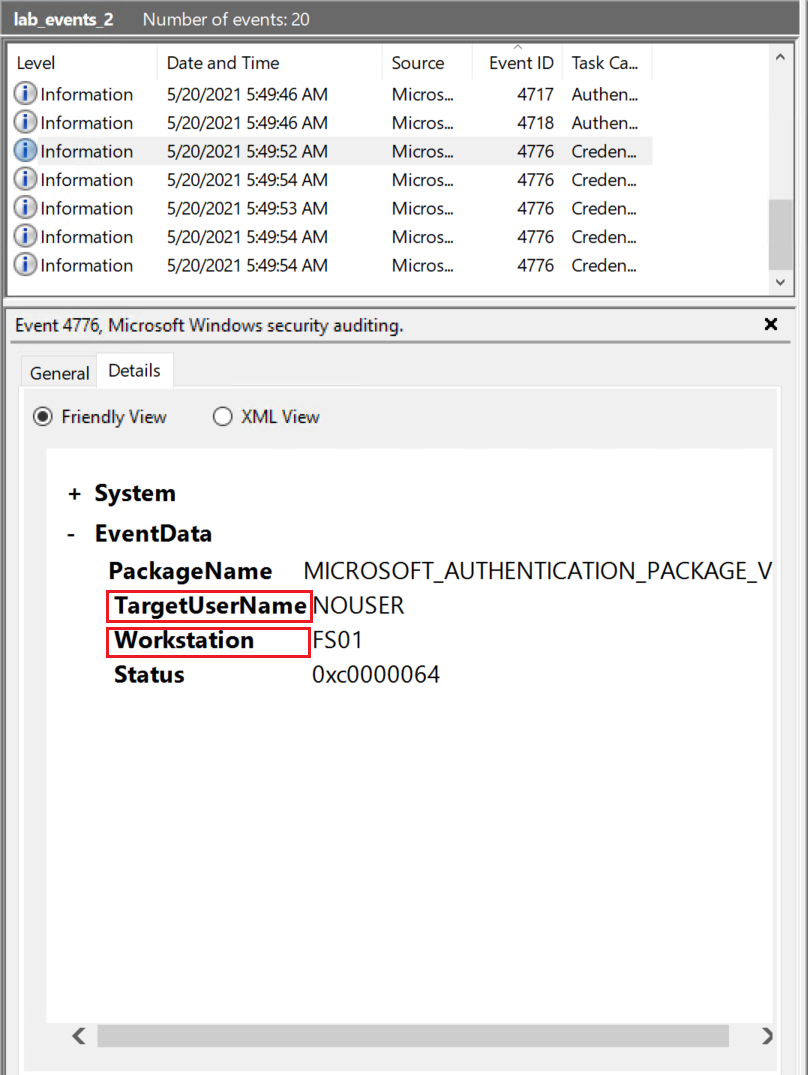
title: Failed NTLM Logins with Different Accounts from Single Source System
id: 6309ffc4-8fa2-47cf-96b8-a2f72e58e538
status: unsupported
description: Detects suspicious failed logins with different user accounts from a single source system
logsource:
  product: windows
  service: security
detection:
  selection2:
    EventID: 4776
    TargetUserName: '*'
    Workstation: '*'
  condition: selection2 | count(TargetUserName) by Workstation > 3
falsepositives:
  - Terminal servers
  - Jump servers
  - Citrix or other multiuser systems
level: medium
The condition uses an aggregation: alert when a single Workstation generates more than three Event 4776 records. Worth being honest about what it actually does, though, which is just count more than three NTLM validation events from the same workstation. It does not strictly confirm the attempts failed or that the usernames differ, so the status: unsupported is fair.
Assessment: Translating a Defender Rule (mimidrv.sys)
The assessment question translates a Defender Sigma rule into PowerShell with sigmac, runs it against an event log, and asks for the malicious driver. sigmac converts the rule into a Get-WinEvent filter on the Defender event IDs.
PS C:\Tools\sigma-0.21\tools> python sigmac -t powershell 'C:\Tools\chainsaw\sigma\rules\windows\builtin\windefend\win_defender_threat.yml'
Get-WinEvent | where {($_.ID -eq "1006" -or $_.ID -eq "1116" -or $_.ID -eq "1015" -or $_.ID -eq "1117") } | select TimeCreated,Id,RecordId,ProcessId,MachineName,Message

PS C:\Tools\sigma-0.21\tools> Get-WinEvent -Path "C:\Events\YARASigma\lab_events_4.evtx" | where {($_.ID -eq "1006" -or $_.ID -eq "1116" -or $_.ID -eq "1015" -or $_.ID -eq "1117") } | select TimeCreated,Id,RecordId,ProcessId,MachineName,Message

TimeCreated : 12/11/2020 4:28:01 AM
Id          : 1116
Message     : Microsoft Defender Antivirus has detected malware or other potentially unwanted software.
                Detection Source: file:_C:\Users\admmig\Documents\mimidrv.sys
The detection source points at mimidrv.sys, the mimikatz driver.
Assessment answer.
mimidrv.sys
Hunting with Chainsaw
Translating rules by hand is fine for one file, but when you are racing to find a needle across a pile of Windows Event Logs, Chainsaw (and Zircolite) run Sigma rules against many logs at once. -s points at a rule or a folder of rules, and --mapping tells Chainsaw which event-log fields map to the Sigma field names.
Failed Logins From a Single Source
PS C:\Tools\chainsaw> .\chainsaw_x86_64-pc-windows-msvc.exe hunt C:\Events\YARASigma\lab_events_2.evtx -s C:\Rules\sigma\win_security_susp_failed_logons_single_source2.yml --mapping .\mappings\sigma-event-logs-all.yml

 ██████╗██╗  ██╗ █████╗ ██╗███╗   ██╗███████╗ █████╗ ██╗    ██╗
██╔════╝██║  ██║██╔══██╗██║████╗  ██║██╔════╝██╔══██╗██║    ██║
██║     ███████║███████║██║██╔██╗ ██║███████╗███████║██║ █╗ ██║
██║     ██╔══██║██╔══██║██║██║╚██╗██║╚════██║██╔══██║██║███╗██║
╚██████╗██║  ██║██║  ██║██║██║ ╚████║███████║██║  ██║╚███╔███╔╝
 ╚═════╝╚═╝  ╚═╝╚═╝  ╚═╝╚═╝╚═╝  ╚═══╝╚══════╝╚═╝  ╚═╝ ╚══╝╚══╝
    By Countercept (@FranticTyping, @AlexKornitzer)

[+] Loading detection rules from: C:\Rules\sigma\win_security_susp_failed_logons_single_source2.yml
[+] Loaded 1 detection rules
[+] Loading forensic artefacts from: C:\Events\YARASigma\lab_events_2.evtx (extensions: .evtx, .evt)
[+] Loaded 1 forensic artefacts (69.6 KB)
[+] Hunting: [========================================] 1/1 -
[+] Group: Sigma
┌─────────────────────┬───────────────────────────┬───────┬──────────┬───────────┬─────────────────┬────────────────────────────────┐
│      timestamp      │        detections         │ count │ Event ID │ Record ID │    Computer     │           Event Data           │
├─────────────────────┼───────────────────────────┼───────┼──────────┼───────────┼─────────────────┼────────────────────────────────┤
│ 2021-05-20 12:49:52 │ + Failed NTLM Logins with │ 5     │ 4776     │ 1861986   │ fs01.offsec.lan │ Status: '0xc0000064'           │
│                     │ Different Accounts from   │       │          │           │                 │ TargetUserName: NOUSER         │
│                     │ Single Source System      │       │          │           │                 │ Workstation: FS01              │
└─────────────────────┴───────────────────────────┴───────┴──────────┴───────────┴─────────────────┴────────────────────────────────┘

[+] 1 Detections found on 1 documents
One detection: five failed NTLM logins for NOUSER from workstation FS01, which matches the Sigma rule from earlier.
Unusually Long PowerShell Commands
This rule flags PowerShell command lines of 1000+ characters, a common sign of encoded or obfuscated payloads.
title: Unusually Long PowerShell CommandLine
id: d0d28567-4b9a-45e2-8bbc-fb1b66a1f7f6
status: test
description: Detects unusually long PowerShell command lines with a length of 1000 characters or more
author: oscd.community, Natalia Shornikova / HTB Academy, Dimitrios Bougioukas
tags:
  - attack.execution
  - attack.t1059.001
logsource:
  category: process_creation
  product: windows
detection:
  selection:
    EventID: 4688
    NewProcessName|endswith:
      - '\powershell.exe'
      - '\pwsh.exe'
      - '\cmd.exe'
  selection_powershell:
    CommandLine|contains:
      - 'powershell.exe'
      - 'pwsh.exe'
  selection_length:
    CommandLine|re: '.{1000,}'
  condition: selection and selection_powershell and selection_length
falsepositives:
  - Unknown
level: low
The first Chainsaw run against lab_events_3.evtx found nothing, which was not a bug in the rule.
[+] Loading detection rules from: C:\Rules\sigma\proc_creation_win_powershell_abnormal_commandline_size.yml
[+] Loaded 1 detection rules
[+] Loading forensic artefacts from: C:\Events\YARASigma\lab_events_3.evtx (extensions: .evt, .evtx)
[+] Loaded 1 forensic artefacts (69.6 KB)
[+] Hunting: [========================================] 1/1 -
[+] 0 Detections found on 0 documents
The problem was the mapping file. The rule keys off NewProcessName, but the default mapping did not translate that field, so it never matched. A mapping that does include it fixes the run.
PS C:\Tools\chainsaw> Select-String -Path .\mappings\sigma-event-logs-all-new.yml -Pattern 'NewProcessName' -Context 2,3
> mappings\sigma-event-logs-all-new.yml:389:      - from: NewProcessName
> mappings\sigma-event-logs-all-new.yml:390:        to: Event.EventData.NewProcessName
With the corrected mapping, Chainsaw translates NewProcessName to Event.EventData.NewProcessName and the detection fires: a cmd.exe launching a hidden, gzip-compressed, base64-encoded PowerShell download cradle.
PS C:\Tools\chainsaw> .\chainsaw_x86_64-pc-windows-msvc.exe hunt C:\Events\YARASigma\lab_events_3.evtx -s C:\Rules\sigma\proc_creation_win_powershell_abnormal_commandline_size.yml --mapping .\mappings\sigma-event-logs-all-new.yml
[+] Loaded 1 detection rules
[+] Loaded 1 forensic artefacts (69.6 KB)
[+] Group: Sigma
┌─────────────────────┬─────────────────────────────┬──────────┬─────────────────────┬──────────────────────────────────┐
│      timestamp      │         detections          │ Event ID │      Computer       │            Event Data            │
├─────────────────────┼─────────────────────────────┼──────────┼─────────────────────┼──────────────────────────────────┤
│ 2021-04-22 08:51:04 │ + Unusually Long PowerShell │ 4688     │ fs03vuln.offsec.lan │ CommandLine: C:\Windows\system   │
│                     │ CommandLine                 │          │                     │ 32\cmd.exe /b /c start /b /min   │
│                     │                             │          │                     │  powershell.exe -nop -w hidden   │
│                     │                             │          │                     │  -noni -c "if([IntPtr]::Size ... │
└─────────────────────┴─────────────────────────────┴──────────┴─────────────────────┴──────────────────────────────────┘
The lesson here is that a Sigma rule is only as good as the field mapping under it. A zero-detection result can mean the rule is wrong, or it can mean the mapping never handed the rule the field it needed.
Lab: Defender Exclusions
This question hunts lab_events_5.evtx for suspicious Defender exclusions with a PowerShell script-block rule.
PS C:\Tools\chainsaw> .\chainsaw_x86_64-pc-windows-msvc.exe hunt C:\Events\YARASigma\lab_events_5.evtx -s "C:\Tools\chainsaw\sigma\rules\windows\powershell\powershell_script\posh_ps_win_defender_exclusions_added.yml" --mapping .\mappings\sigma-event-logs-all.yml
[+] Loaded 1 detection rules
[+] Loaded 1 forensic artefacts (1.1 MB)
[+] Group: Sigma
┌─────────────────────┬───────────────────────────────┬──────────┬─────────────────────┬────────────────────────────────┐
│      timestamp      │          detections           │ Event ID │      Computer       │           Event Data           │
├─────────────────────┼───────────────────────────────┼──────────┼─────────────────────┼────────────────────────────────┤
│ 2021-10-06 11:14:56 │ + Windows Defender Exclusions │ 4104     │ win10-02.offsec.lan │ ScriptBlockText: Set-MpPrefere │
│                     │ Added - PowerShell            │          │                     │ nce -ExclusionPath c:\document │
│                     │                               │          │                     │ \virus\                        │
├─────────────────────┼───────────────────────────────┼──────────┼─────────────────────┼────────────────────────────────┤
│ 2021-10-06 11:15:06 │ + Windows Defender Exclusions │ 4104     │ win10-02.offsec.lan │ ScriptBlockText: Set-MpPrefere │
│                     │ Added - PowerShell            │          │                     │ nce -ExclusionExtension '.exe' │
└─────────────────────┴───────────────────────────────┴──────────┴─────────────────────┴────────────────────────────────┘

[+] 2 Detections found on 2 documents
Two exclusions were added, a path and an extension. The excluded directory is the one in the Set-MpPreference -ExclusionPath call.
Lab answer.
C:\document\virus\
Hunting with Sigma (Splunk Edition)
Sigma is like a universal translator that lifts you above SIEM-specific query languages, and sigmac can target Splunk just as easily as PowerShell.
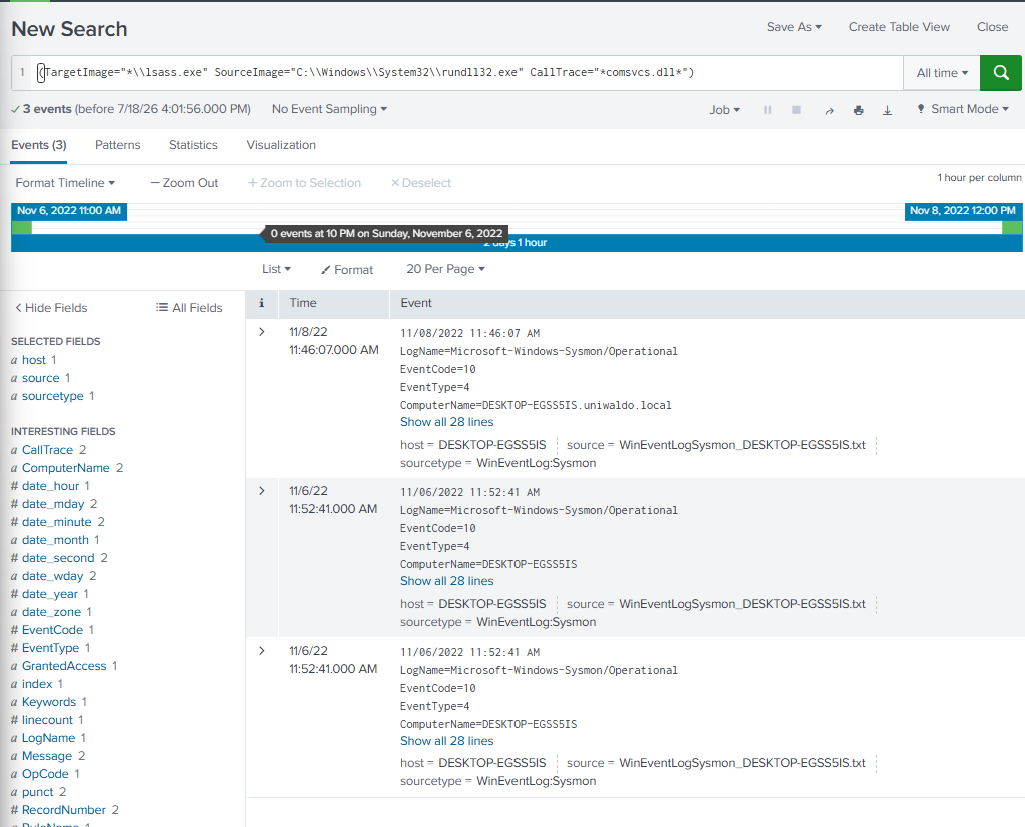
LSASS Dump via comsvcs.dll
This rule catches the classic rundll32 comsvcs.dll LSASS minidump. Translated to Splunk SPL:
PS C:\Tools\sigma-0.21\tools> python sigmac -t splunk C:\Tools\chainsaw\sigma\rules\windows\process_access\proc_access_win_lsass_dump_comsvcs_dll.yml -c .\config\splunk-windows.yml
(TargetImage="*\\lsass.exe" SourceImage="C:\\Windows\\System32\\rundll32.exe" CallTrace="*comsvcs.dll*")
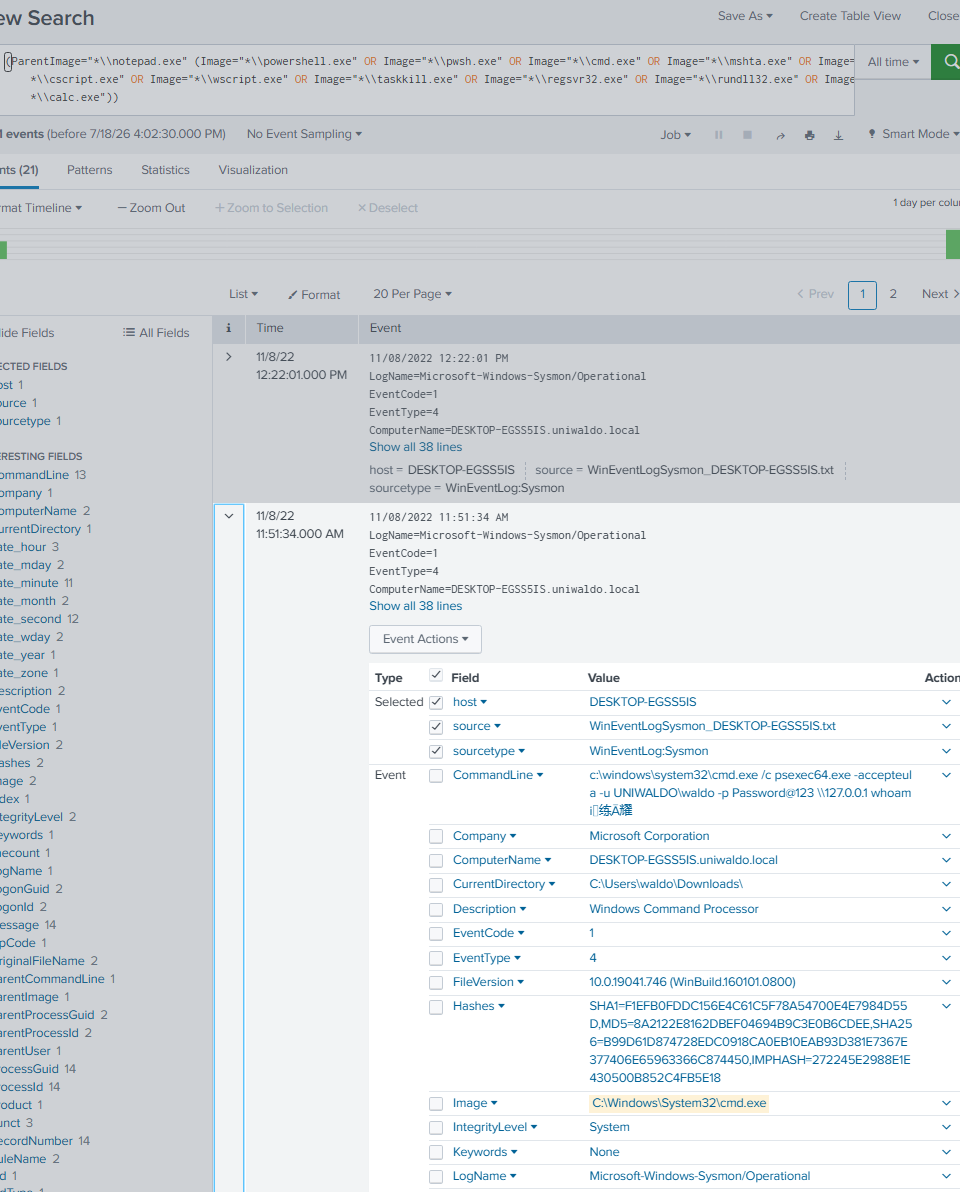
Notepad Spawning a Child Process
Notepad has no business spawning a shell or scripting host, so this rule lists the suspicious children.
PS C:\Tools\sigma-0.21\tools> python sigmac -t splunk C:\Rules\sigma\proc_creation_win_notepad_susp_child.yml -c .\config\splunk-windows.yml
(ParentImage="*\\notepad.exe" (Image="*\\powershell.exe" OR Image="*\\pwsh.exe" OR Image="*\\cmd.exe" OR Image="*\\mshta.exe" OR Image="*\\cscript.exe" OR Image="*\\wscript.exe" OR Image="*\\taskkill.exe" OR Image="*\\regsvr32.exe" OR Image="*\\rundll32.exe" OR Image="*\\calc.exe"))
Lab: Office Dropping an Archive (BloodHound)
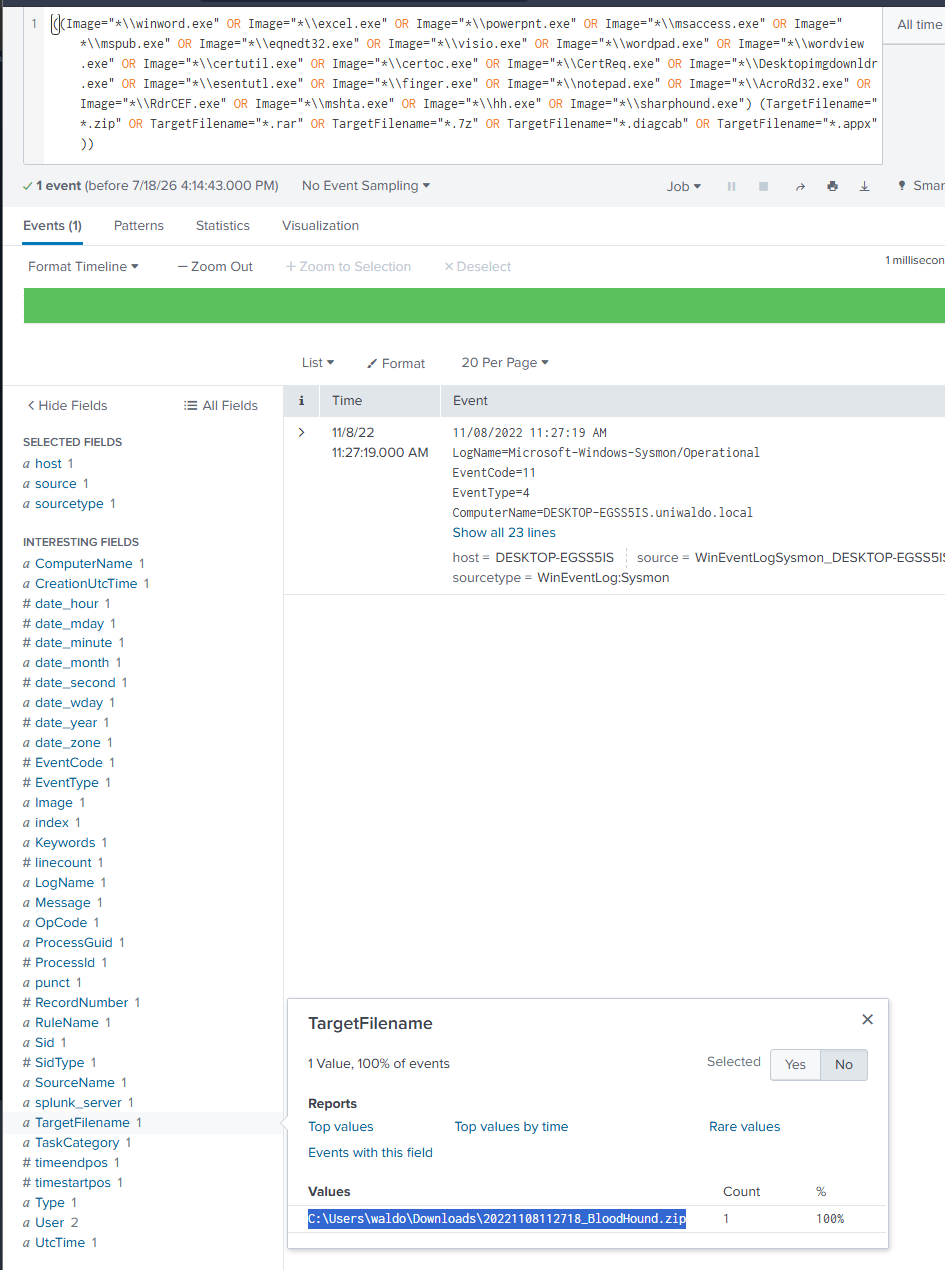
The Splunk assessment hunts for an Office or LOLBin application dropping an archive file. For this one I could not RDP in, so I went back to an earlier machine to generate the query and spin the Splunk instance up again to run it.
PS C:\Tools\sigma-0.21\tools> python sigmac -t splunk C:\Rules\sigma\file_event_win_app_dropping_archive.yml -c .\config\splunk-windows.yml
((Image="*\\winword.exe" OR Image="*\\excel.exe" OR Image="*\\powerpnt.exe" OR Image="*\\msaccess.exe" OR Image="*\\mspub.exe" OR Image="*\\eqnedt32.exe" OR Image="*\\visio.exe" OR Image="*\\wordpad.exe" OR Image="*\\wordview.exe" OR Image="*\\certutil.exe" OR Image="*\\certoc.exe" OR Image="*\\CertReq.exe" OR Image="*\\Desktopimgdownldr.exe" OR Image="*\\esentutl.exe" OR Image="*\\finger.exe" OR Image="*\\notepad.exe" OR Image="*\\AcroRd32.exe" OR Image="*\\RdrCEF.exe" OR Image="*\\mshta.exe" OR Image="*\\hh.exe" OR Image="*\\sharphound.exe") (TargetFilename="*.zip" OR TargetFilename="*.rar" OR TargetFilename="*.7z" OR TargetFilename="*.diagcab" OR TargetFilename="*.appx"))
Pasting the query into Splunk returns the dropped archive.
Lab answer.
C:\Users\waldo\Downloads\20221108112718_BloodHound.zip
Skill Assessment
Two tasks to close the module, one YARA and one Chainsaw.
Completing the Seatbelt Rule ($class2)
The rule detects the Seatbelt .NET assembly on disk, but $class2 is blank. It already keys off three other class names plus the BSJB .NET magic.
PS C:\Users\htb-student> Get-Content C:\Rules\yara\seatbelt.yar
rule seatbelt_detected {
 meta:
   description = "Rule for detecting Seatbelt"
   author = "Dimitrios Bougioukas"
 strings:
   $class1 = "WMIUtil"
   $class2 = ""
   $class3 = "SecurityUtil"
   $class4 = "MiscUtil"
   $dotnetMagic = "BSJB" ascii
 condition:
   (uint16(0) == 0x5A4D and uint16(uint32(0x3c)) == 0x4550) and $dotnetMagic and 4 of them
}
The answer format hint is L________r, so I used strings64.exe and filtered for anything starting with L and ending with r.
PS C:\Users\htb-student> strings64.exe -nobanner "C:\Samples\YARASigma\Seatbelt.exe" | Where-Object { $_ -match '^L.*r$' }
LocalAddr
LsaFreeReturnBuffer
LsaWrapper
LAPSFormatter
LolbasFormatter
LocalGroupMembershipTextFormatter
LocalSecurityAuthorityFormatter
LsaNtStatusToWinError
loader
LogMeIn Reporter
LsaWrapper fits the L________r pattern (10 characters), and it reads like a real class name rather than a formatter or a random string. I will admit I leaned on the answer-format hint and a regex here rather than deriving it purely from the assembly, which felt a little like cheating, but it lined up. Filling it in and running the rule confirms the match.
PS C:\Users\htb-student> yara64 -s C:\Rules\yara\seatbelt.yar C:\Samples\YARASigma\Seatbelt.exe
seatbelt_detected C:\Samples\YARASigma\Seatbelt.exe
0x68299:$class1: WMIUtil
0x69f18:$class2: LsaWrapper
0x682c0:$class3: SecurityUtil
0x682a1:$class4: MiscUtil
0x2b068:$dotnetMagic: BSJB
Assessment answer.
$class2 = "LsaWrapper"
Hunting Shadow-Copy Deletion with Chainsaw
The last task hunts lab_events_6.evtx for shadow-copy deletion via WMI and asks for the ScriptBlock ID.
PS C:\Tools\chainsaw> .\chainsaw_x86_64-pc-windows-msvc.exe hunt C:\Events\YARASigma\lab_events_6.evtx -s "C:\Tools\chainsaw\sigma\rules\windows\powershell\powershell_script\posh_ps_susp_win32_shadowcopy.yml" --mapping .\mappings\sigma-event-logs-all.yml
[+] Loaded 1 detection rules
[+] Loaded 1 forensic artefacts (69.6 KB)
[+] Group: Sigma
┌─────────────────────┬────────────────────────────────┬──────────┬─────────────────┬──────────────────────┐
│      timestamp      │           detections           │ Event ID │    Computer     │      Event Data      │
├─────────────────────┼────────────────────────────────┼──────────┼─────────────────┼──────────────────────┤
│ 2021-12-19 15:13:49 │ + Delete Volume Shadow         │ 4104     │ FS03.offsec.lan │ ScriptBlockId: faaeb │
│                     │ Copies via WMI with PowerShell │          │                 │ a08-01f0-4a32-ba48-b │
│                     │ - PS Script                    │          │                 │ d65b24afd28          │
│                     │                                │          │                 │ ScriptBlockText: Get │
│                     │                                │          │                 │ -WmiObject Win32_Sha │
│                     │                                │          │                 │ dowcopy | ForEach-Ob │
│                     │                                │          │                 │ ject {$_.Delete();}  │
└─────────────────────┴────────────────────────────────┴──────────┴─────────────────┴──────────────────────┘

[+] 1 Detections found on 1 documents
The detection is a Get-WmiObject Win32_Shadowcopy | ForEach-Object {$_.Delete();} one-liner, and the ScriptBlock ID pieces back together from the wrapped column.
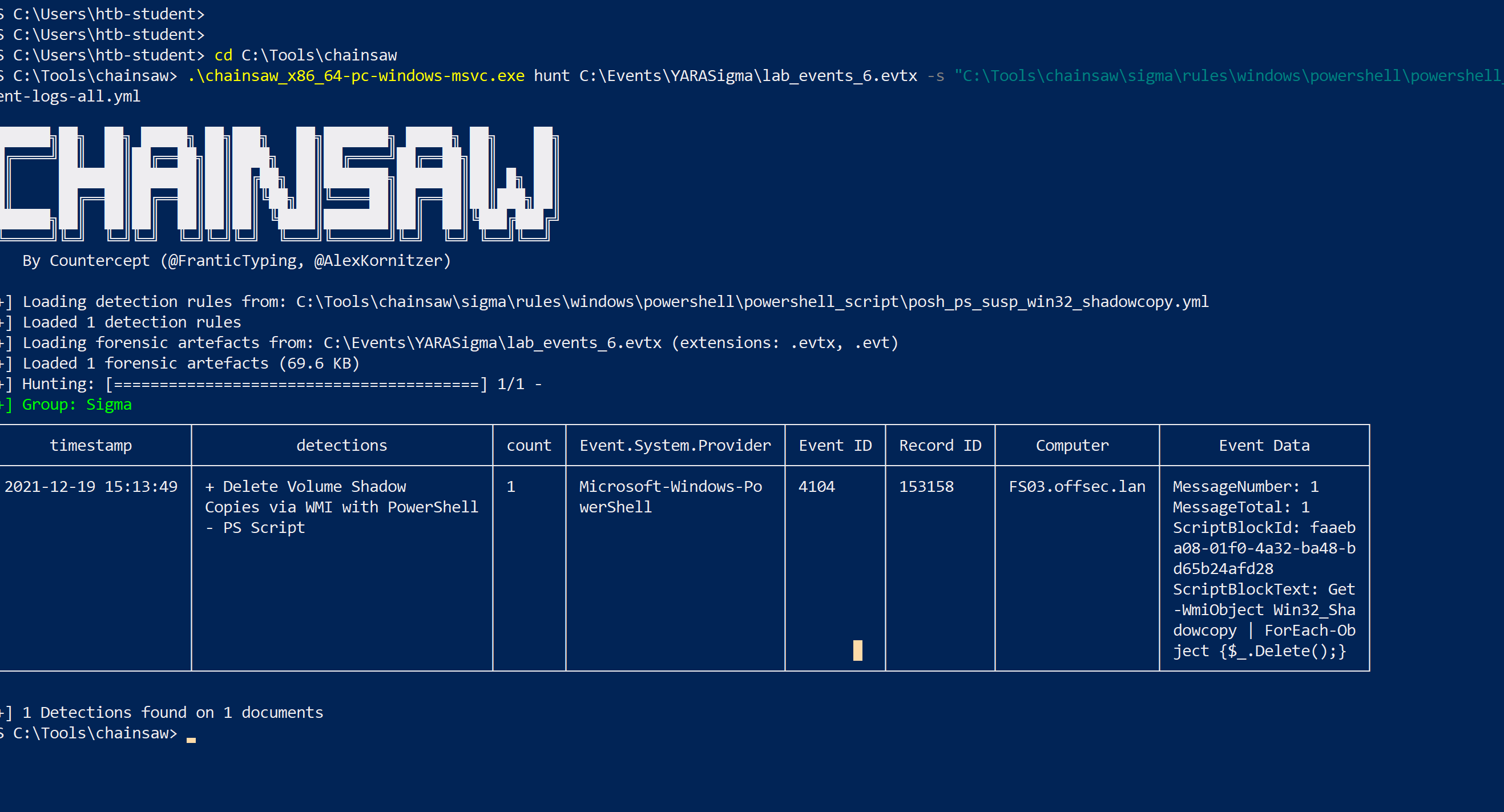
For cleaner output it is worth running Chainsaw from PowerShell rather than cmd, the wrapping is easier to read.
Assessment answer.
faaeba08-01f0-4a32-ba48-bd65b24afd28
Key Takeaway
- YARA is for files and memory, Sigma is for logs. They cover different data, but the approach is the same: describe a threat precisely, then go looking for it.
- Start from what the sample contains.
strings, imphash, and per-section entropy hand you the indicators. yarGen automates the first pass, but a human still has to trim it down to the strings that actually matter. - Good conditions do real work. Magic bytes plus a size bound plus string logic (and
peormathmodule checks) is what separates a precise rule from a noisy one. - Hunt across every surface. The same rule idea scans disk, live process memory, ETW telemetry, and raw memory images, so a single confirmed sample turns into full coverage.
- Sigma logic lives in the nesting. Lists are OR, map fields are AND, and
selection and not 1 of filter_*is how you keep signal high without drowning in benign updater noise. - A rule is only as good as its mapping, and once that is right the translation is a one-time step. The zero-detection PowerShell run was a mapping problem, not a rule problem, which is an easy trap. After that, the translator (
sigmachere, though it is deprecated now in favour of pySigma) converts the rule once, and Chainsaw or a live Splunk instance runs that same detection logic across piles of event logs.