ShadowRoast

Challenge Overview
ShadowRoast is a Medium CyberDefenders Threat Hunting lab. I investigated malicious activity in an Active Directory environment using Windows event logs and Splunk queries to identify initial access, persistence, credential access, privilege escalation, lateral movement, and collection.
| Detail | Value |
|---|---|
| Category | Threat Hunting |
| MITRE ATT&CK tactics | Defense Evasion, Credential Access |
| Primary tool | Splunk |
| Environment | Active Directory with three Windows hosts |
| Questions | 8 |
Methodology
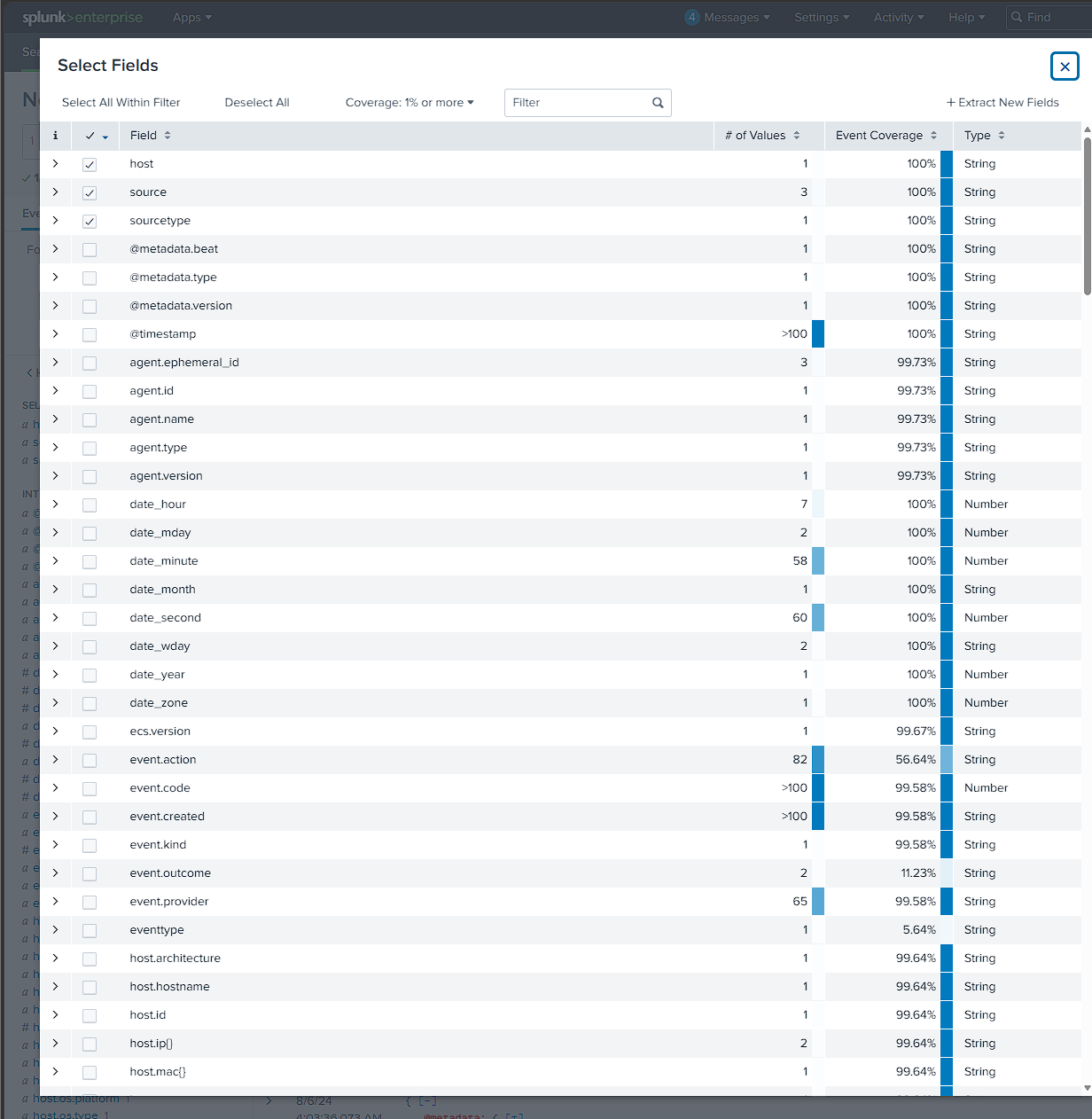
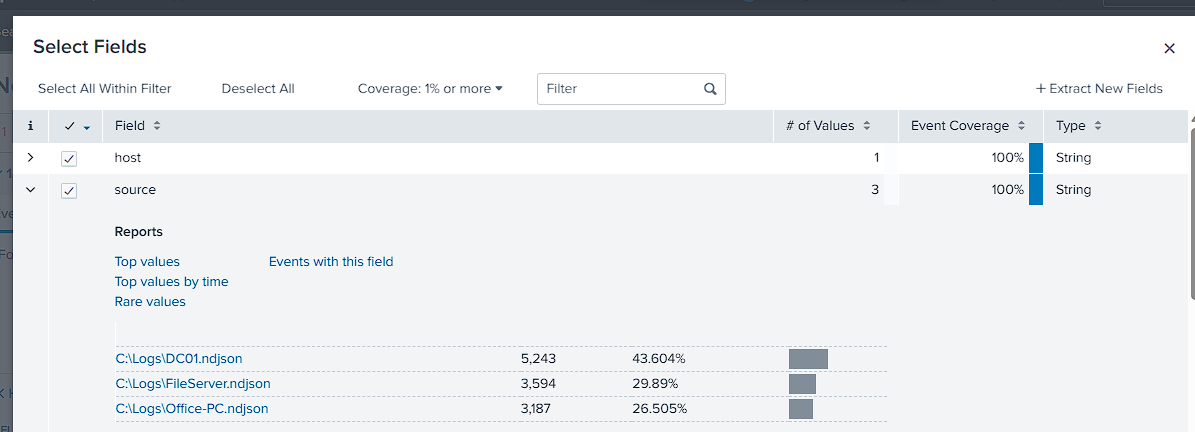
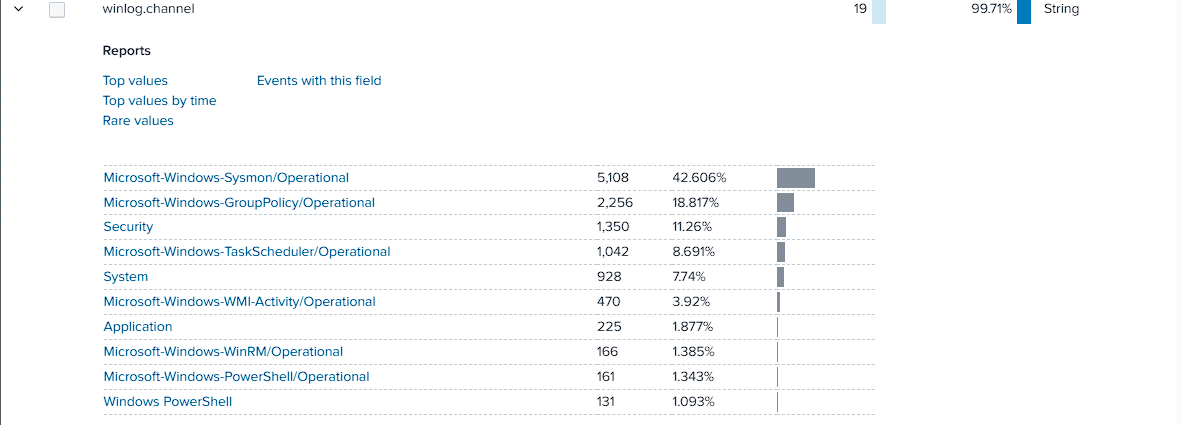
Before touching any hunting phase, I mapped the environment first: which hosts are logging (source), what type of log each event belongs to (winlog.channel), and which event IDs live in each channel. That groundwork is what let every later query be targeted instead of a blind search.
index=shadowroast
| stats count, dc(winlog.event_id) as distinct_event_ids, values(winlog.event_id) as event_ids by winlog.channel
| eval event_ids=mvjoin(event_ids, ", "), pct=round((count/12024)*100,1)
| sort - count
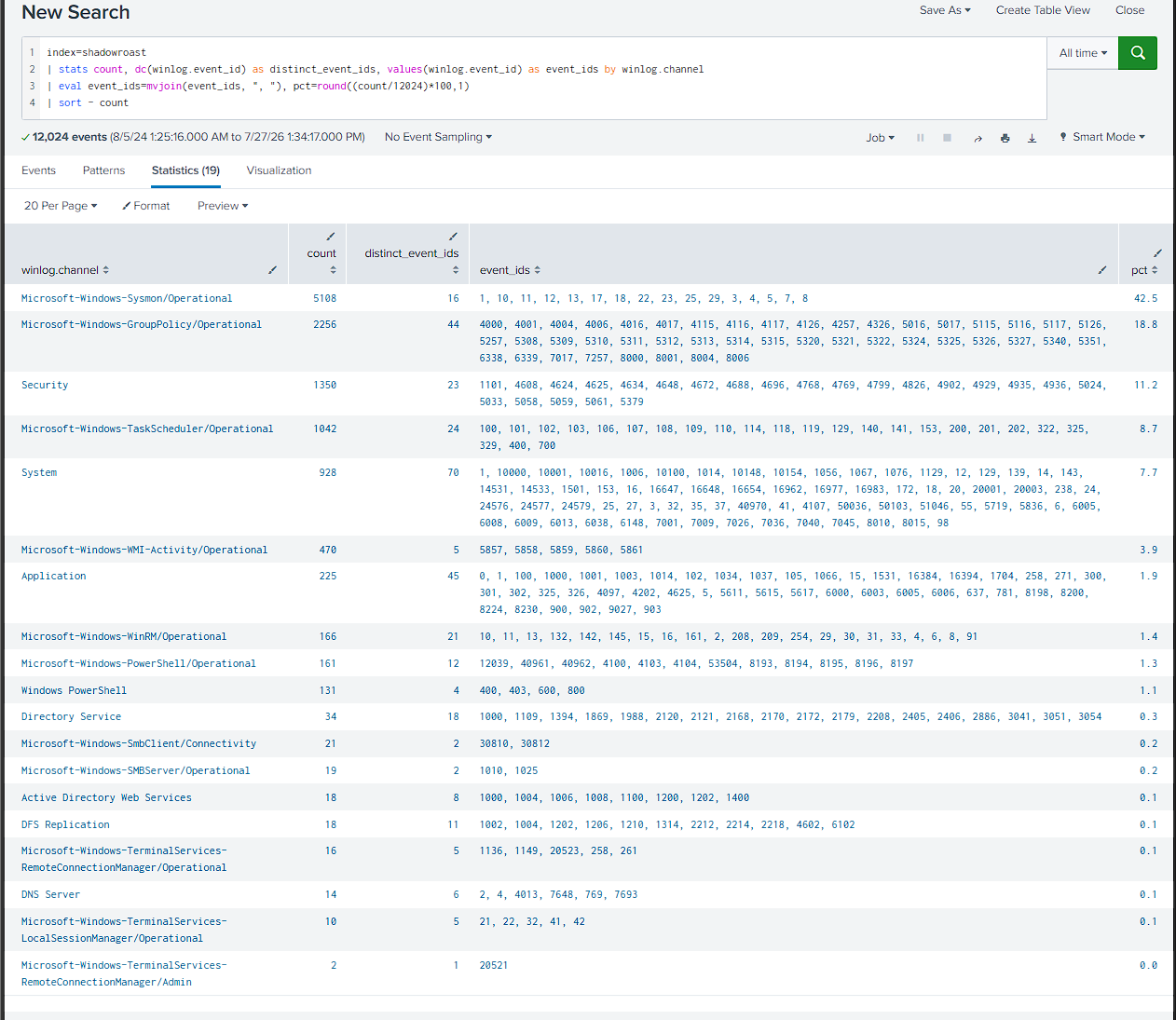
I found three hosts, DC01, FileServer, and Office-PC, sending Winlogbeat JSON across 18 log channels. Sysmon dominated at 42.6%, followed by GroupPolicy noise at 18.8%. TaskScheduler, Service Control Manager, WMI-Activity, WinRM, and PowerShell appeared in smaller but meaningful volumes. That looked more like a persistence and lateral-movement lab than routine workstation noise.
Hunting Mindset
I conducted this investigation without reading the associated questions first because I wanted to approach it like a blind incident-response case rather than a guided walkthrough.
I used two complementary hunting models:
Attack Perspective Hunting (APH): I started from a plausible attacker technique or relationship, then searched for behavior that would confirm or reject it. For Initial Access, I saw only a domain controller, file server, and workstation. With no internet-facing host visible, I prioritized valid-account abuse and a malicious file executed by a user.
Data-Based Hunting (DBH): I started from behavior in a rich data source and derived the attacker relationship without assuming a technique first. I used process names, parent-child lineage, execution paths, and user context as my main anomaly lenses. Each confirmed behavior then gave me the next pivot.
I did not stop using these models after finding Initial Access. I carried each confirmed artifact into the next phase and let the evidence reshape my hypothesis:
| Phase | How I hunted it |
|---|---|
| Initial Access | I used APH to test valid-account abuse and remote execution first. When neither explained the entry point, I used DBH on Sysmon file creation and process lineage, which led me to AdobeUpdater.exe. |
| Persistence | I carried the confirmed malware process forward and asked how it would survive a restart. I checked Registry Run keys first, then ruled out services and scheduled tasks with the telemetry available. |
| Privilege Escalation and Credential Access | I followed changes in user context through the process tree. The SYSTEM named-pipe sequence suggested token impersonation, while the captured asreproast command identified Rubeus and its target. |
| DCShadow | I treated DefragTool.exe as an unknown and followed its LDAP, RPC, DNS, and replication behavior. That evidence formed the DCShadow hypothesis, which I tested against DC01 replication events. |
| Lateral Movement | I followed the compromised tcooper identity across hosts, then correlated logon types, source IPs, and wsmprovhost.exe child processes to reconstruct WinRM followed by RDP. |
| Collection and Staging | I reviewed every FileServer process in the attacker window, isolated an unusual PowerShell process, and traced it to CrashDump.zip. I stopped at staging because I found no transfer evidence. |
APH helped me ask what the attacker would likely do next. DBH kept those ideas grounded in the logs and gave me the next pivot when a hypothesis failed.
Initial Access
Applying APH to the Entry Point
I tested valid-account abuse first because a full logon timeline was the fastest way to confirm or reject it. That search exposed suspicious activity, but none of it explained how the attacker entered the environment.
| Hypothesis | Why I tested it | Result |
|---|---|---|
FileShareService credential abuse |
A service account showed an interactive logon | The session was real, but its source and credential acquisition were not established |
| Remote WinRM activity on August 5 | SMB, WinRM, and PowerShell appeared close together | PowerShell ran through ConsoleHost, not wsmprovhost.exe, so it was local |
| PowerShell download | Invoke-WebRequest appeared in Sanderson’s session |
The URL was not recoverable because supporting script-block and network telemetry was absent |
I kept these as useful evidence gaps, but I did not have enough support to call any of them the initial-access vector.
Eliminated hypothesis 1: FileShareService interactive logon
I sorted Security events 4624 and 4625 across all hosts:
index=shadowroast winlog.channel="Security" (winlog.event_id=4624 OR winlog.event_id=4625)
| stats earliest(_time) as first_seen, count, values(winlog.event_id) as event_ids, values(winlog.event_data.LogonType) as logon_types by winlog.event_data.TargetUserName, winlog.computer_name
| eval first_seen=strftime(first_seen, "%Y-%m-%d %H:%M:%S")
| sort first_seen

I saw Sanderson log into Office-PC normally at 01:03:38. Forty-three seconds later, FileShareService showed an interactive logon on FileServer, which was unusual enough for me to investigate.
I traced the logon to FileServer itself, not Office-PC. Credential Manager reads and ParentImage = explorer.exe confirmed a real desktop session, but I could not find a local process that explained the access. I ruled out Kerberoasting because the account never appeared as the roasted target. I also ruled out brute force because the failed logon occurred three hours after the successful one.
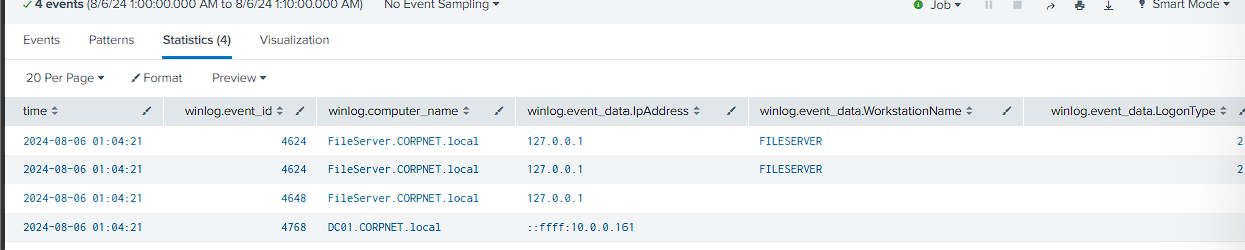
Verdict: suspicious account activity and an unresolved credential gap, but not the confirmed entry point.
Eliminated hypothesis 2: August 5 remote execution
I checked August 5 on the theory that the entry point might predate the known August 6 activity:
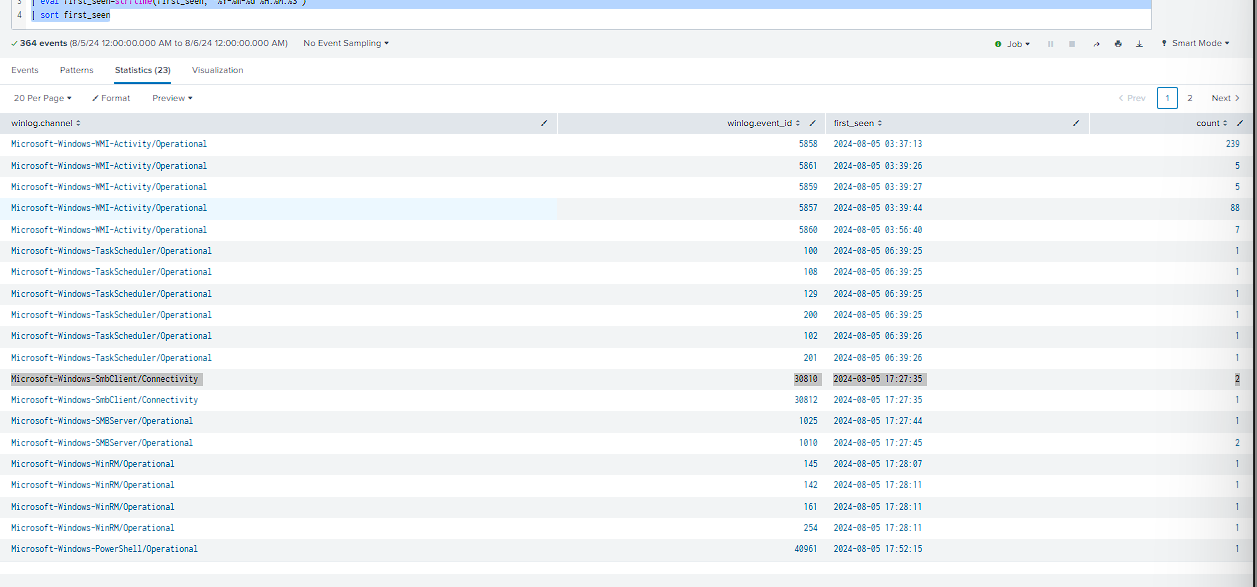
I initially read the SMB, WinRM, and PowerShell sequence at 17:27 to 17:53 as remote execution.
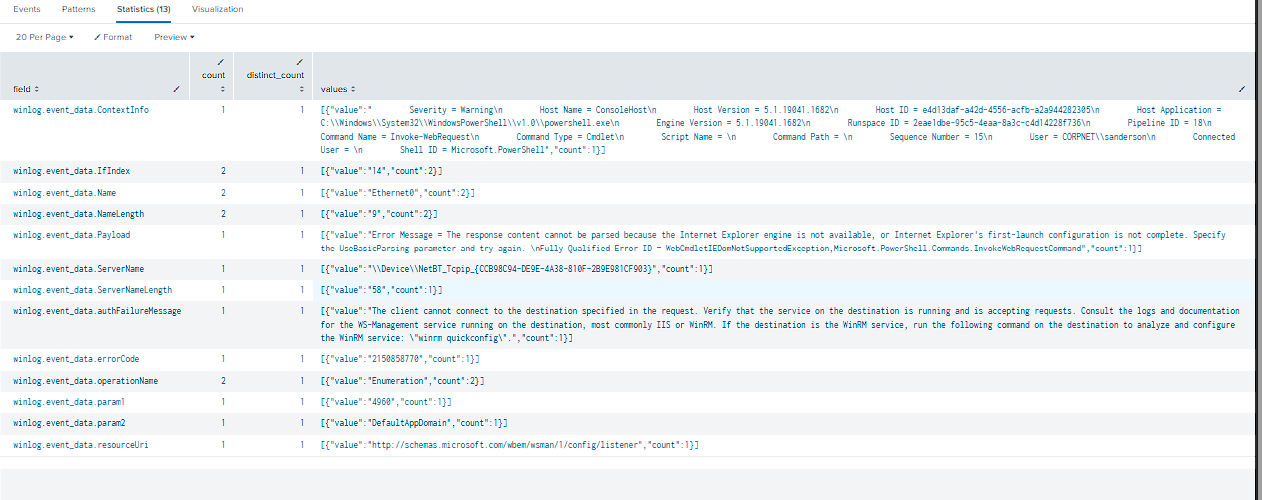
When I checked ContextInfo, Host Application = powershell.exe showed that this was a local ConsoleHost session. I would expect a remote WinRM PowerShell session to run through wsmprovhost.exe.
I still found Sanderson’s local PowerShell running Invoke-WebRequest at 17:53:26, but my supporting DNS and network searches returned nothing:
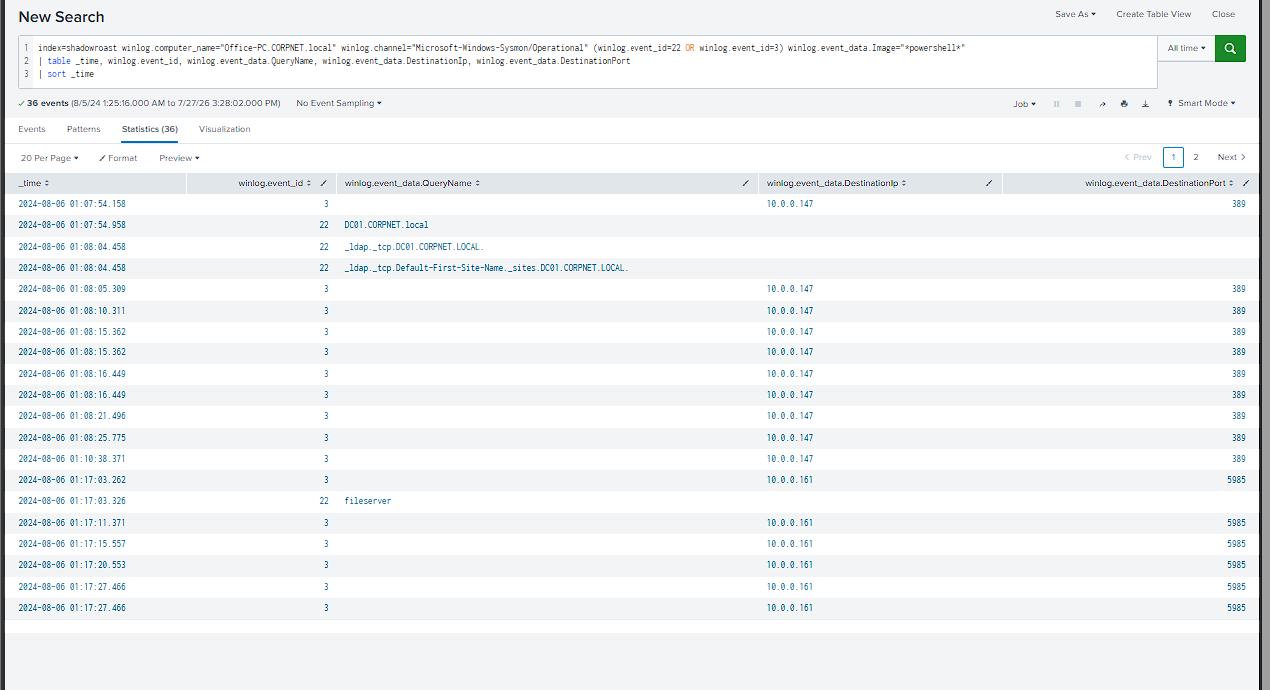
PowerShell script-block logging was not enabled, so I could not recover the URL. I also traced an earlier WMI-Activity burst at 03:37 to WIN-TSGC03SS1KV, an unrelated base-template host on another network range.
Verdict: local PowerShell activity with an unresolved download lead, but no evidence of remote WinRM initial access.
Winning Pivot: Data-Based File Hunting
After the APH hypotheses failed to establish entry, I switched to DBH and searched Sysmon Event ID 11 for executables and scripts written across all three hosts. This removed the delivery assumption and looked directly for suspicious file creation:
index=shadowroast winlog.channel="Microsoft-Windows-Sysmon/Operational" winlog.event_id=11
(winlog.event_data.TargetFilename="*.exe" OR winlog.event_data.TargetFilename="*.dll" OR winlog.event_data.TargetFilename="*.ps1" OR winlog.event_data.TargetFilename="*.vbs" OR winlog.event_data.TargetFilename="*.bat" OR winlog.event_data.TargetFilename="*.scr")
| table _time, winlog.computer_name, winlog.event_data.Image, winlog.event_data.TargetFilename
| sort _time

My sweep exposed AdobeUpdater.exe in Sanderson’s Downloads directory. Its updater-themed name and user-writable location made it my strongest lead. I then confirmed execution and lineage with Process GUID and Parent Process GUID:
index=shadowroast winlog.computer_name="Office-PC.CORPNET.local" winlog.event_id=1
earliest="08/06/2024:01:04:00" latest="08/06/2024:01:16:00"
| eval time=strftime(_time, "%Y-%m-%d %H:%M:%S")
| table time, winlog.event_data.User, winlog.event_data.Image, winlog.event_data.ProcessGuid, winlog.event_data.ParentProcessGuid, winlog.event_data.ParentImage, winlog.event_data.CommandLine
| sort time
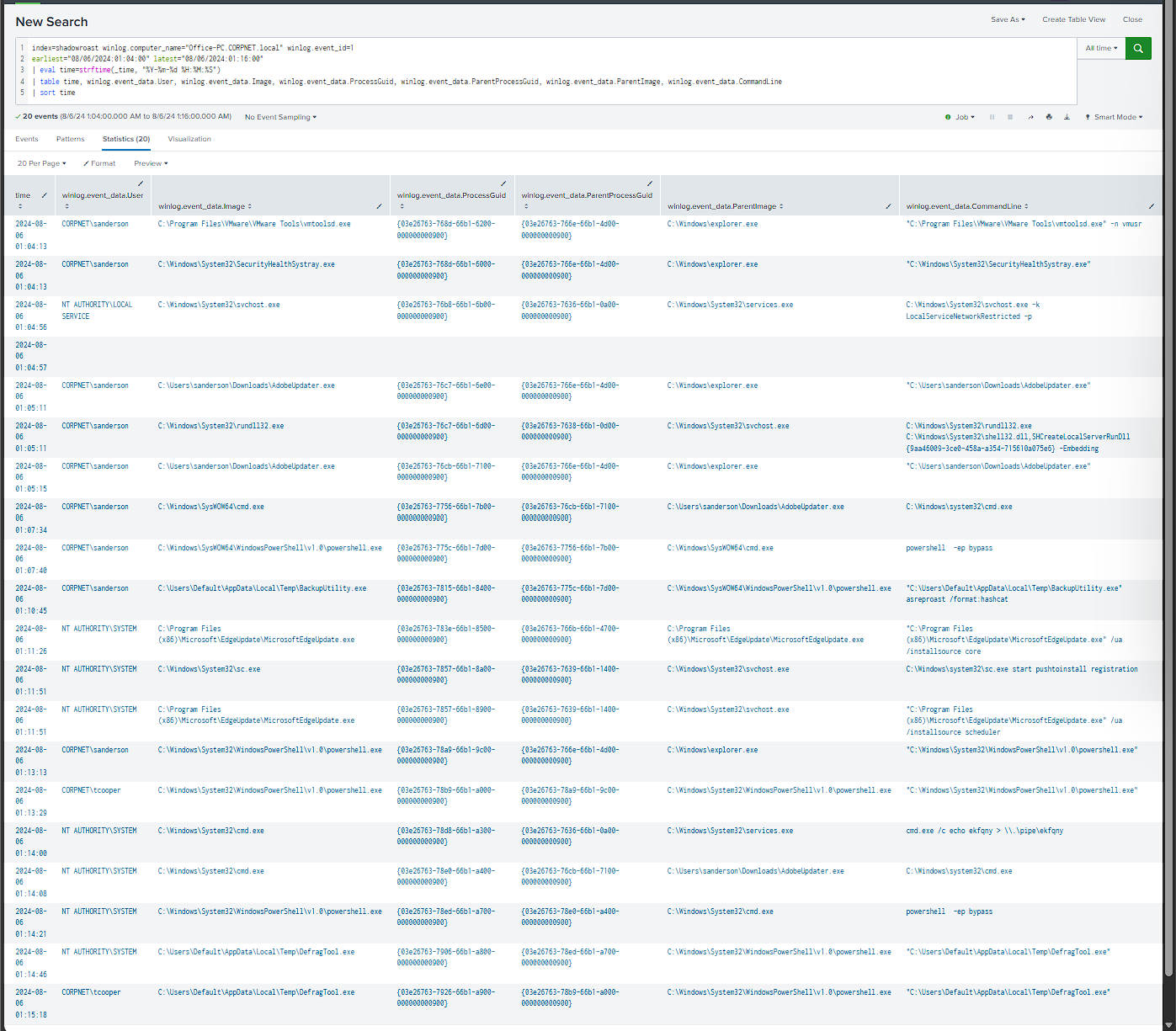
explorer.exe (sanderson's shell)
├── AdobeUpdater.exe (01:05:15, sanderson)  ← INITIAL ACCESS
│   ├── cmd.exe (01:07:34) → powershell.exe -ep bypass (01:07:40)
│   │       └── BackupUtility.exe "asreproast /format:hashcat" (01:10:45)  ← CREDENTIAL HARVESTING
│   └── cmd.exe (01:14:08, SYSTEM) → powershell.exe -ep bypass (01:14:21, SYSTEM)
│           └── DefragTool.exe (01:14:46, SYSTEM)
└── powershell.exe (01:13:13, sanderson)
    └── powershell.exe (01:13:29, tcooper)  ← 2nd token theft
        └── DefragTool.exe (01:15:18, tcooper)
Initial-Access Conclusion
AdobeUpdater.exe executed from Sanderson’s interactive explorer.exe session and launched the command-to-PowerShell chain. Its activity dropped three disguised tools, BackupUtility.exe, SystemDiagnostics.ps1, and DefragTool.exe, under C:\Users\Default\AppData\Local\Temp\.
I concluded that user execution of the fake updater was the initial-access event. Its Downloads location and lure-style name are consistent with phishing, but I did not find email, browser, or download-origin evidence that proves the delivery mechanism.
Persistence
I started from the impersonation finding rather than running a blind persistence sweep. Since AdobeUpdater.exe and its children later ran as SYSTEM, I checked Registry Run keys first:
index=shadowroast winlog.channel="Microsoft-Windows-Sysmon/Operational" winlog.event_id=13 winlog.event_data.TargetObject="*\\Run\\*"
| table _time, winlog.computer_name, winlog.event_data.TargetObject, winlog.event_data.Details, winlog.event_data.Image
| sort _time
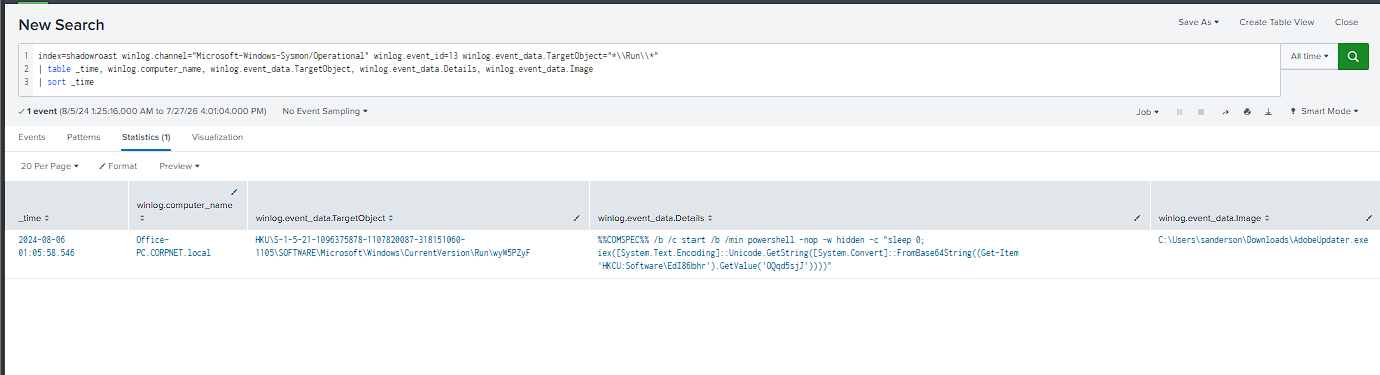
I confirmed persistence on the first query. AdobeUpdater.exe wrote HKU\...\Run\wyW5PZyF 43 seconds after execution. The random value name matched the same operational-security pattern I saw elsewhere in the intrusion:
cmd /b /c start /b /min powershell -nop -w hidden -c "iex([Text.Encoding]::Unicode.GetString([Convert]::FromBase64String((Get-Item 'HKCU:Software\EdI86bhr').GetValue('OQqd5sjJ'))))"
I classified this as fileless registry-based persistence. The Run key does not hold the payload directly. It reads a second Registry value, decodes it, and executes it through iex, so the script never touches disk. I then cross-checked the MITRE Persistence technique list against the available event IDs and found no additional service or scheduled-task persistence. This Run key was the only persistence mechanism supported by the dataset.
Privilege Escalation & Credential Harvesting
The process tree already showed the privilege transition, but I wanted to validate the mechanism separately. Immediately before the child processes began running as SYSTEM, I found:
NT AUTHORITY\SYSTEM cmd.exe /c echo ekfqny > \\.\pipe\ekfqny, spawned from services.exe.
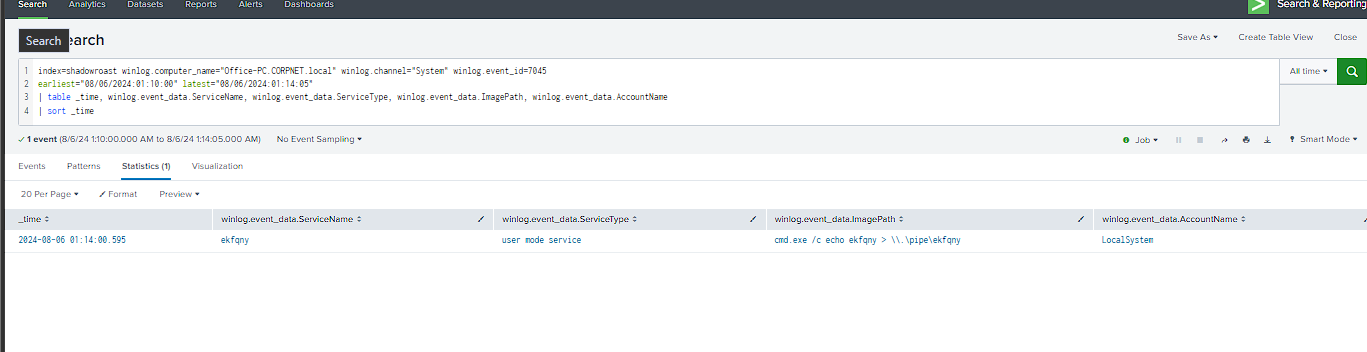
I found the throwaway ekfqny service running as LocalSystem and writing to a named pipe immediately before the process context changed to SYSTEM. I treated that sequence as consistent with named-pipe token impersonation, including Potato-style privilege-escalation patterns.
Tool identification: I identified BackupUtility.exe as Rubeus from its captured asreproast /format:hashcat command. Rubeus also supports ticket manipulation and S4U operations, but this command specifically proves the credential-harvesting action.
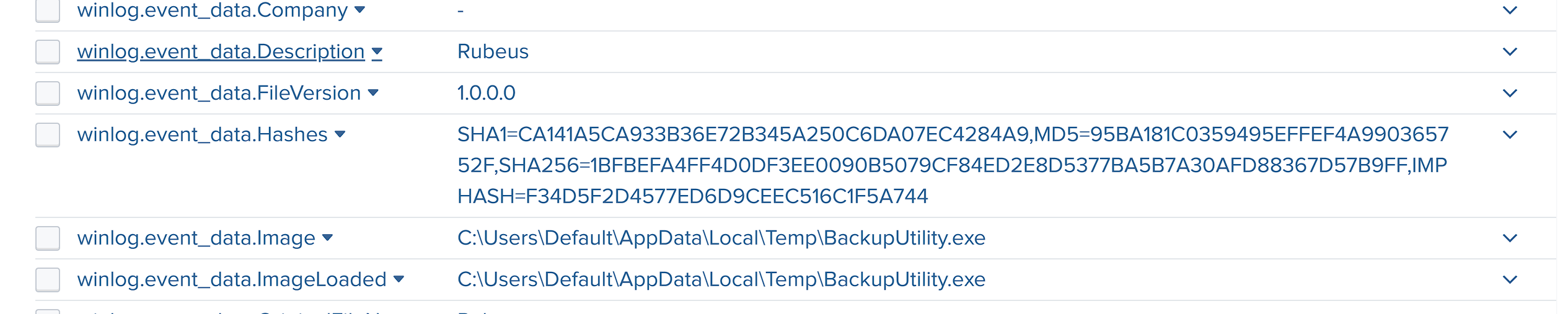
To identify the target, I checked Event ID 4768 around the Rubeus execution. A 4768 event for tcooper appeared at 01:10:48, three seconds after the command. I could therefore confirm that the AS-REP Roasting activity targeted tcooper and received a KDC response. Later events prove that tcooper’s identity was compromised and used across the network, but I could not see the offline cracking step or prove that the later access came directly from the roasted material.
DC Rogue / DCShadow
I returned to DefragTool.exe, which was dropped in the same chain as the AS-REP Roasting tool. It ran twice, once as SYSTEM and once as tcooper, with only the bare executable path and no visible arguments. Since the command line did not explain its purpose, I pivoted to its network behavior.
index=shadowroast winlog.event_data.Image="C:\\Users\\Default\\AppData\\Local\\Temp\\DefragTool.exe" winlog.event_id=1
| table _time, winlog.computer_name, winlog.event_data.User, winlog.event_data.Image, winlog.event_data.ParentImage, winlog.event_data.CommandLine
| sort _time
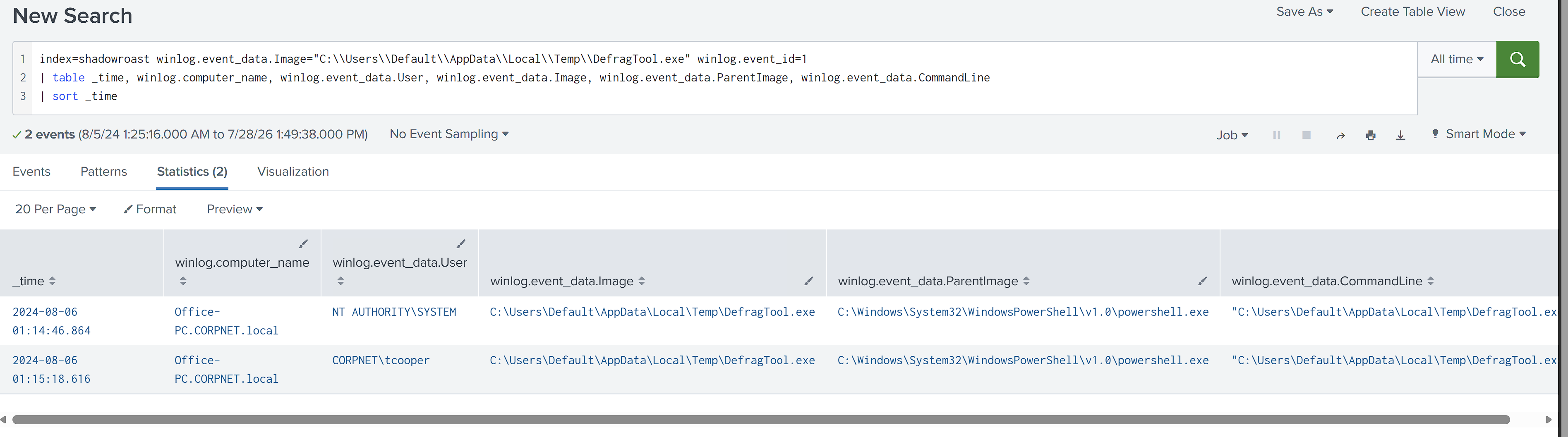
I combined Sysmon Event ID 3 for network connections with Event ID 22 for DNS queries. One showed what the process contacted, while the other showed what it searched for beforehand:
index=shadowroast winlog.event_data.Image="C:\\Users\\Default\\AppData\\Local\\Temp\\DefragTool.exe" (winlog.event_id=3 OR winlog.event_id=22)
| table _time, winlog.event_id, winlog.event_data.DestinationIp, winlog.event_data.DestinationPort, winlog.event_data.QueryName
| sort _time
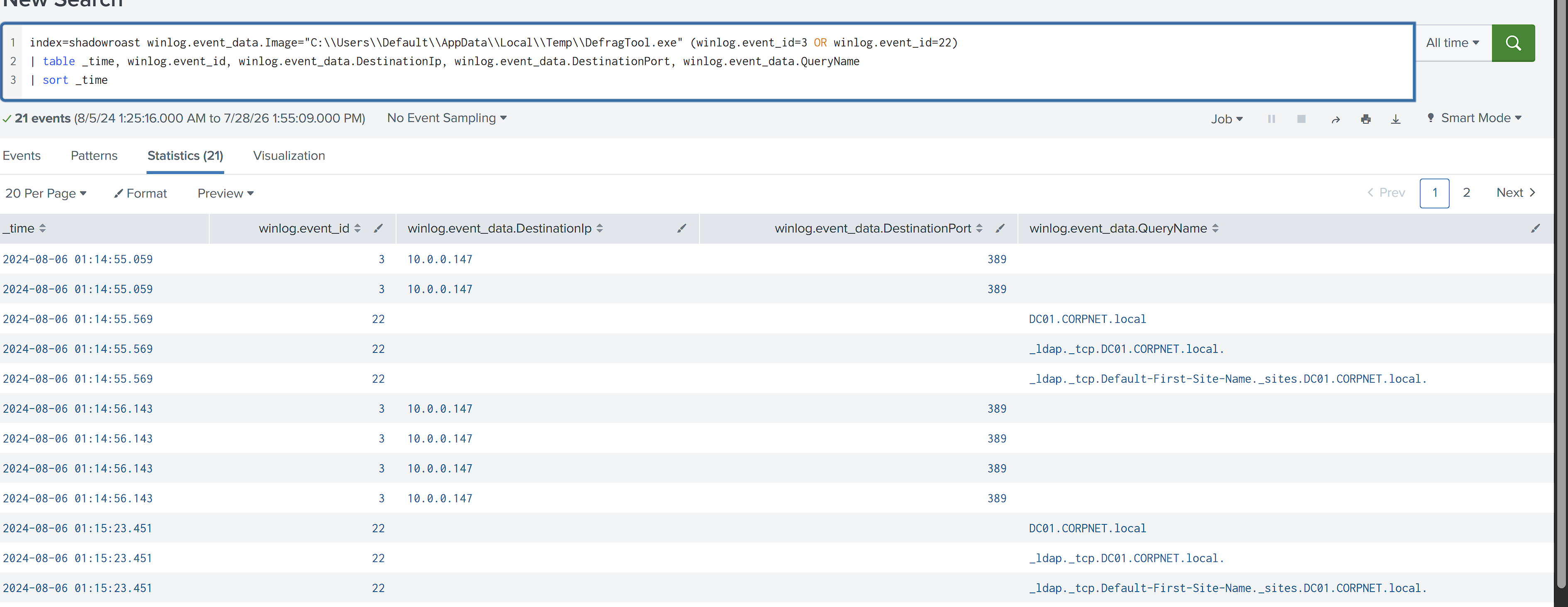
I found DefragTool.exe reaching DC01 over LDAP and RPC within seconds of both executions. The same behavior appeared under SYSTEM and tcooper. Because the command line contained no arguments, I used this repeatable network fingerprint as the next clue to its purpose.
I then checked DC01 for the corresponding inbound LDAP or RPC connection from Office-PC. DC01’s Sysmon data did not record it at the relevant timestamp, so I kept that as a telemetry gap rather than treating it as evidence of absence:
index=shadowroast winlog.computer_name="DC01.CORPNET.local" winlog.event_id=3 winlog.event_data.SourceIp="10.0.0.184"
| table _time, winlog.event_data.Image, winlog.event_data.SourceIp, winlog.event_data.DestinationPort
| sort _time
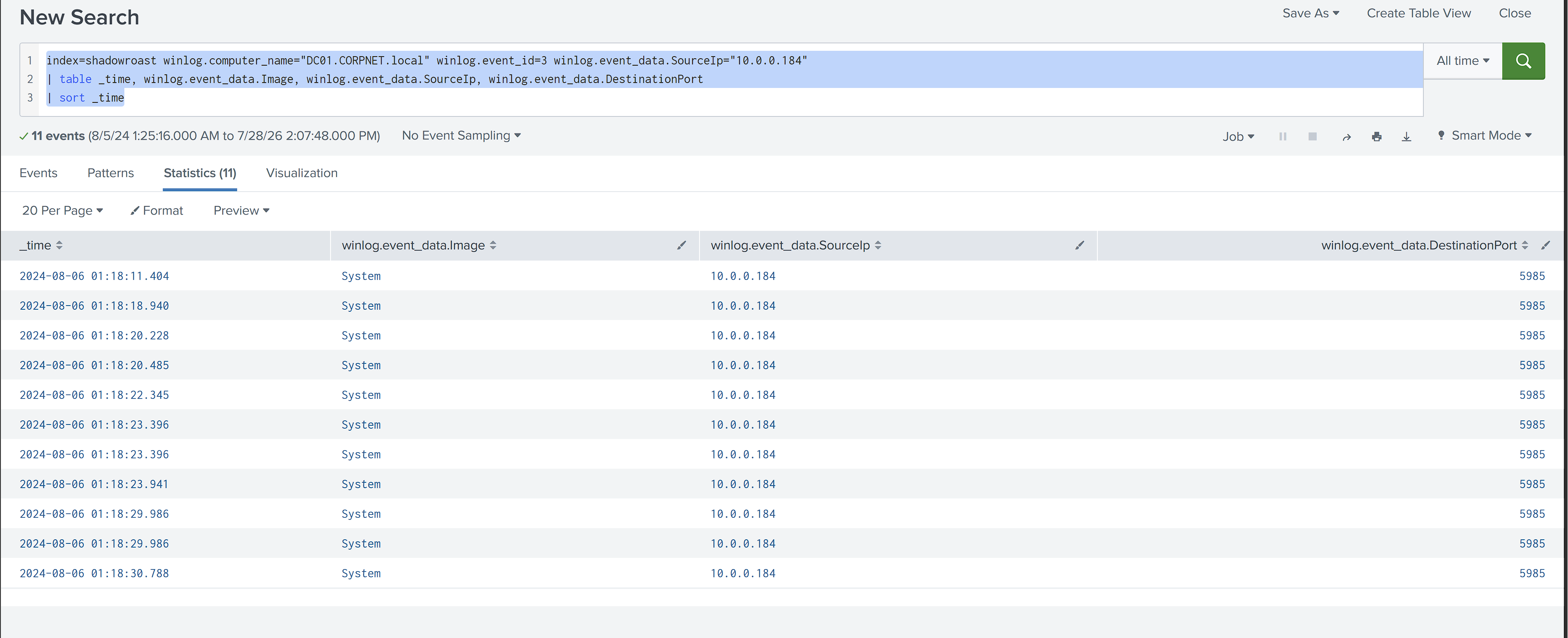
I widened the search to every event family recorded on DC01 during the same window:
index=shadowroast winlog.computer_name="DC01.CORPNET.local"
earliest="08/06/2024:01:14:50" latest="08/06/2024:01:15:25"
| stats count by winlog.channel, winlog.event_id
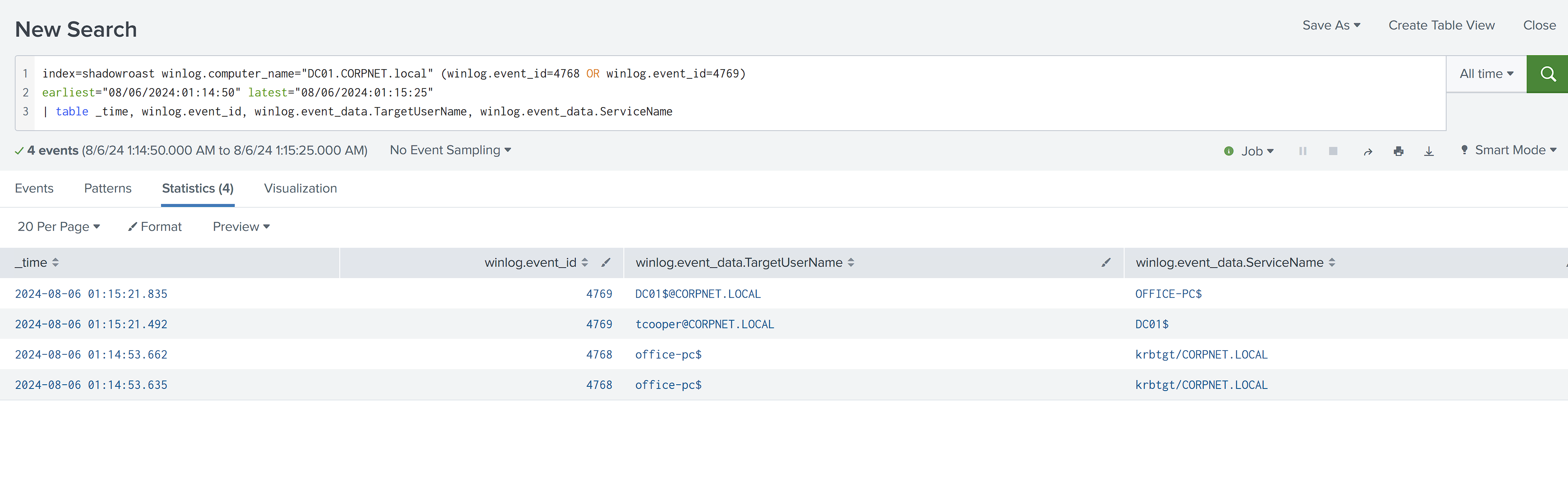
| sort - count
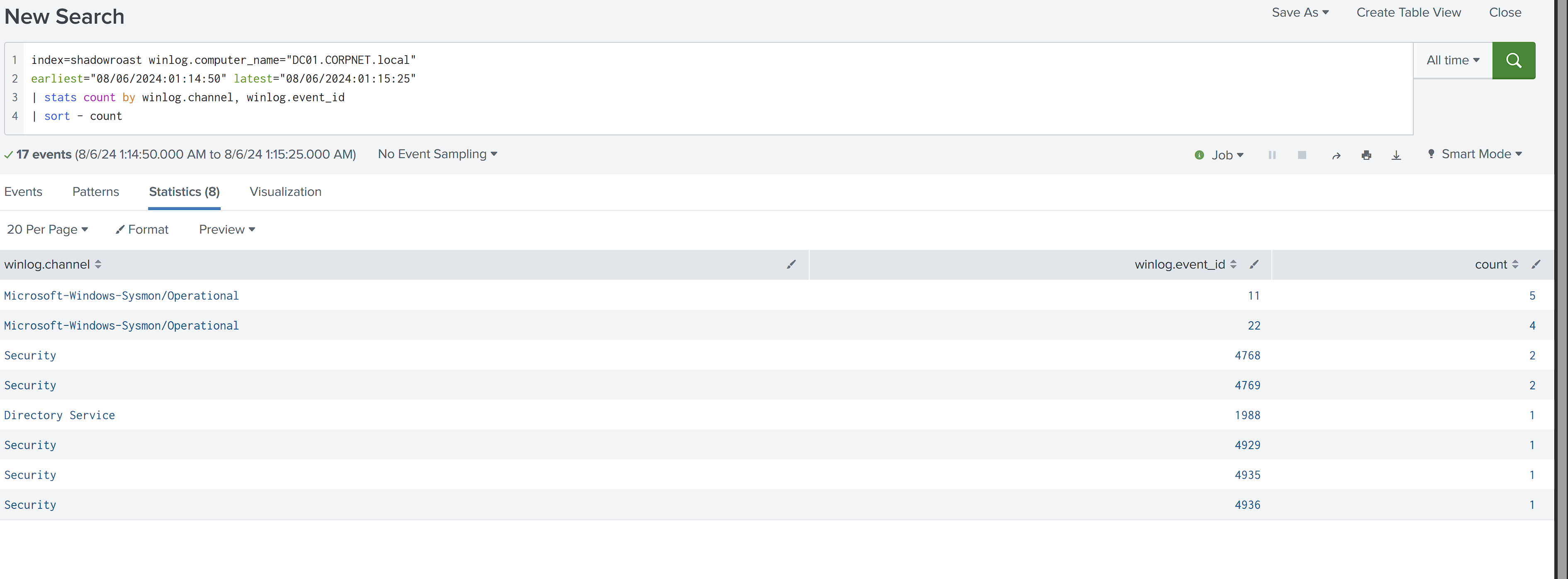
I checked Event IDs 4768 and 4769 first. The only fresh TGT issuance in this window was Event ID 4768 for Office-PC$ at 01:14:53. The tcooper and DC01$ tickets visible in 4769 were being used during this period, but they were not necessarily issued during it.
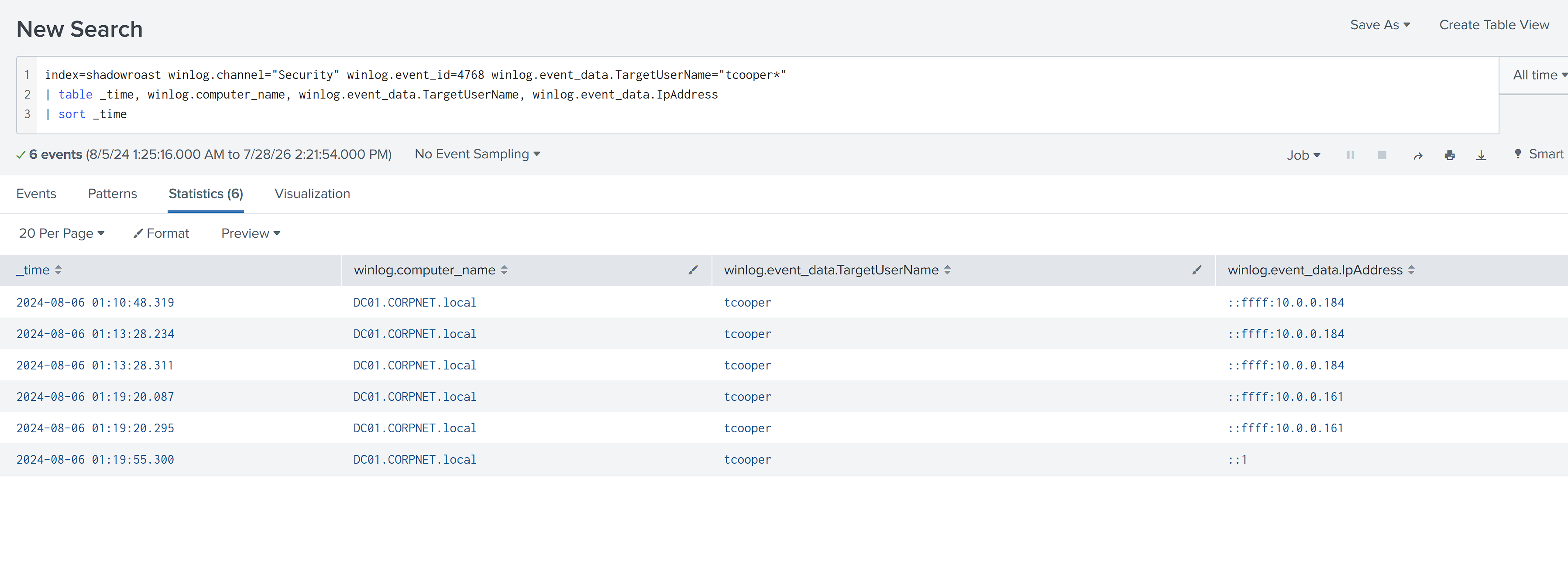
I then searched backward for tcooper’s first TGT and found it at 01:10:48, sourced from Office-PC (10.0.0.184). That was three seconds after the Rubeus asreproast command at 01:10:45.
Next, I checked DC01’s Event ID 22 DNS activity in the DCShadow window:
index=shadowroast winlog.computer_name="DC01.CORPNET.local" winlog.event_id=22
earliest="08/06/2024:01:14:50" latest="08/06/2024:01:15:25"
| table _time, winlog.event_data.Image, winlog.event_data.QueryName
| sort _time
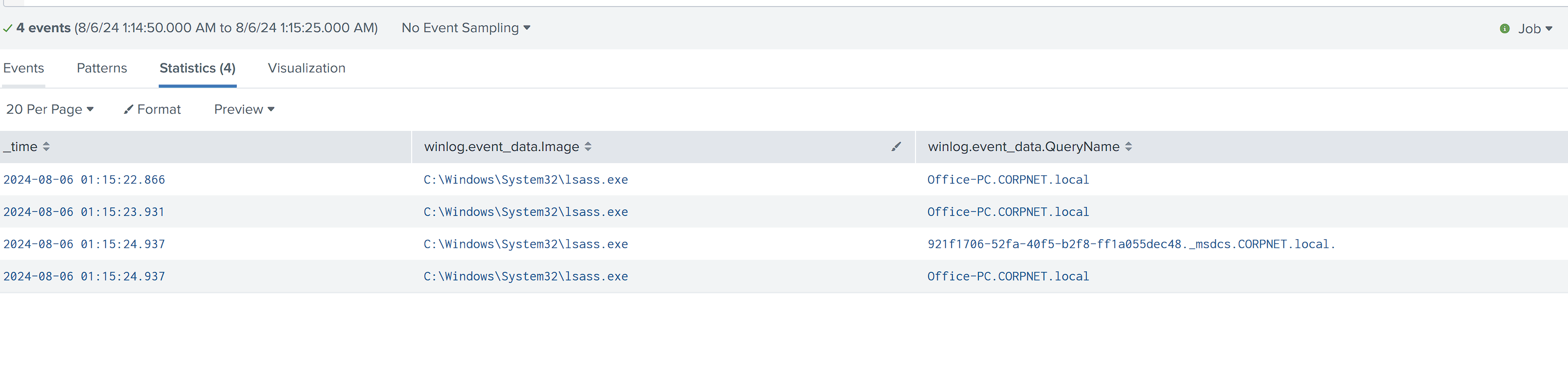
I found DC01’s NTDS process, lsass.exe, resolving Office-PC both by hostname and through a _msdcs GUID lookup. That behavior suggested DC01 was treating Office-PC as a replication peer, so I checked for rogue domain-controller registration.
The direct DS object-access event, Event ID 4662, was not present in the Security log. I treated that as an auditing gap and fell back to the available Directory Service Replication events from 4928 through 4937:
index=shadowroast winlog.channel="Security" (winlog.event_id=4928 OR winlog.event_id=4929 OR winlog.event_id=4930 OR winlog.event_id=4934 OR winlog.event_id=4935 OR winlog.event_id=4936)
| eval time=strftime(_time, "%Y-%m-%d %H:%M:%S"), status=coalesce(winlog.event_data.StatusCode, winlog.event_data.ReplicationStatusCode, winlog.event_data.AuditStatusCode)
| rename winlog.event_id as EventID, winlog.event_data.SourceAddr as Source_Host, status as Status
| table time, EventID, Source_Host, Status
| sort time
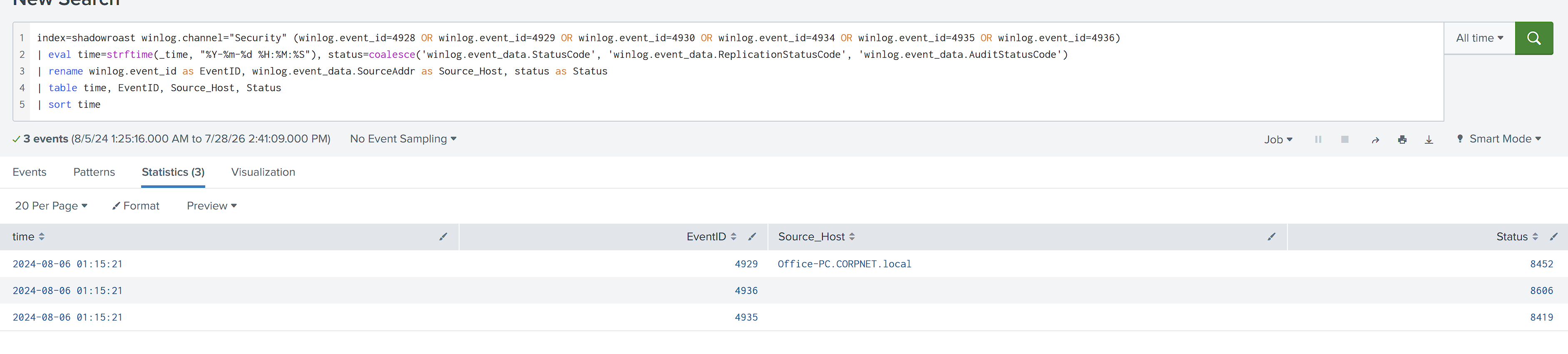
I found three DCShadow-related replication events at the same second, 01:15:21:
4929: Office-PC registered and was then removed as a replication source, error code84524935: replication failure begins, error code84194936: replication failure ends, error code8606
I interpreted the sequence as Office-PC claiming to be a replication source, attempting replication, and failing immediately. The register, attempt, and reject pattern supports a DCShadow attempt without proving a successful directory modification.
Strict Replication Consistency Check
index=shadowroast winlog.computer_name="DC01.CORPNET.local" winlog.channel="Directory Service" winlog.event_id=1988
| eval time=strftime(_time, "%Y-%m-%d %H:%M:%S")
| rename winlog.event_data.param1 as Source_Host, winlog.event_data.param2 as Target_Object, winlog.event_data.param4 as Consistency_Check
| table time, Source_Host, Target_Object, Consistency_Check
I found Event ID 1988 recording Office-PC.CORPNET.local as the source and CN=tcooper,CN=Users,DC=CORPNET,DC=local as the target object. It fired at the same moment as the failed 4929, 4935, and 4936 sequence. I used it to identify what the rogue source tried to update and to support the conclusion that Strict Replication Consistency rejected the attempt. I did not treat it as proof that tcooper’s object was successfully modified.
Tool identification: Mimikatz implements DCShadow through lsadump::dcshadow. I correlated that behavior with DefragTool.exe, then checked its recorded hash:
index=shadowroast winlog.event_data.Image="C:\\Users\\Default\\AppData\\Local\\Temp\\DefragTool.exe" winlog.event_id=1
| table _time, winlog.computer_name, winlog.event_data.User, winlog.event_data.Hashes
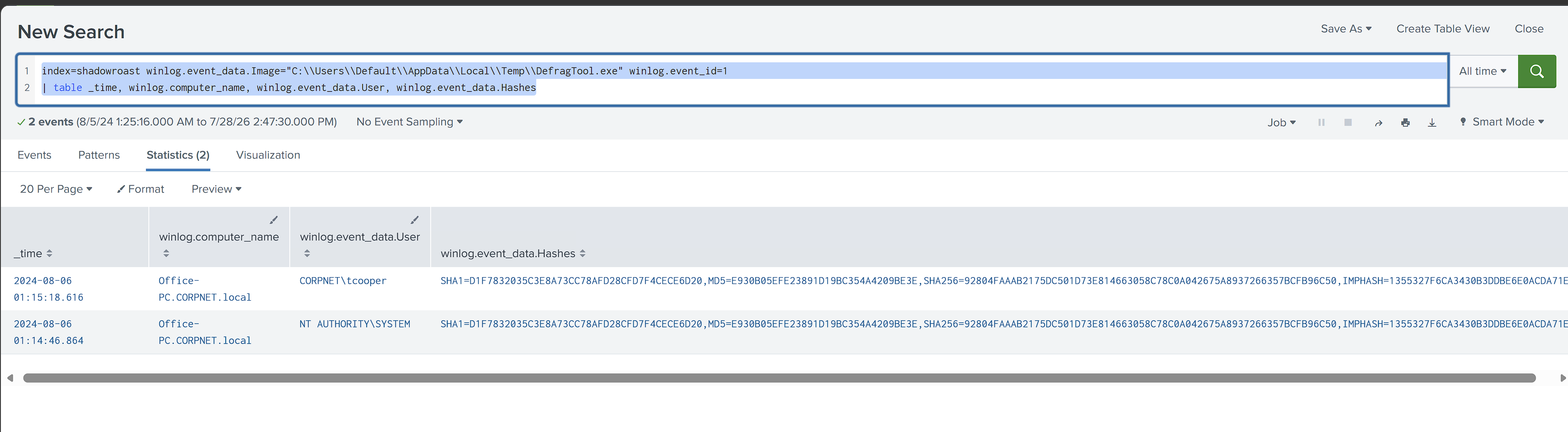
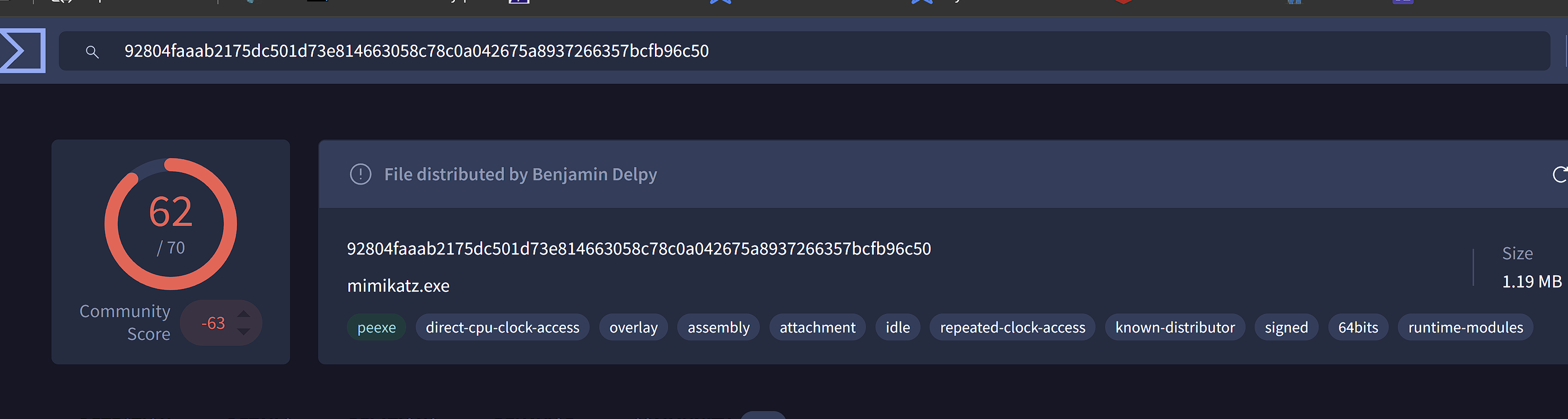 I concluded that
 DefragTool.exe, a renamed Mimikatz binary supported by its hash and behavior, attempted DCShadow registration from Office-PC against tcooper’s AD object. DC01 recorded the registration in Event ID 4929, followed by failure events 4935 and 4936 with status codes 8452, 8419, and 8606. Event ID 1988 identified the same target object. My verdict: the attempt targeted tcooper, but DC01 likely rejected it. I could not confirm a successful modification.
Lateral Movement
I first investigated spoolsv.exe and tsprint.dll, which appeared on FileServer and DC01, as a possible PrintNightmare-style path. I traced them to legitimate RDP print redirection and ruled that path out.
I pivoted to the account already known to be compromised, tcooper, and checked where else that identity appeared:
index=shadowroast (winlog.event_data.TargetUserName="tcooper" OR winlog.event_data.SubjectUserName="tcooper") winlog.channel="Security"
| stats count by winlog.computer_name
| sort - count
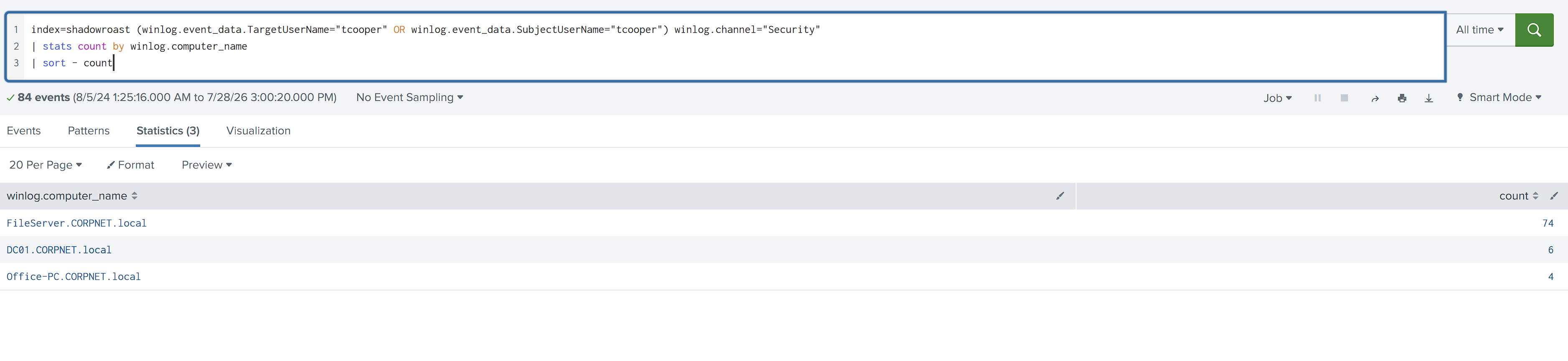
I found 74 events involving tcooper on FileServer and 6 on DC01, confirming that the identity reached hosts beyond Office-PC.
Because FileServer contained most of the activity, I examined its logon types and source IPs first:
index=shadowroast winlog.computer_name="FileServer.CORPNET.local" (winlog.event_data.TargetUserName="tcooper" OR winlog.event_data.SubjectUserName="tcooper") winlog.channel="Security"
| stats count by winlog.event_data.LogonType, winlog.event_data.IpAddress
| sort - count
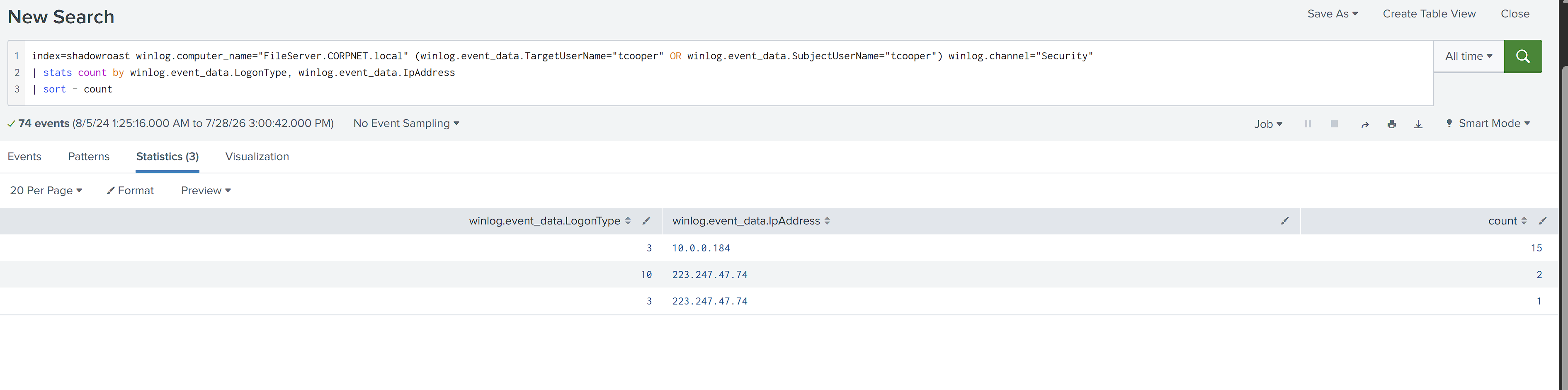 I found two access paths using the same identity:
 LogonType 3 network access from Office-PC (10.0.0.184) and LogonType 10 RDP access from the external IP 223.247.47.74. I pulled the raw chronology to determine which came first:
index=shadowroast winlog.computer_name="FileServer.CORPNET.local" (winlog.event_data.TargetUserName="tcooper" OR winlog.event_data.SubjectUserName="tcooper") winlog.channel="Security" winlog.event_id=4624
| table _time, winlog.event_data.LogonType, winlog.event_data.IpAddress
| sort _time
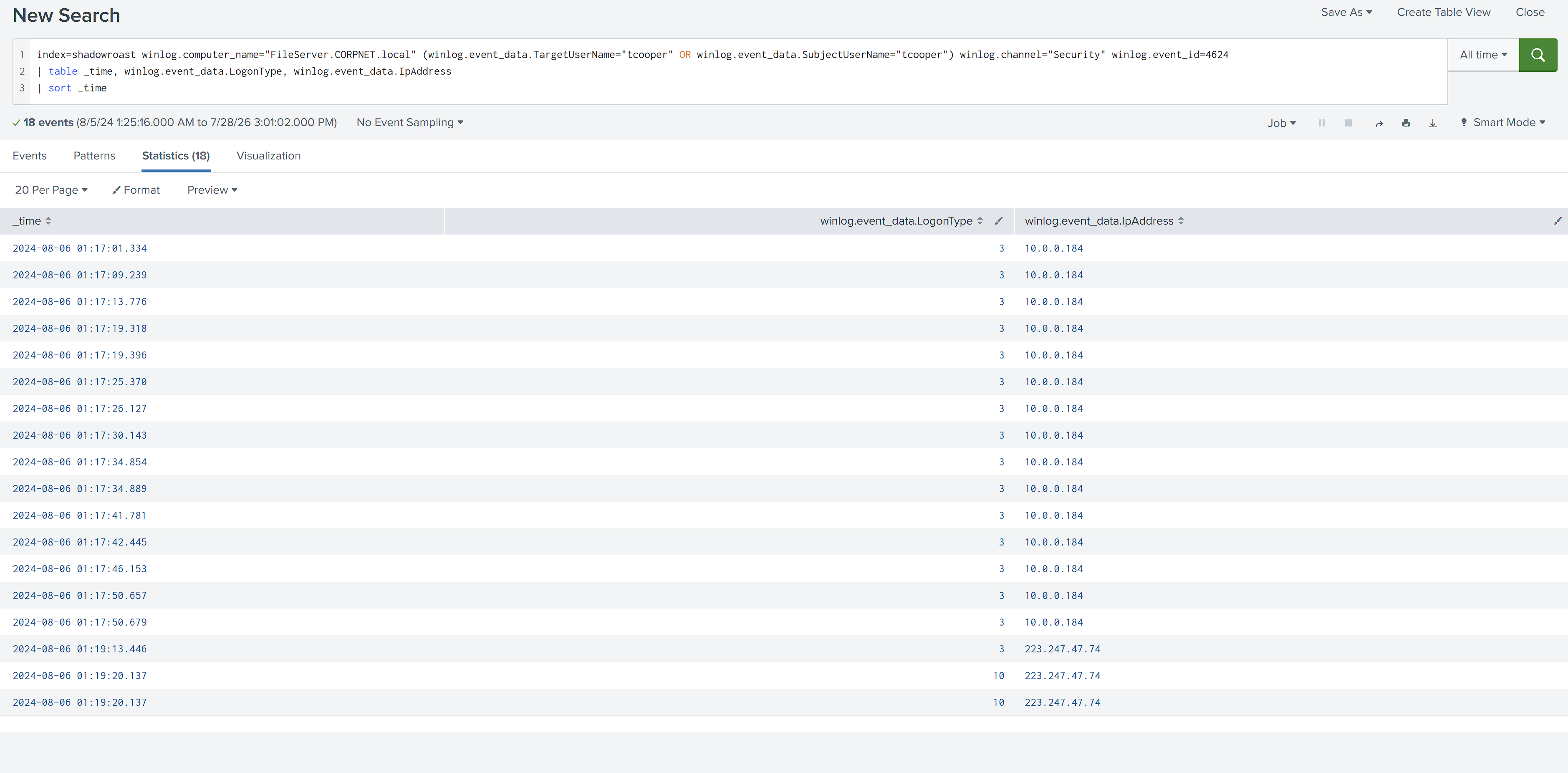 I confirmed 15 network logons from Office-PC between
 01:17:01 and 01:17:50, followed by network pre-authentication from the external IP at 01:19:13 and the RDP logon at 01:19:20. I then checked what the WinRM session actually executed:
index=shadowroast winlog.computer_name="FileServer.CORPNET.local" winlog.event_id=1 winlog.event_data.User="*tcooper*"
earliest="08/06/2024:01:17:00" latest="08/06/2024:01:18:00"
| table _time, winlog.event_data.Image, winlog.event_data.ParentImage, winlog.event_data.CommandLine
| sort _time
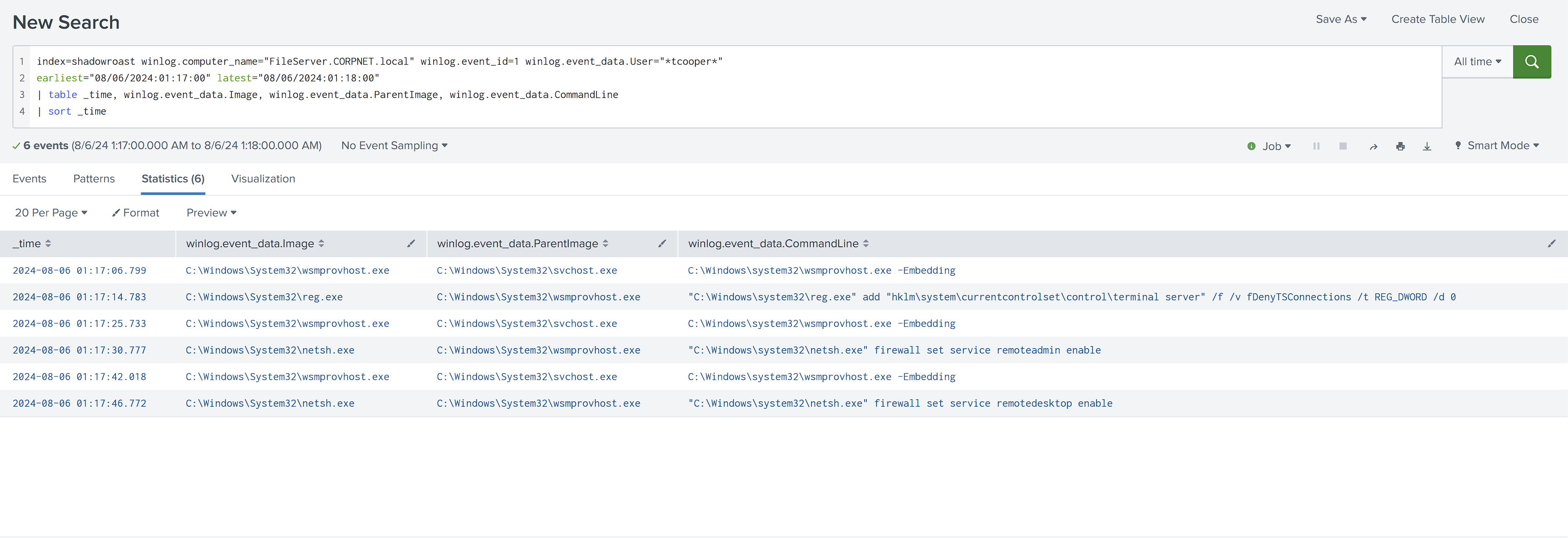
I found reg.exe add ... fDenyTSConnections /d 0 and two netsh firewall set service remoteadmin/remotedesktop enable commands, all spawned by wsmprovhost.exe. That parent confirmed remote WinRM execution. I concluded that the compromised tcooper session enabled RDP remotely, after which the external RDP connection arrived.
I reconstructed the chain as: token theft on Office-PC, WinRM to FileServer at 01:17:06, RDP and firewall enablement, WinRM session closure, and external RDP access at 01:19:20.
I found the same reg and netsh sequence on DC01 roughly one minute later, showing that the attacker repeated the RDP-enablement technique on the domain controller.
Collection and Staging
I audited every process that ran on FileServer across the full session window so I would not miss a collection or staging action:
index=shadowroast winlog.computer_name="FileServer.CORPNET.local" winlog.event_id=1
earliest="08/06/2024:01:17:00" latest="08/06/2024:02:30:00"
| stats count by winlog.event_data.Image
| sort - count
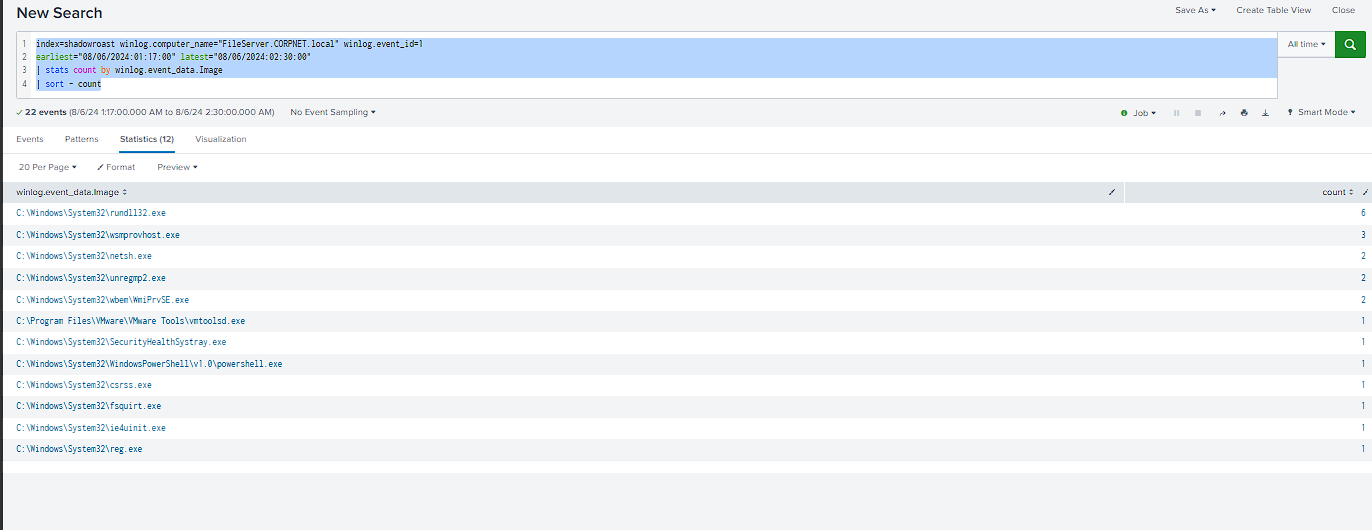
I ruled most of the activity out as routine DISM staging, driver-install temporary files, PowerShell policy checks, and Windows session setup. One PowerShell process did not fit, so I traced everything associated with it:
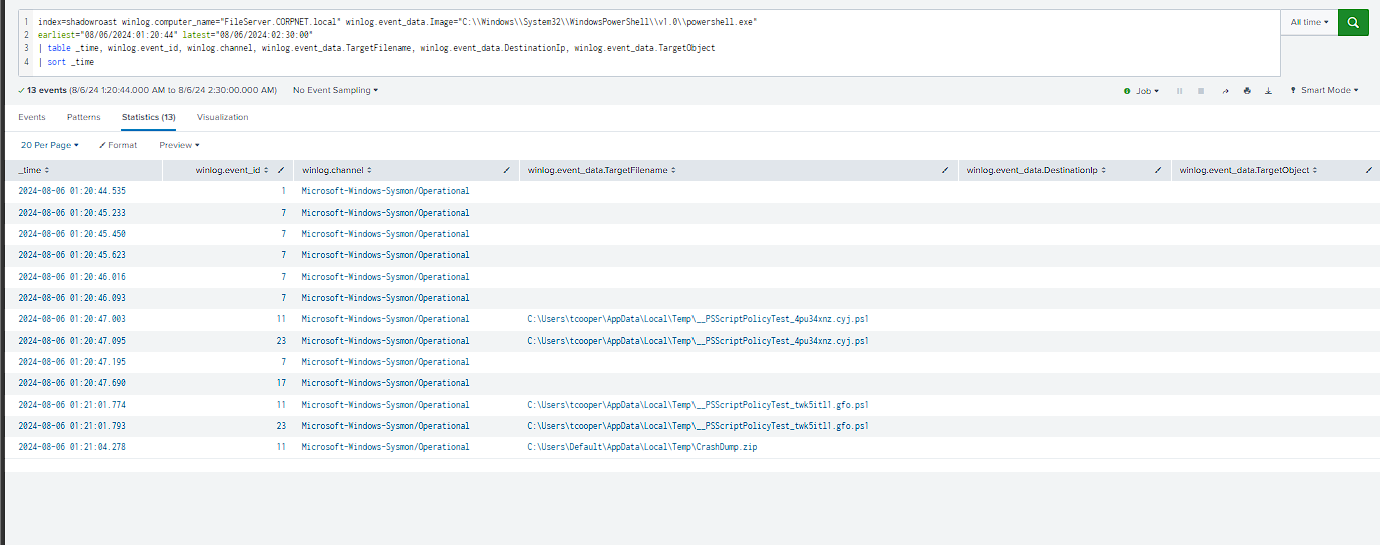
I found a single powershell.exe process running Set-Location 'C:\Shares' and creating CrashDump.zip under C:\Users\Default\AppData\Local\Temp\ 20 seconds later. The location matched the disguise and staging pattern used elsewhere in the intrusion. I searched globally for extraction, network transfer, or later references to the archive and found none. I could confirm collection and staging, but not onward exfiltration.
Master Timeline
| Time | Host | Event | Phase |
|---|---|---|---|
| 01:03:38 | Office-PC | sanderson logs in (normal) | Baseline |
| 01:05:15 | Office-PC | AdobeUpdater.exe executed |
Initial Access |
| 01:05:58 | Office-PC | Registry Run key wyW5PZyF written |
Persistence |
| 01:07:09–19 | Office-PC | Drops BackupUtility.exe, SystemDiagnostics.ps1, DefragTool.exe |
Initial Access |
| 01:07:34–40 | Office-PC | cmd.exe → powershell.exe -ep bypass (sanderson) |
Initial Access |
| 01:10:45 | Office-PC | BackupUtility.exe (Rubeus) asreproast /format:hashcat |
Credential Harvesting |
| 01:10:48 | Office-PC | tcooper’s first TGT, 3s after asreproast |
Credential Harvesting |
| 01:13:13–29 | Office-PC | sanderson’s PowerShell spawns child as tcooper (token theft) | Privilege Escalation |
| 01:14:00 | Office-PC | ekfqny named-pipe write (SYSTEM impersonation) |
Privilege Escalation |
| 01:14:08–21 | Office-PC | cmd.exe → powershell.exe -ep bypass, as SYSTEM |
Privilege Escalation |
| 01:14:46 | Office-PC | DefragTool.exe runs as SYSTEM (1st execution) |
DCShadow |
| 01:14:54–55 | Office-PC→DC01 | LDAP/RPC connections to DC01 begin | DCShadow |
| 01:15:18 | Office-PC | DefragTool.exe runs as tcooper (2nd execution) |
DCShadow |
| 01:15:21 | DC01 | DCShadow push targets tcooper’s AD object (4929/4935/4936/1988) |
DCShadow |
| 01:15:22–24 | DC01 | lsass.exe resolves Office-PC by name + DC-GUID |
DCShadow |
| 01:17:01–50 | Office-PC→FileServer | tcooper’s WinRM session (15x network logons) | Lateral Movement |
| 01:17:14–46 | FileServer | reg/netsh enable RDP + firewall rules |
Lateral Movement |
| ~01:18:18–28 | DC01 | Same reg/netsh sequence repeats |
Lateral Movement |
| 01:19:13–20 | FileServer | External IP (223.247.47.74) pre-auth, then RDP lands |
Lateral Movement |
| 01:19:55 | DC01 | tcooper TGT sourced locally (::1), interactive session on DC01 |
Lateral Movement |
| 01:21:04 | FileServer | CrashDump.zip created after Set-Location 'C:\Shares' |
Collection and Staging |
Key Lessons Learned
-
Failed hypotheses still create useful pivots. When valid-account abuse and remote WinRM did not explain Initial Access, I switched to Sysmon Event
11and foundAdobeUpdater.exe. -
DCShadow failure produced a recognizable event sequence. Events
4929,4935, and4936occurred in the same second with non-zero status codes. The absence of successful replication events supported a failed or rejected attempt. -
Event
1988identified the target, not a successful modification. It namedtcooperas the targeted AD object and indicated that Strict Replication Consistency likely blocked or recorded the rejected operation. -
A bare command line does not mean inactivity. When
DefragTool.exeexposed no arguments, I pivoted to Sysmon Events3and22, process context, hashes, and AD replication events. -
AD DS replication audit events provided stronger evidence than network metadata. Sysmon Event
3only showed thatDefragTool.execonnected to DC01. Windows Security Event4929, generated by Active Directory Domain Services under Detailed Directory Service Replication auditing, recorded Office-PC being removed as a replica source. Events4935and4936then recorded the replication failure beginning and ending. -
Telemetry gaps limited my conclusions. Sysmon could not capture interactive console input, ordinary file reads, or protocol contents. Missing PowerShell Events
4103and4104and Directory Service Events4662and5136also restricted what I could prove. -
A missing event did not mean the activity never happened. I searched for adjacent evidence and clearly documented what remained unproven, including the delivery method, successful AD modification, and archive exfiltration.
Answers
| Q | Question | Answer |
|---|---|---|
| Q1 | Malicious file name for initial access | AdobeUpdater.exe |
| Q2 | Registry Run key name | wyW5PZyF |
| Q3 | Directory used to store dropped tools | C:\Users\Default\AppData\Local\Temp\ |
| Q4 | Tool for privesc and credential harvesting | Rubeus |
| Q5 | Compromised domain account | tcooper |
| Q6 | Tool for rogue DC registration | Mimikatz |
| Q7 | First command to enable RDP | "C:\Windows\system32\reg.exe" add "hklm\system\currentcontrolset\control\terminal server" /f /v fDenyTSConnections /t REG_DWORD /d 0 |
| Q8 | File created after compressing confidential files | CrashDump.zip |